Embedded vault
In Embedded mode, CyberElements holds the secrets itself: each alias is stored encrypted in a vault database belonging to the tenant, and password rotation is carried out by the Mediation Controllers, with no agent whatsoever on the target machines.
It is the default mode, and the only one that requires no third-party component. The mode is set in the general options.
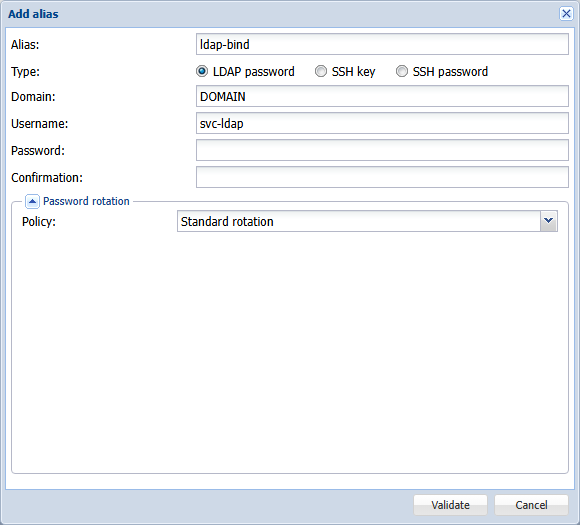
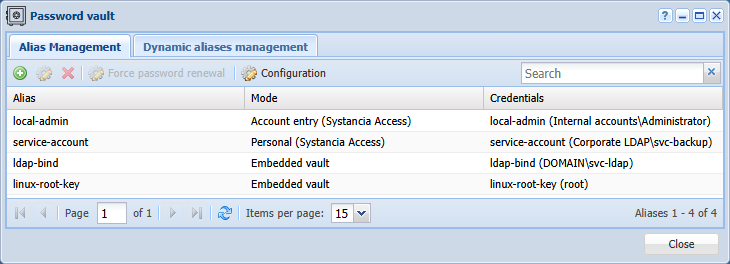
Alias types
The type is chosen at creation and determines the rest of the form.
- LDAP password: a domain account, with its domain and its password. This is the default type, the one used for RDS, RDP, VNC or Web access.
- SSH password: a Unix machine account, with no domain.
- SSH key: a private key deposited in the vault, with its passphrase if it has one. The Mediation Controllers can renew it, in RSA or ECDSA depending on the policy applied.
No domain for SSH types
The Domain field is disabled and emptied as soon as an SSH type is chosen, and it stays that way. An SSH account is local to its machine: filling the field would be meaningless, and the value would not be kept.
Attaching SSH aliases to applications
For both SSH types, the form presents two drag-and-drop lists holding the SSH and HTML5 (SSH) applications that have already been declared. Moving an application into the right-hand list has two simultaneous effects: the alias is attached to the application, and that application's SSO switches to Fixed.
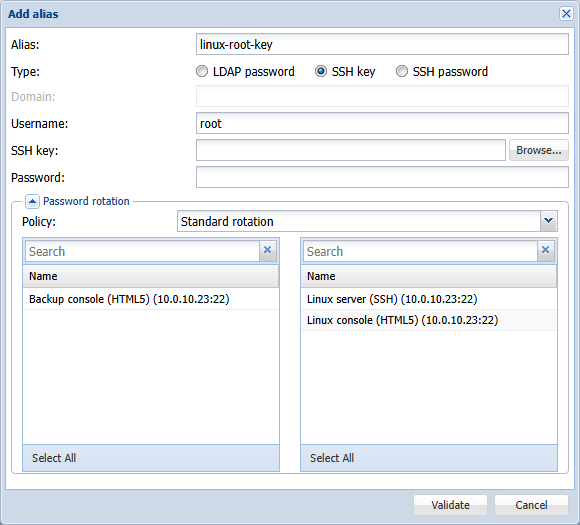
Creation order
The SSH applications must exist before the alias, otherwise the list is empty and there is nothing to attach. Conversely, removing an application from the right-hand list returns it to Enabled SSO as soon as no other alias serves it.
SSH key and standard SSH application
The pairing is checked on validation: if the selection contains a standard SSH application while the alias type is SSH key, saving is refused. A key can only be used with privileged SSH applications. The check happens only when saving, never while dragging.
Alias rotation policy
The form's Password rotation frame requires a
password policy, DefaultPolicy by default. The link is
exclusive: attaching an alias to a policy detaches it from the one it held, and any alias
that would end up with no policy is immediately placed back under DefaultPolicy. There is
therefore no alias without a rotation rule.
The same link is set from both sides: from the alias, one at a time, or from the policy, in bulk. Both screens act on the same relation.
Display of the current password
The Display current password button only appears when editing an existing alias, and only if the general options allow passwords to be displayed (Allow password display in alias). It stays inactive as long as the alias is not attached to an enabled policy.
Rotation after display
As the confirmation states, revealing the password creates an entry in the history of exposure and schedules its renewal at the end of the delay set in the general options. The display is a traced operation, and it invalidates the password shown.
While an exposure is still awaiting rotation, a further lookup of the same alias creates no second entry and does not push the deadline back.
Changes after creation
- The alias name becomes plain displayed text from the first save onwards.
- Changing an alias's user name or its type requires entering the password again, or uploading the key again: saving is refused otherwise. The stored secret belongs to one precise account/type pair, and does not follow a change of account.
Remote vault database
The Configuration button moves the storage of the secrets onto a remote database, PostgreSQL or Microsoft SQL Server, reached through the Edge Gateway of a site. It is not used to reach a third-party server (there is none). Without that configuration, the database is hosted on the Mediation Controllers.
The operation is a migration, not a mere change of address:
- the connection is tested first of all, and a failure is displayed inside the window;
- if the address, the port, the site or the local/remote mode have changed, the console asks for two decisions: create the new database, and transfer the existing data into it;
- the migration runs in the background, the grid stays masked while it lasts, and its outcome is announced at the end.
Transfer of existing data
The two checkboxes are independent and unticked: accepting the change of database without ticking the transfer leaves the existing aliases in the old database. The vault then opens on an empty list, and the applications that relied on those aliases stop working.
Successive migrations
A new request is refused while the previous one is still running. The console picks the ongoing operation back up when the module is reopened, and resumes tracking it.
Limits
- The alias type and name are frozen at creation.
- An SSH alias can only be attached to SSH or HTML5 (SSH) applications that are already declared, and an SSH key excludes standard SSH applications.
- No agent is involved: the Mediation Controllers do not discover accounts, nor the places where they are used. The vault only knows what was declared in it by hand.
- A displayed password is deemed compromised: its rotation is scheduled, and the exposure cannot be cancelled.
The detail of the fields (database configuration, creation and edition forms per type, password display) is in the module reference.