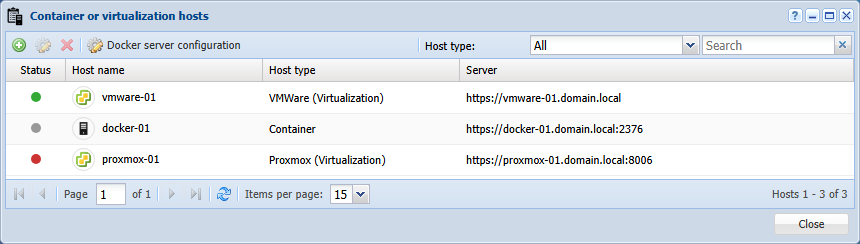
Container or virtualization hosts
A host is the execution platform CyberElements talks to in order to produce something on demand: a virtual machine cloned for a virtual desktop (privileged and standard), or a browser container for an Isolate (Web) application (privileged and standard).
This screen is the only place where those platforms are declared, and nothing else happens here: no machine and no container is ever created from it.
Availability
The module appears as soon as either of two features is enabled on the platform: virtual machine management or Isolate. They are independent of each other, and their activation is requested from CyberElements Support.
This results in an asymmetry: with Browser Isolation alone, this screen exists but the virtual machines screen does not: the latter depends on virtual machine management only.
Manager types
The Manager type field splits the screen in two and governs the whole of the rest of the form.
A virtualisation manager is a hypervisor: the platform connects to it to list machines, start them, clone them, destroy them. Two products are offered, VMWare and Proxmox.
A container manager is a Docker registry. It is not an execution machine: the platform runs nothing on it, it downloads an image from it. Running the container itself is entrusted to the Browser Isolation engine.
Docker registry and image templates
The Host field of an image template only offers hosts of that type, and what the platform draws from it are the credentials of where to fetch the image: URL, login, password.
As a consequence, with no container host declared, no image template can be created, hence no Isolate (Web) application.
Type expected by each consumer
| What needs a host | Expected type |
|---|---|
| A Virtual desktop application | virtualisation |
| The virtual machines screen | virtualisation |
| An image template, hence Isolate (Web) | container |
No screen mixes the two: each filters the list on the type it cares about, so a host of the wrong type appears nowhere, without explanation.
Implementation order
- Declare the host here, with its credentials.
- For a hypervisor, check the status dot in the list before going any further.
- Prepare on that host whatever the platform will clone (the reference machine of a virtual desktop) or, for a registry, publish the browser image on it.
- Create the object that relies on it: the Virtual desktop application, or the image template.
Console checks
Check on saving
When a VMWare host is created, the console connects and checks the version: if the connection fails or the host is not a supported version, the host is not created (it is even removed afterwards), and the message tells three causes apart: invalid credentials or insufficient permissions, unreachable host or invalid certificate, unsupported host. Editing runs the same check again.
A Proxmox host and a Docker registry are not tested on saving: a wrong address or a wrong password is stored without a message.
The status dot in the first column compensates for this absence of check. Every host is tested when the list loads, then every minute; the tooltip gives the reason for a failure. On a Docker registry that test is a plain call to the registry API: it measures reachability, and it does not validate the TLS certificate presented.
The name is unique: the console refuses a host whose name is already taken.
Nature of the host
Manager type and Host type become read-only as soon as the host exists. A host declared as VMWare never becomes a Proxmox host: it has to be deleted and created again, with everything that entails, see below.
Simultaneous clone creation
The host's Advanced parameters group carries the Maximum number of clones that can be created simultaneously (5 by default, at least 1). Beyond that, the clones requested for a virtual desktop remain Waiting to be cloned and are started as places become free.
Site attachment
A virtualisation host can be authenticated through a site, that is, reached through an Edge Gateway of that site rather than directly. The box is ticked by default, and it does not exist for a Docker registry.
Proxmox host without a site
Reaching the console of a Proxmox machine necessarily goes through a gateway attached to a site. On a Proxmox host detached from every site the button stays greyed out in the virtual machines screen and its tooltip says so. A VMWare host opens the console in both cases.
Host deletion
Cascade deletion
A host that holds the reference machine or clones of a Virtual desktop application cannot be deleted: the console refuses and names the applications to delete first.
Outside that case, the server does not look for what depends on a host: the image templates citing it are deleted along with it, in cascade and without a message, and the Isolate (Web) applications that relied on them then stop working. Take stock of those templates before removing the host.
The confirmation adapts to how many hosts are selected; deletion accepts a multiple selection, opening the properties does not.
Limits
- Three host types exist, and only three: VMWare, Proxmox and Docker registry.
- The nature of a host can no longer be changed after creation.
- The address is written without a protocol prefix for a hypervisor, and as a complete URL for a registry.
- The node only exists for Proxmox; the vCenter certificate authority and the separate one for ESXi servers only exist for VMWare.
- A certificate file must be base64 and weigh less than 20 KB.
- No button tests a host on demand: the test is automatic, and periodic.
The field-by-field detail is in the module reference.
The API endpoints that drive this object are described in the API reference: hypervisors and Docker registries.