Date condition
Availability of the condition
| Works without the client | Requires the client | Windows | macOS | Ubuntu |
|---|---|---|---|---|
The Date condition restricts access in time: a period, hours of the day, months, days of the week. It allows expressing "only during business hours" or "until the end of the assignment".
Criteria
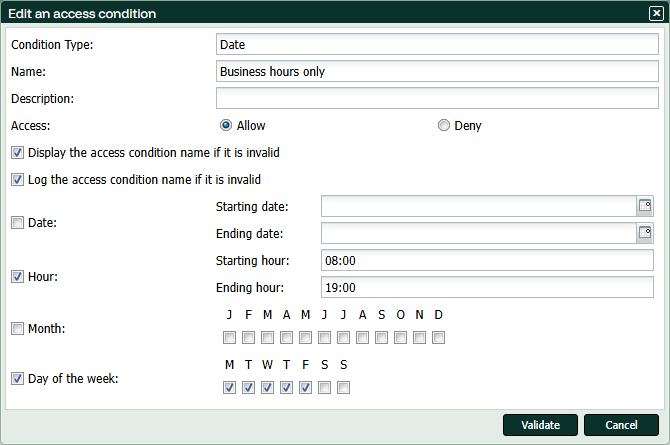
The condition has four criteria. At least one must be ticked, and the active criteria combine with AND: ticked together, they must all be satisfied at the same time.
- Date: a date range. The end cannot precede the start.
- Time: a time range. The end must follow the start, unless the condition spans several days.
- Month: twelve boxes, all ticked by default.
- Day of the week: seven boxes, all ticked by default.
Boxes ticked by default
Month and Day of the week are fully ticked at creation: enabling the criterion without unticking any box lets all users through. Restriction begins with the first unticked box: a criterion enabled and left complete filters nothing.
Session duration and temporary access
By default, this condition applies to the moment of connection: it does not limit the duration of a session already open, which depends on the expiry delay set on the domain. If the periodic check of conditions is enabled (see the evaluation timing), it is re-evaluated during the session like the others: the closing of the window then removes access to the contract's applications, or even closes the session if the platform is set to.
For temporary access granted to one person for one application, the workflow suits better: it carries a deadline of its own, without creating a configuration object that has to be deleted afterwards.
Limits
- The condition is evaluated against platform time, not the workstation's: for a user in another time zone, the window does not match their local time.
- Without periodic check, it is only evaluated at connection: a session opened before the window closes is not terminated when it does.
The details of the fields are in the module reference.