Managed accounts (CyberElements Access mode)
A managed account is a real account (local to one machine, or shared between several) whose password CyberElements Access takes charge of. Declaring it in this screen hands the account over to the mechanism: from then on, the agents change its secret according to the applicable policy, and pass it on to each of its usages.
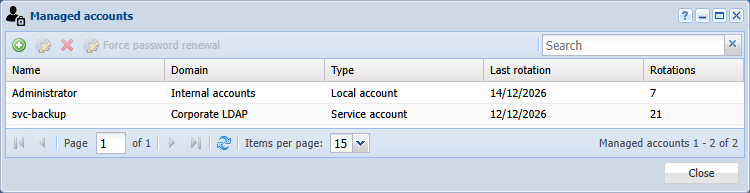
Creation in the CyberElements Access directory
Adding one does not create a local object: the console asks the CyberElements Access server to create the shared account, then fetches its record. An account declared here therefore exists on the server side, and deleting it from the console really deletes it there.
The initial password the form asks for is the account's current password, the one in force before it is taken over: it lets the agent open a first session in order to replace it. It is only asked for at creation.
Type of accounts created from the console
The form presents two radio buttons (Local account and Service account), but both are inactive, at creation as well as in edition, and the value sent is always Service account. A local account therefore only appears in this list if it was discovered by an agent, never if it was entered here. The grid's Type column shows the account's real origin.
Forced rotation
The Force password renewal action does not manufacture a new secret: it marks the account as due on the server side, and the last rotation date falls back to its default value. The actual change happens on the next pass of the agent responsible.
Account with no agent
The request is accepted without error even if no agent covers the account. The list will then show a last rotation date that never moves, with nothing else to report it. That is the first symptom of a missing, disabled or offline agent.
Display of the current password
The button only appears when editing an existing account, and only if the general options allow passwords to be displayed. As in Embedded mode, revealing it creates an entry in the history of exposure and schedules the rotation of the secret.
If no rotation has happened yet, the value shown reports an unknown password: the mechanism does not have a secret of its own yet.
Deletion of an account
The deletion is propagated to the CyberElements Access server, then the local data is removed. The account's usages disappear in cascade, and the applications that went through it revert to Enabled SSO: they no longer present an account, and ask the user for credentials.
Implementation order
- Access to the vault is configured and the server answers.
- The agents are installed on the machines carrying the account, and attached to a policy.
- The account is declared here, with its current password.
- Its usages come up on their own, and are set one by one.
- An alias in Password rotation mode makes the account usable by an application.
Limits
- An account's name and host are frozen at creation, and the type is editable in neither form: opening an account in edition is, in practice, only good for displaying its current password.
- The account form holds a usages section that is never displayed: usages are consulted and set in Managed accounts usages.
- The module cannot declare a local account: only agent discovery produces one.
- Every operation requires a reachable CyberElements Access server and a valid container for the configured service account.
The detail of the fields (columns, creation and edition forms, password display) is in the module reference.