Atskaites izveide, modificēšana un dzēšana
Atskaite tiek konfigurēta, izmantojot XML failu. Jādefinē:
- vaicājums CyberElements Identity datu bāzē, lai izgūtu vajadzīgo informāciju,
- katras parādāmās kolonnas rekvizīti XML formātā: objekta tips, nosaukums SQL datu bāzē, parādāmais nosaukums, parādīšanas indekss utt.
- diagrammu parādīšanas opcijas (joslu diagramma, sektoru diagramma, krāsaini punkti).
Noklikšķiniet uz pogas „New report“, lai izveidotu un konfigurētu jaunu atskaiti.
Atlasiet atskaiti un noklikšķiniet uz pogas „Modify“, lai modificētu tās konfigurāciju.
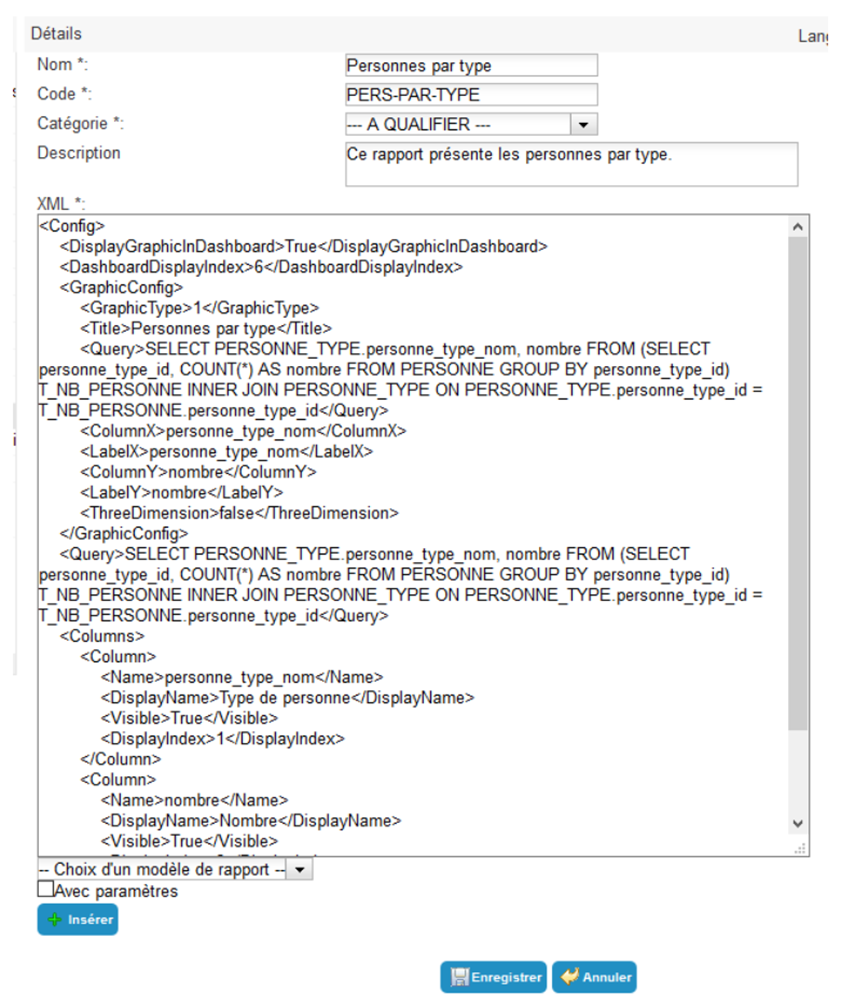
Atskaites rekvizīti
| Parametrs |
Apraksts |
Tipi un iespējamās vērtības |
| Name |
Atskaites parādāmais nosaukums. |
Rakstzīmju virkne. Obligāts. |
| Code |
Atbilst objekta ID. Tā vērtībai jābūt unikālai starp visām atskaitēm. |
Rakstzīmju virkne , bez atstarpēm un speciālajām rakstzīmēm. Obligāts |
| Category |
Atskaišu kategorija, kurā tiks parādīts atskaišu saraksts. |
Iepriekš definētu kategoriju saraksts. |
| Description |
|
Rakstzīmju virkne. |
| XML |
XML tagi, kas apraksta SQL vaicājumu Hpliance datu bāzē, katras atskaites kolonnas rekvizītus un grafisko elementu rekvizītus. |
Teksts XML formātā. |
| Choice of report template |
Atskaites grafiskā veidne (papildus datu tabulai). |
Without chart, Histogram, Stacked histogram, Pie chart vai Color ball by threshold. |
| With parameters |
Ļauj pievienot lietotāja ievadītus mainīgos. XML failam būs jāpievieno tags . |
Izvēles rūtiņa. |
Vienkāršas atskaites XML rakstīšana
 1
 2
 3
 4
 5
 6
 7
 8
 9
10
11
12
13
14
15
16
17
18
19
20
21
22
23
24
25
26
27
28
29
30
31
32
33
34
35
36
37
38
39
40
41
42
43
44
45
46
47
48
49
50
51
52
53
54
55
56
57 | <Config>
<!-- If there is a chart, indicate whether to display the chart on the dashboard -->
<DisplayGraphicInDashboard>true</DisplayGraphicInDashboard>
<!-- If there is a chart, indicate the chart display index on the dashboard -->
<DashboardDisplayIndex>0</DashboardDisplayIndex>
<!-- Indicates whether data is displayed as soon as the report page is accessed -->
<DirectDisplay>true</DirectDisplay>
<!-- The SQL query used to retrieve the data to be displayed -->
<Query></Query>
<!-- Definition of the list of columns available to the user. -->
<!-- The visibility and display index of the column can be configured by the user when viewing the report. -->
<Columns>
<!-- Definition of a column (to be duplicated as many times as necessary) -->
<Column>
<!-- The Object Type -->
<ObjectType></ObjectType>
<!-- Name of the column containing the IDs -->
<Column_Link_Id></Column_Link_Id>
<!-- The name of the field as defined in the query. -->
<Name></Name>
<!-- The default name to display to the user. -->
<DisplayName></DisplayName>
<!-- Indicates whether this column is visible by default. TRUE or FALSE -->
<Visible></Visible>
<!-- The default display index. -->
<DisplayIndex></DisplayIndex>
</Column>
</Columns>
</Config>
|
Piemērs: lietotāju bez tālruņa numura saraksts
 1
 2
 3
 4
 5
 6
 7
 8
 9
10
11
12
13
14
15
16
17
18
19
20
21
22
23
24
25
26
27
28
29
30
31
32
33
34
35
36
37
38
39
40
41
42
43
44
45
46
47
48
49
50
51
52
53
54
55
56
57
58
59
60
61
62
63
64
65
66
67 | <Config>
<DisplayGraphicInDashboard>true</DisplayGraphicInDashboard>
<DashboardDisplayIndex>0</DashboardDisplayIndex>
<DirectDisplay>true</DirectDisplay>
<Query>
SELECT personne_uid,personne_display_name FROM PERSONNE
WHERE personne_id NOT IN(SELECT personne_id FROM PERSONNE_MULTIVALUED WHERE personne_schema_attribut_id = 7)
AND personne_hidden=0
</Query>
<Columns>
<Column>
<ObjectType/>
<Column_Link_Id/>
<Name/>
<DisplayName/>
<Visible/>
<DisplayIndex/>
</Column>
<Column>
<ObjectType/>
<Column_Link_Id/>
<Name>personne_uid</Name>
<DisplayName>UID</DisplayName>
<Visible>TRUE</Visible>
<DisplayIndex>1</DisplayIndex>
</Column>
<Column>
<Name>personne_display_name</Name>
<DisplayName>Nom</DisplayName>
<Visible>TRUE</Visible>
<DisplayIndex>2</DisplayIndex>
</Column>
</Columns>
</Config>
|
XML tagi, kas apraksta atskaites kolonnas
| XML tags |
Definīcija |
Iespējamās vērtības |
| Name |
Lauka nosaukums, kā tas definēts SQL vaicājumā. |
Rakstzīmju virkne. |
| Column_Link_Id |
Tiek izmantots, lai izveidotu kolonnas ar noklikšķināmiem datiem. Atbilst tās kolonnas nosaukumam, kurā ir saites pārvaldībai izmantotais ID. |
Rakstzīmju virkne. Neobligāts |
| ObjectType |
Noklikšķināmās saites mērķa objekta tips (Identity, struktūra). |
Identity = 1 => novirzīšana uz lapu userDetails.aspx |
|
|
Structure = 2 => novirzīšana uz lapu structure.aspx |
|
|
Neobligāts |
| DisplayName |
Kolonnas nosaukums, kas tiks parādīts saskarnē. |
Rakstzīmju virkne. |
| Visible |
Norāda, vai kolonna tiek rādīta vai paslēpta. |
'TRUE' vai 'FALSE' |
| DisplayIndex |
Kolonnas indekss (parādīšanas secība). |
Vesels skaitlis, kas lielāks par 0 |
Atzīmējiet izvēles rūtiņu „With parameters“ un pievienojiet XML failam šādus tagus:
 1
 2
 3
 4
 5
 6
 7
 8
 9
10
11
12
13
14
15
16
17
18
19
20
21
22
23
24
25
26
27
28
29
30
31 | <!-- Definition of the list of parameters expected by the report request. -->
<Parameters>
<!-- Definition of a parameter (to be duplicated as many times as necessary) -->
<Parameter>
<!-- The name of the variable as defined in the query. -->
<Variable></Variable>
<!-- The label to display to the user. -->
<Label></Label>
<!-- An integer indicating the expected data type (see documentation for possible values) -->
<DataType></DataType>
<!-- Indicates whether the user must specify a value of ‘TRUE’ or ‘FALSE’ -->
<Mandatory></Mandatory>
<!-- For optional parameters, the default value to be used if not entered by the user. -->
<DefaultValue></DefaultValue>
</Parameter>
</Parameters>
|
Piemērs: atļaujas, kuru derīgums drīz beigsies
 1
 2
 3
 4
 5
 6
 7
 8
 9
10
11
12
13
14
15
16
17
18
19
20
21
22
23
24
25
26
27
28
29 | <Query>DECLARE @DateNow AS DATETIME; SELECT @DateNow = GETDATE(); SELECT * FROM vHABILITATIONS_FULL WHERE (date_debut_lien IS NULL OR @DateNow > date_debut_lien) AND date_fin_lien IS NOT NULL AND ((0 = @ApplicationId) OR (application_id = @ApplicationId)) AND DATEADD(dd, @NbJours, @DateNow) > date_fin_lien ORDER BY date_fin_lien ASC</Query>
<Parameters>
<Parameter>
<Variable>ApplicationId</Variable>
<DataType>4</DataType>
<Mandatory>TRUE</Mandatory>
<Label>Selectionnez l'application</Label>
</Parameter>
<Parameter>
<Variable>NbJours</Variable>
<DataType>23</DataType>
<Mandatory>TRUE</Mandatory>
<Label>Sélectionnez le nombre de jour</Label>
</Parameter>
</Parameters>
|
XML tagi elementā <Parameter>, kas apraksta parametrus, kurus var ievadīt lietotājs:
| XML tags |
Definīcija |
Iespējamās vērtības |
| Variable |
SQL vaicājumā izmantotā mainīgā nosaukums (bez @). |
Rakstzīmju virkne. |
| Data Type |
Parametram atbilstošais CyberElements Identity objekta tips. Ja tas nav pamata objekta tips (datums, virkne, vesels skaitlis utt.), parametrs būs nolaižamais saraksts ar iespējamajām vērtībām. |
Structure=2; Authorization Rule=3; Application=4; Repository=5; Right=8; StructureType=11; Tree=12; AdminProfile=18; PersonType=19; String=22; Integer=23; Boolean=24; Date=25. |
| Label |
Etiķete, kas tiks parādīta lietotājam. |
Rakstzīmju virkne. |
| AttributeCode |
PSA atribūta kods. |
Rakstzīmju virkne, kas atbilst PSA kodam. |
| Mandatory |
Norāda, vai lietotājam ir obligāti jānorāda vērtība. |
'TRUE' vai 'FALSE |
| DefaultValue |
Neobligātiem parametriem — noklusējuma vērtība, kas tiek ievietota, ja lietotājs neko neievada. |
Rakstzīmju virkne. |
Diagrammu parametru definēšana
Nolaižamajā sarakstā atlasiet grafisko veidni un pievienojiet XML failam šādus tagus:
 1
 2
 3
 4
 5
 6
 7
 8
 9
10
11
12
13
14
15
16
17
18
19
20
21
22
23
24
25
26
27
28
29
30
31
32
33
34
35 | <GraphicConfig>
<!-- The type of graph (1=Histogram, 2=Stacked histogram, 3=Pie chart, 4=Colored ball per threshold -->
<GraphicType>1</GraphicType>
<!-- Graph title (if not specified, the report name will be used -->
<Title></Title>
<!-- The query to use to retrieve the data that will be used to generate the graph -->
<Query></Query>
<!-- The name of the query field that will serve as the x-axis -->
<ColumnX></ColumnX>
<!-- The name of the query field that will serve as the y-axis -->
<ColumnY></ColumnY>
<!-- The label of the x-axis -->
<LabelX>Label of column X</LabelX>
<!-- The label of the y-axis -->
<LabelY>Label of column Y</LabelY>
<!-- Indicates whether the graph is in 3 dimensions -->
<ThreeDimension>false</ThreeDimension>
</GraphicConfig>
|
Stacked histogram
Ievietojiet tagā šādus tagus:
 1
 2
 3
 4
 5
 6
 7
 8
 9
10
11
12
13
14
15
16
17
18
19
20
21
22
23
24
25
26
27
28
29
30
31 | <!-- 0 = each compiled block corresponds to a column of data (default value) -->
<!-- 1 = each compiled block corresponds to a grouping of data from a single column of data -->
<StackColumnMode></StackColumnMode>
<!-- Definition of the list of columns to stack. -->
<StackedColumns>
<!-- Definition of a column (to be duplicated as many times as necessary) -->
<StackedColumn>
<!-- StackColumnMode = 0: The name of the field that contains the data as defined in the query. -->
<!-- StackColumnMode = 1: The name of the field that allows you to create stackable blocks. (YColumn contains the data) -->
<DataField></DataField>
<!-- The name to display to the user. -->
<DisplayName></DisplayName>
<!-- Defines the color of the stacked block (HTML code or color name) -->
<Color></Color>
</StackedColumn>
</StackedColumns>
|
Krāsains aplis pēc sliekšņa
Ievietojiet tagā šādus tagus:
 1
 2
 3
 4
 5
 6
 7
 8
 9
10
11
12
13
14
15
16
17
18
19
20
21
22
23 | <!-- Definition of thresholds -->
<Intervals>
<!-- Definition of a threshold (to be duplicated as many times as necessary) -->
<Interval>
<!-- Minimum threshold included -->
<Min></Min>
<!-- Maximum threshold excluded -->
<Max></Max>
<!-- Color of the ball for the defined threshold (HTML code or color name) -->
<Color></Color>
</Interval>
</Intervals>
|
Atskaites kolonnu nosaukumu tulkošana
Atskaites rezultātos iekļautās kolonnas un vērtības var tulkot vairākās valodās.
Tālāk ir sniegts atskaites piemērs, kurā kolonnas ir iztulkotas:
 1
 2
 3
 4
 5
 6
 7
 8
 9
10
11
12
13
14
15
16
17
18
19
20
21
22
23
24
25
26
27
28
29
30
31
32
33
34
35
36
37
38
39
40
41
42
43
44
45
46
47
48
49
50
51
52
53
54
55
56
57
58
59
60
61
62
63
64
65
66
67
68
69
70
71
72
73
74
75
76
77
78
79
80
81
82
83
84
85
86
87 | <Config>
<DisplayGraphicInDashboard>True</DisplayGraphicInDashboard>
<DashboardDisplayIndex>5</DashboardDisplayIndex>
<GraphicConfig>
<GraphicType>1</GraphicType>
<Title>Nombre de personnes par application et type de compte</Title>
<Query>SELECT APPLICATION.application_nom + ' - ' + compte_type_nom as Administrateur, T_PERSONNE_APPLICATION_GROUPED.total FROM (SELECT application_id, compte_type_id, COUNT(*) AS total FROM (SELECT DISTINCT personne_id, vPERSONNE_COMPTE_DROIT.application_id, compte_type_id FROM vPERSONNE_COMPTE_DROIT INNER JOIN DROIT ON DROIT.droit_id = vPERSONNE_COMPTE_DROIT.droit_id) T_PERSONNE_APPLICATION GROUP BY application_id, compte_type_id) T_PERSONNE_APPLICATION_GROUPED INNER JOIN APPLICATION ON APPLICATION.application_id = T_PERSONNE_APPLICATION_GROUPED.application_id INNER JOIN COMPTE_TYPE ON COMPTE_TYPE.compte_type_id = T_PERSONNE_APPLICATION_GROUPED.compte_type_id ORDER BY total DESC</Query>
<ColumnX>Administrateur</ColumnX>
<LabelX>Nom de l'administrateur</LabelX>
<ColumnY>total</ColumnY>
<LabelY>Nombre de compte</LabelY>
<ThreeDimension>false</ThreeDimension>
</GraphicConfig>
<Query>SELECT APPLICATION.application_culture, APPLICATION.application_nom, compte_type.compte_type_nom, compte_type.compte_type_culture, T_PERSONNE_APPLICATION_GROUPED.total FROM (SELECT application_id, compte_type_id, COUNT(*) AS total FROM (SELECT DISTINCT personne_id, vPERSONNE_COMPTE_DROIT.application_id,
compte_type_id FROM vPERSONNE_COMPTE_DROIT INNER JOIN DROIT ON DROIT.droit_id = vPERSONNE_COMPTE_DROIT.droit_id) T_PERSONNE_APPLICATION GROUP BY application_id, compte_type_id) T_PERSONNE_APPLICATION_GROUPED INNER JOIN APPLICATION ON APPLICATION.application_id = T_PERSONNE_APPLICATION_GROUPED.application_id INNER JOIN COMPTE_TYPE ON COMPTE_TYPE.compte_type_id = T_PERSONNE_APPLICATION_GROUPED.compte_type_id ORDER BY total DESC</Query>
<Columns>
<Column>
<Name>application_nom</Name>
<DisplayName>Application</DisplayName>
<Visible>True</Visible>
<DisplayIndex>1</DisplayIndex>
<Internationaldisplayname Lang="FR">Application_FR</internationaldisplayname>
<Internationaldisplayname Lang="EN">Application_EN</internationaldisplayname>
<CultureColumnName Prop="Name">application_culture</CultureColumnName>
</Column>
<Column>
<Name>compte_type_nom</Name>
<DisplayName>Compte type</DisplayName>
<Visible>True</Visible>
<DisplayIndex>2</DisplayIndex>
<Internationaldisplayname Lang="FR">Compte type</internationaldisplayname>
<Internationaldisplayname Lang="EN">Account type</internationaldisplayname>
<CultureColumnName Prop="Name">compte_type_culture</CultureColumnName>
</Column>
<Column>
<Name>total</Name>
<DisplayName>Nombre</DisplayName>
<Visible>True</Visible>
<DisplayIndex>3</DisplayIndex>
<internationaldisplayname Lang="FR">Nombre</internationaldisplayname>
<internationaldisplayname Lang="EN">Number</internationaldisplayname>
</Column>
</Columns>
</Config>
|
XML tags
- Internationaldisplayname:
- Definīcija: tags, ko izmanto, lai tulkotu atskaites atgriezto kolonnu nosaukumus. Šim tagam jābūt tik reižu, cik valodu ir konfigurēts risinājumā CyberElements Identity.
- Atribūts: Lang=„<\language_code>“, kur <\language_code> ir valodas kods, kas definēts valodas iestatījumos cilnē General > Application Settings.
- Iespējamā vērtība: rakstzīmju virkne. Kolonnas nosaukums, kas atskaitē tiek parādīts attiecīgajā valodā.
- CultureColumnName:
- Definīcija: kultūras XML definīcija, ko izmanto, lai tulkotu atskaites ģenerētās tabulas saturu.
- Atribūts: Prop=„<\XML_Attribute>“, kur <\XML_Attribute> ir XML rekvizīta atribūts, kas atbilst dažādajām kolonnas vērtībām.
- Iespējamā vērtība: rakstzīmju virkne. SQL vaicājuma kultūras kolonna.
Atskaites parādīšana atkarībā no lietotāja konteksta
Hpliance versijā 4000 atskaitei var pievienot neredzamu parametru, kas tiks definēts atkarībā no personas, kura palaiž atskaiti. Atskaites vērtības tiks parādītas atkarībā no lietotāja atribūta vērtībām. Piemēram, persona redzēs tikai savas organizācijas rezultātus.
Atskaites piemērs: uzskaitīt visas atļaujas, kas piešķirtas noteiktas struktūras identitātēm. Parādīt uzvārdus, vārdus, atļaujas un lietojumprogrammas visām identitātēm, kuru struktūras atribūts „Responsibility“ atbilst pierakstījušās lietotāja struktūras atribūtam.
  1
  2
  3
  4
  5
  6
  7
  8
  9
 10
 11
 12
 13
 14
 15
 16
 17
 18
 19
 20
 21
 22
 23
 24
 25
 26
 27
 28
 29
 30
 31
 32
 33
 34
 35
 36
 37
 38
 39
 40
 41
 42
 43
 44
 45
 46
 47
 48
 49
 50
 51
 52
 53
 54
 55
 56
 57
 58
 59
 60
 61
 62
 63
 64
 65
 66
 67
 68
 69
 70
 71
 72
 73
 74
 75
 76
 77
 78
 79
 80
 81
 82
 83
 84
 85
 86
 87
 88
 89
 90
 91
 92
 93
 94
 95
 96
 97
 98
 99
100
101
102
103
104
105
106
107
108
109 | <Config>
<DirectDisplay>true</DirectDisplay>
<Query>select P.personne_id,P.personne_nom, P.personne_prenom, D.droit_nom, A.application_nom
from vHABILITATIONS_ALL AS VHA
inner join LIEN_PERSONNE_STRUCTURE AS LPS ON LPS.personne_id = VHA.personne_id
inner join DROIT AS D ON D.droit_id = VHA.droit_id
inner join PERSONNE AS P ON P.personne_id = VHA.personne_id
inner join APPLICATION AS A ON A.application_id = D.application_id
where structure_id in
(select * from dbo.fctSplitString(dbo.fctGetAttributeValueByPersonneIdAndPersonneSchemaAttributCode(@personneId, 'responsabilite'), '|'))
</Query>
<Columns>
<Column>
<Name>personne_id</Name>
<DisplayName>ID</DisplayName>
<Visible>False</Visible>
<DisplayIndex>1</DisplayIndex>
</Column>
<Column>
<Name>personne_nom</Name>
<DisplayName>Nom</DisplayName>
<Visible>True</Visible>
<DisplayIndex>2</DisplayIndex>
<ObjectType>1</ObjectType>
<Column_Link_Id>personne_id</Column_Link_Id>
</Column>
<Column>
<Name>personne_prenom</Name>
<DisplayName>Prénom</DisplayName>
<Visible>True</Visible>
<DisplayIndex>2</DisplayIndex>
<ObjectType>1</ObjectType>
<Column_Link_Id>personne_id</Column_Link_Id>
</Column>
<Column>
<Name>droit_nom</Name>
<DisplayName>Droit</DisplayName>
<Visible>True</Visible>
<DisplayIndex>3</DisplayIndex>
</Column>
<Column>
<Name>application_nom</Name>
<DisplayName>Application</DisplayName>
<Visible>True</Visible>
<DisplayIndex>4</DisplayIndex>
</Column>
</Columns>
<Parameters>
<Parameter>
<Variable>personneId</Variable>
<AttributUserConnected>True</AttributUserConnected>
<AttributeCode>personne_id</AttributeCode>
</Parameter>
</Parameters>
</Config>
|
XML tagi, kas apraksta parametrus, pamatojoties uz lietotāja kontekstu.
- Variable:
- Definīcija: SQL vaicājumā izmantotā mainīgā nosaukums (bez @).
- Iespējamā vērtība: rakstzīmju virkne.
- AttributUserConnected:
- Definīcija: norāda, vai parametrs tiek definēts, pamatojoties uz pašreizējā lietotāja kontekstu, vai arī tas jāievada manuāli saskarnē.
- Iespējamā vērtība:
- True: lietotāja konteksts
- False: manuāla ievade
- AttributeCode:
- Definīcija: PSA atribūta kods.
- Iespējamā vērtība: rakstzīmju virkne, kas atbilst PSA kodam.