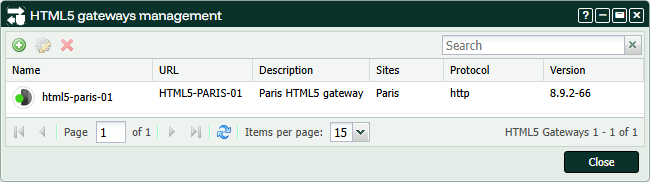
HTML5 gateways management
An HTML5 Gateway serves the accesses that take place entirely in the browser: the HTML5 (RDP), HTML5 (SSH) and HTML5 (VNC) applications. The Mediation Controller publishes it under a path of its own, and it exchanges with the platform over HTTP or WebSocket.
Like an Edge Gateway, it only serves once attached to a site, and that attachment is done from Sites management.
Relationship with the Edge Gateway
An HTML5 Gateway does not replace an Edge Gateway: it comes in addition to one.
An HTML5 application calls on both at launch: an Edge Gateway of the site, which reaches the target machine, and an HTML5 Gateway of the same site, which renders the session in the browser.
Where the HTML5 Gateway is placed
The HTML5 Gateway does not need to be placed in the resources network: it never reaches the target machine itself, the Edge Gateway of the site does. Only the Edge Gateway needs to reach the resources.
Site with no active HTML5 Gateway
A site with no active HTML5 Gateway serves no HTML5 application. It may be available for everything else: its HTML5 applications are simply not offered to the user. The portal does not explain their disappearance, and the administration console does not tell an available site from a site available "except for HTML5".
An HTML5 Gateway does not record anything either: its form carries neither a recording certificate nor an archive path. Recording a session, when it is requested, is handled by the Edge Gateway.
URL and protocol
The URL is mandatory. It is not a full address but the path under which the Mediation
Controller publishes the HTML5 Gateway, that is, the element that follows the / of the
address (for example HTML5-PARIS-01). That path is declared by CyberElements in the
configuration of the Mediation Controller. The console neither derives it nor checks it: the
value entered must be the one declared on the platform.
The exchange protocol is either HTTP or WebSocket, and it has to match what the gateway actually exposes.
Pairing
The mechanism is the Edge Gateway one: a Create a pairing token box reveals the section, the
gateway certificate is uploaded, and the resulting token is entered at install time. The
expected CN of the certificate is <gateway name>@<organization>.
As with an Edge Gateway, the token is consumed on the first successful connection: the gateway then moves from awaiting pairing to online, and the Authentication Token field stops being displayed.
Token settings and certificate
Pairing key validity period and IP authorized to use the token stay inactive until
a certificate file matching the chosen format has been supplied. A .pem picked while the
announced format is pkcs12 therefore leaves them greyed out.
On an already paired gateway, those two fields do not reopen: they can only be changed while it is awaiting pairing.
HTML5 Gateway deletion
Only the attachment to a site prevents deletion: the gateway must first be switched to UNUSED there. Unlike Edge Gateways, no other configuration holds it back.
Availability
The module only exists if the tenant allows HTML5 connections. That setting is held by the tenant, is made by CyberElements, and is off by default.
Without it, the HTML5 Gateways tab of Sites management and the matching column of its list disappear as well.
Limits
- No passive mode: an HTML5 Gateway is ACTIVE or UNUSED within a site. Several active gateways share the load, with no backup.
- No session recording.
- The name follows the same rule as an Edge Gateway one: 50 characters at most, unaccented letters, digits, hyphen, dot and underscore.
The field-level detail is described in the module reference.
The API endpoints that drive this object are described in the API reference.