Categories
A category files applications. It has two uses: it organises what the user sees in their portal, and it allows a group of applications to be designated in bulk wherever the console asks for a selection.
The second use is the most important for administration. An access policy that targets a category grants access to every application it contains, including those that will enter it later.
Assignment by category
Without categories, every object that assigns applications has to list them one by one, and each new application means going back through all of those objects. With a category, the filing is declared once, and the applications that enter it inherit whatever targets the category.
The following objects accept either a category or an application, indifferently:
- access policies, to grant access;
- notification profiles;
- assistance profiles;
- workflows;
- executable authorisation contracts;
- direct access contracts, SSH and RDP alike.
Filing and rights
Adding an application to a category opens it immediately to everyone whose contract targets that category. Filing therefore determines rights: two applications that would not be granted to the same people do not belong in the same category, however alike they look.
Default category
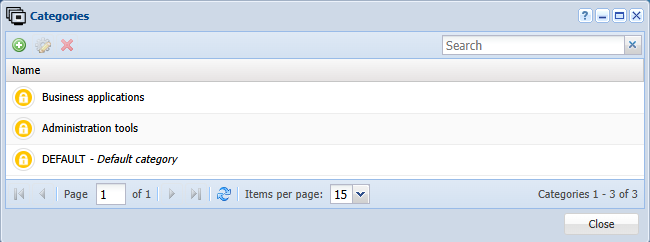
The Selected by default checkbox designates the category offered when an application is created. It is exclusive: ticking it on one category unticks it on whichever category held it, without confirmation. The list marks the category concerned with "Default category".
Reserved categories
DEFAULT category
The category shipped with the platform is called DEFAULT in the database and appears
under a translated name: DEFAULT in English, DEFAUT in French. Its name field is
disabled on opening, and the delete button stays greyed out while it is
selected. It is the fallback filing, which exists so that no application is ever left without
a category.
Workplace category
A Workplace category is reserved for the Workplace association. It is excluded from
the module's list (neither visible nor editable) and both names Workplace and
DEFAULT are rejected on input, with the message "Invalid Name".
Names are unique: reusing an existing one is refused with "This category already exists."
Deleting a category
Deleting a category involves two points, in this order.
Use of the category. Three objects block deletion: an access policy, an assistance profile or a notification profile that cites it. The console says so before starting, naming the categories concerned, then carries on with the others if the selection held several.
Scope of the upfront warning
The calculation that greys out the operation, and that feeds the warning, only takes the access policy and the notification profile into account. A category cited solely by an assistance profile therefore looks deletable: the refusal comes only at execution time. A deletion that has no effect and no apparent explanation can be explained by this case.
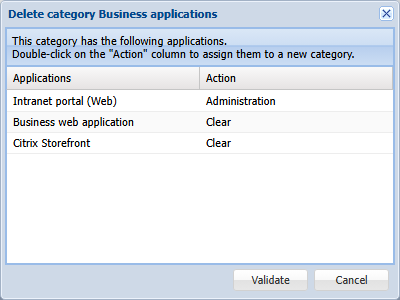
Applications it holds. If the category is not empty, a window lists its applications and asks, for each one, what to do with it. A double-click in the action column allows another category to be picked.
Clear option
In that same list of choices, Clear (Effacer in French) does not remove the application
from the category: it deletes the application. The label does not say so, and the
operation is final.
If one of the destination categories has disappeared in the meantime, the processing fails and the category is not deleted: the console reports it by name.
Limits
- An application's category is unique: an application is filed in one place only, there is no multiple filing and no sub-category.
DEFAULTcan be neither renamed nor deleted;Workplaceis not visible.- Deleting a category is not a filing operation: it requires handling each of its applications, and deleting them is one of the choices offered.
- The list sorts by name only, and the search covers the name only.
The details of the fields and screens are in the module reference.
The API endpoints that drive this object are described in the API reference.