Event logs
The Logs screen of the administration console is the timestamped history of the events observed by the platform: sign-ins, launches, and creations, modifications and deletions in the configuration. It serves for an audit, for analysing an incident, or for identifying the author and date of an action.
It records and does not watch: it is a history queried after the fact, whereas the Control center shows what is happening in real time.
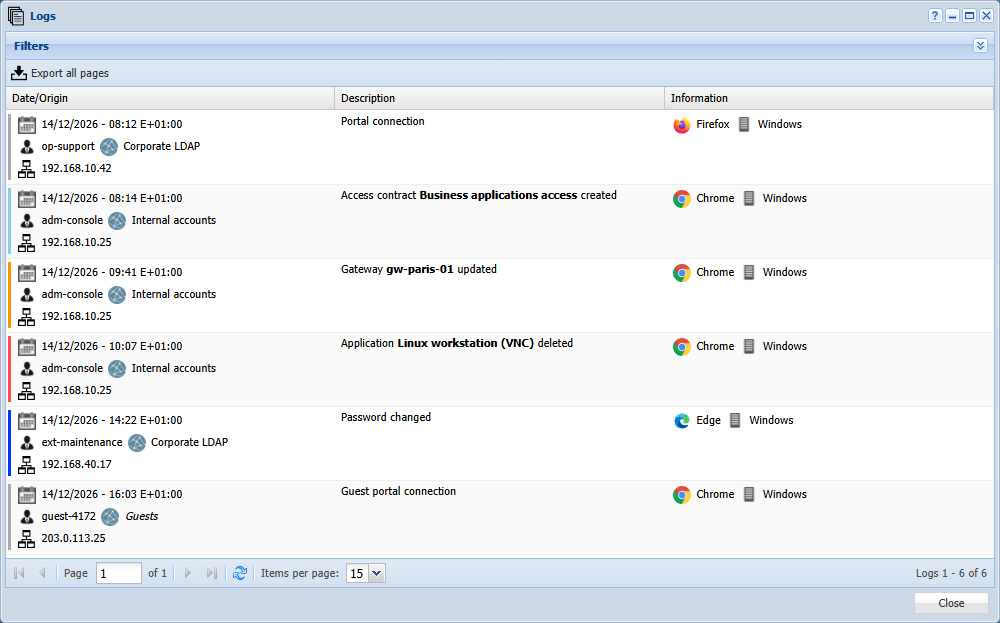
Log content
The log groups four families of events, of different origins:
- administration actions: adding, modifying or deleting a configuration object, whichever screen it came from;
- session actions carried out from the Control center: closing, pausing, resuming, and taking over a session as an operator;
- usage events: console and user portal sign-ins, launches and closures of applications and of direct access sessions, actions on passwords, password rotation failures, help requests and answers;
- infrastructure events: Edge Gateways, HTML5 Gateways and the CyberElements client connecting and disconnecting.
Events not logged
The log holds neither the content of sessions (the purpose of recordings, in Archives) nor the events raised by alert rules, which have their own history under Alerts. A session appears there through its two messages only, launch and closure.
These events can also be sent to a syslog server: their text, as the server receives it, is given in Tenant events.
Message composition
The platform does not store the text of an event: it stores an identifier and its values, and the console composes the sentence when it displays it, in the language of the administrator viewing it. As a result:
- two administrators, one in French, one in English, each read the same event in their own language: the log has no language of its own;
- the keyword search works on the sentence as rendered in the current language: a French keyword finds nothing in a console displayed in English;
- the exported file is written in the language of the administrator who exports it. Two exports of the same interval may therefore not be comparable word for word.
Search modes
The filter panel offers four mutually exclusive modes: acting on the fields of one disarms the others. "Administration actions" and "usage events" therefore cannot be crossed in a single search: two searches are required.
In the two checkbox modes, ticking nothing amounts to keeping everything in that mode, never to keeping nothing. Ticking a single box therefore narrows the search, and does not widen it.
Scope of the keyword search
The keyword search is not limited to the event label: it also covers the user, their domain, the client workstation IP address, the browser, the operating system and the values attached to the event, for instance a gateway name and version. It is the only mode that can retrieve every trace of a given IP address or workstation, whatever the event type.
The Date checkbox is not a mode: it brackets whichever mode is selected. Both bounds are inclusive, and neither can go past the current day.
Export
The export button produces a CSV file that reflects the current filters, not the displayed page: whatever was narrowed on screen is narrowed in the file too.
Capped export
The number of exported rows is limited by a platform setting: 10,000 rows until it is raised, which is done on the server and not from the console. Beyond that the file stops, with no message and no warning row: nothing distinguishes a complete export from a truncated one. On a large log, exporting over successive date intervals is the only way to guarantee a complete export.
Variable columns
Three columns (a gateway's name, version and address) are only added when the exported batch holds at least one gateway or client event. Any automated processing of that file must therefore rely on the header row, never on column position.
Limits
- The screen deletes nothing: purging is done from Log data cleanup, and nothing expires as long as no cleanup is scheduled.
- Search modes do not combine with one another; only the date bracket adds to the selected mode.
- No automatic sending from this screen. Producing a log periodically and sending it by email belongs to Automatic logs, which carries only part of the events: portal sign-ins, application launches and direct session launches.
The detail of the columns, the colour code, each filter and the structure of the exported file is described in the module reference.