Supervision des Mediation Controller
Attention
Cette section est spécifique aux infrastructures CyberElements Bastion.
Depuis le menu « Statistiques serveur » de la console « System » :
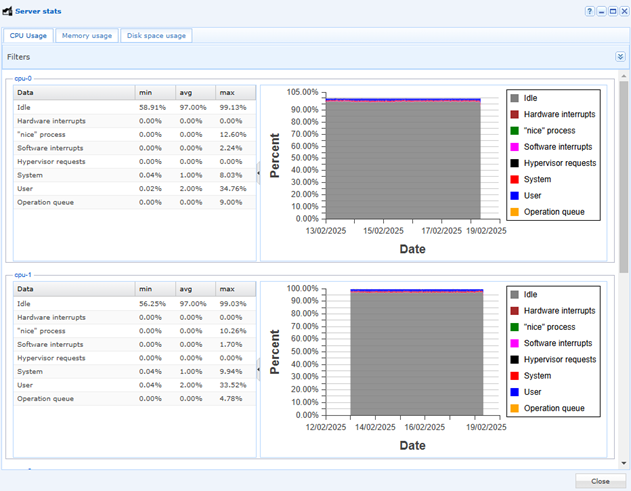
Le tableau de bord permet d’obtenir des informations sur la consommation CPU, RAM et espace disque des serveurs Mediation Controller :
Ci-dessous, la liste des services pouvant être supervisés :
| Service | Description | Commentaire |
|---|---|---|
| apache2 | The Apache HTTP Server | Serveur HTTP de la console d’administration et du portail utilisateur |
| cleanroom-vault | Cleanroom Vault Alias rotation | Rotation automatique des mots de passe du coffre-fort |
| cleanroom-xmlrpc-api | CleanroomGatewaysMngmt | API interne de gestion des Edge Gateway, des HTML5 Gateway et des organisations, utilisée par la console d’administration |
| collectd | Statistics collection and monitoring daemon | Collecte des statistiques système — prérequis de l’installation |
| cron | Regular background program processing daemon | Exécution des tâches planifiées |
| gate-xmlrpc-api | GateApiXmlrpc | API interne de gestion des jetons d’appairage et des certificats des Edge Gateway, utilisée par la console d’administration |
| getty@tty1.service | Getty on tty1 | Ouverture de session sur la console locale du serveur |
| ipdiva | LSB: Start IPdiva services | Démarrage de l’ensemble des services du Mediation Controller, dont le routeur SSL |
| ipdiva-hostmanager | IPdiva Hostmanager Service | Pilotage à distance de la configuration du serveur (réseau, paramètres système) |
| ipdiva-logger | IPdiva Logger Service | Collecte des journaux des différents composants du produit |
| ipdivasafe-emails | IpdivaSafeEmails | Envoi des notifications et des rapports par e-mail |
| ipdivasafe-tasks | IpdivaSafeTasks | Exécution des tâches de fond (rapports) |
| networking | Raise network interfaces | Configuration des interfaces réseau |
| ntpsec.service | Network Time Service | Synchronisation de l’heure, dont dépend l’horodatage des journaux |
| postgresql | PostgreSQL RDBMS | Service parent des instances PostgreSQL : il ne fait rien lui-même, l’instance est postgresql@15-main |
| postgresql@15-main | PostgreSQL Cluster 15-main | Base de données contenant la configuration et la journalisation du produit (architecture standalone) ou la journalisation du socle technique de base (architecture cluster) |
| rsyslog | System Logging Service | Journalisation système (/var/log/syslog et journaux du produit) |
| snmpd | Simple Network Management Protocol (SNMP) Daemon. | Agent SNMP, pour une supervision par un outil tiers |
| ssh | OpenBSD Secure Shell server | Connexion SSH à distance au serveur, pour son administration (service installé par openssh-server) |
| sysstat | Resets System Activity Logs | Collecte des statistiques de performance du système (sar) |
| systemd-journald.service | Journal Service | Journal système de systemd |
| systemd-logind.service | User Login Management | Gestion des sessions de connexion au système |
| zope2.11.service | LSB: Start chrooted zope at boot time | Serveur d’applications Zope du socle technique Mediation Controller |