Supervisione dei Mediation Controller
Attenzione
Questa sezione è specifica delle infrastrutture CyberElements Bastion.
Dal menu «Server Statistics» della console «System»:

La dashboard fornisce informazioni sull'utilizzo di CPU, RAM e spazio su disco dei server Mediation Controller:
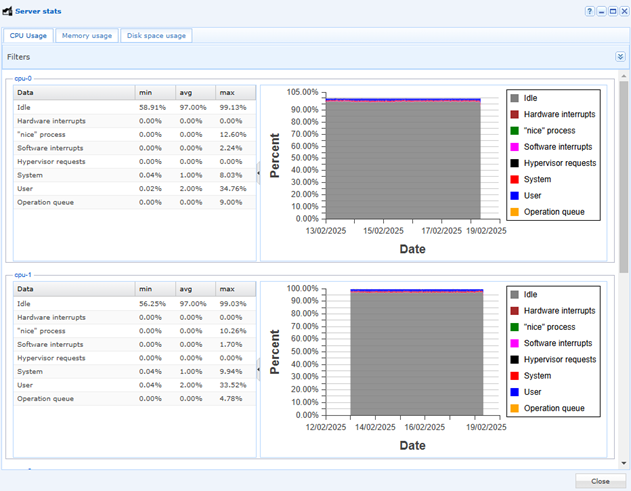
Di seguito l'elenco dei servizi che è possibile monitorare:
| Servizio | Description | Commento |
|---|---|---|
| apache2 | The Apache HTTP Server | Server HTTP della console di amministrazione e del portale utente |
| cleanroom-vault | Cleanroom Vault Alias rotation | Rotazione automatica delle password del Vault delle password |
| cleanroom-xmlrpc-api | CleanroomGatewaysMngmt | API interna per la gestione degli Edge Gateway, degli HTML5 Gateway e delle organizzazioni, utilizzata dalla console di amministrazione |
| collectd | Statistics collection and monitoring daemon | Raccolta delle statistiche di sistema — prerequisito dell'installazione |
| cron | Regular background program processing daemon | Esecuzione delle attività pianificate |
| gate-xmlrpc-api | GateApiXmlrpc | API interna per la gestione dei pairing token e dei certificati degli Edge Gateway, utilizzata dalla console di amministrazione |
| getty@tty1.service | Getty on tty1 | Accesso alla console locale del server |
| ipdiva | LSB: Start IPdiva services | Avvio di tutti i servizi del Mediation Controller, incluso l'SSL Router |
| ipdiva-hostmanager | IPdiva Hostmanager Service | Controllo remoto della configurazione del server (rete, parametri di sistema) |
| ipdiva-logger | IPdiva Logger Service | Raccolta dei log dei vari componenti del prodotto |
| ipdivasafe-emails | IpdivaSafeEmails | Invio delle notifiche e dei report via e-mail |
| ipdivasafe-tasks | IpdivaSafeTasks | Esecuzione delle attività in background (report) |
| networking | Raise network interfaces | Configurazione delle interfacce di rete |
| ntpsec.service | Network Time Service | Sincronizzazione dell'ora, da cui dipendono le marcature temporali dei log |
| postgresql | PostgreSQL RDBMS | Servizio padre delle istanze PostgreSQL: non svolge alcuna attività propria, l'istanza è postgresql@15-main |
| postgresql@15-main | PostgreSQL Cluster 15-main | Database contenente la configurazione e i log del prodotto (architettura Standalone) o i log della piattaforma tecnica di base (architettura Cluster) |
| rsyslog | System Logging Service | Registro di sistema (/var/log/syslog e log del prodotto) |
| snmpd | Simple Network Management Protocol (SNMP) Daemon. | Agente SNMP, per il monitoraggio tramite uno strumento di terze parti |
| ssh | OpenBSD Secure Shell server | Connessione SSH remota al server, per la sua amministrazione (servizio installato da openssh-server) |
| sysstat | Resets System Activity Logs | Raccolta delle statistiche di prestazione del sistema (sar) |
| systemd-journald.service | Journal Service | Journal di sistema di systemd |
| systemd-logind.service | User Login Management | Gestione delle sessioni di accesso al sistema |
| zope2.11.service | LSB: Start chrooted zope at boot time | Server applicativo Zope della piattaforma tecnica del Mediation Controller |