Toolbox
The Toolbox offers the installers for CyberElements clients, agents and add-ons, hosted on the server itself. It is used to fetch the package to deploy on a workstation, an application server or a browser, without depending on an outside download.
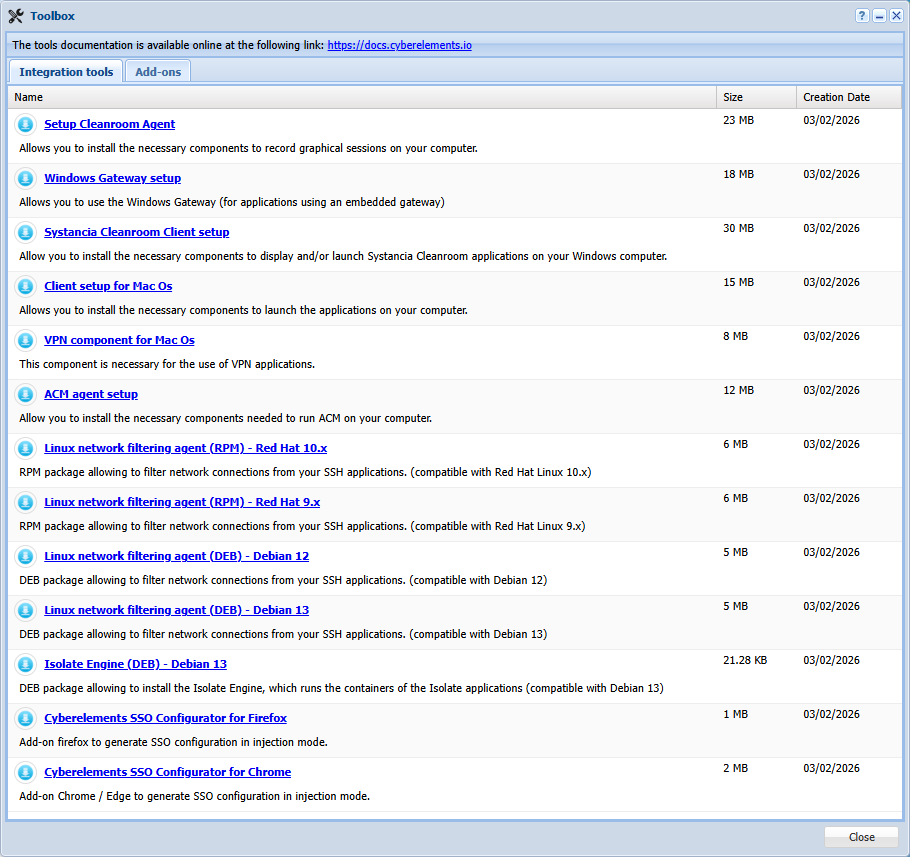
Download only
The screen only serves files: it has no save button, no form, nothing to store. Clicking a name downloads the file.
File dates
Each row shows the size and the creation date of the file as it is on the server. Those packages are laid down (and replaced) at every installation or upgrade of the platform: the date is therefore the only indication, in this screen, of the version of the component to be deployed.
Missing file
Sizes and dates are requested in a single batch for the whole list. If a single one of the programs is absent from the appliance, the platform returns nothing at all and every Size and Date cell stays empty, with no message and no error. A list entirely devoid of dates therefore does not mean that all the files are missing, but that at least one is.
Time zone
The date is shown in universal time. It is converted neither to the server's time zone nor to the browser's. A few hours' gap with the expected timestamp is normal.
Component documentation
A banner at the top of the window points to the online documentation. It is the only link to any manual: no technical note can be downloaded from this screen, even though the components have one. How an agent works is described in that documentation, not in the Toolbox.
Limits
- Read-only screen: nothing is added, changed or deleted here.
- No version number is displayed; only the file's date tells.
- No technical note is offered, even though these components are documented.
Details of the columns and of the listed programs are in the module reference.