Identity Providers
An authentication domain defines where CyberElements verifies the identity of the user who connects, and how. It is the first object to create on a new platform, because everything else depends on it: an account belongs to a group, a group belongs to a domain, and access rights to applications are granted to groups.
A domain does not necessarily store the accounts. Depending on its type, it hosts them (local directory), reads them from the organisation's directory without ever copying them (LDAP), or delegates verification entirely to a third party (SAML).
Choice of type
The type is chosen at creation and cannot be changed afterwards: choosing the wrong type means recreating the domain, and therefore recreating its groups and accounts too.
| Type | Where the accounts live | Use case |
|---|---|---|
| Local directory | In the platform database | A small scope, external contractors, or a complement to a directory that does not cover everyone. |
| LDAP directory | In the organisation's directory (Active Directory, OpenLDAP…) | Existing accounts and groups are reused as they are, with no copy and no synchronisation to maintain. |
| SAML domain | At the identity provider | The organisation already has an IdP and wants CyberElements to connect to it rather than authenticate users itself. |
| Anonymous directory | Nowhere | Rare case: the user has already been authenticated by an external means, and access to the application requires no further verification. |
Several domains can coexist, including domains of different types. At login, users pick theirs from a list, with three exceptions:
- a domain declared as an invisible shortcut is not in it: it can only be reached through its full URL;
- a domain that no access policy names is not listed on the user portal;
- with cascading authentication, the list of domains is not displayed: users enter their credentials, and the platform queries the domains of the cascade.
Implementation order
- The domain: its type, the source of accounts, and the session settings.
- The user groups: with LDAP they come from the directory, with a local directory they are created by hand.
- The accounts: not needed with LDAP, where they come from the directory.
- The access policies: this is where groups receive their applications.
A domain with no group opens access only if an access policy is set for all the users of the domain. Otherwise it opens no access at all: this is not an error but an unfinished configuration, and nothing reports it.
Dependencies
Once created, a domain is referenced by several other objects, which explains most refusals to delete it:
- access policies, which name groups of that domain;
- notification profiles;
- assistance profiles.
Limits
Deleting a referenced domain
Deletion is refused as long as the domain is named by an access policy, a notification profile or an assistance profile. The message names the object concerned and, during a multiple deletion, it lists the domains that could not be removed: the others are deleted. The referencing object must therefore be changed or removed before trying again.
Final directory type
It is chosen at creation and cannot be changed afterwards. Likewise, the Radius option of an LDAP domain can only be enabled at creation.
Three further bounds are checked, and refused on save if they are not met:
- the domain name must be unique on the platform;
- the session expiration time must be between 1 and 1,440 minutes;
- the maximum number of sessions per user ranges from 1 to the number of concurrent users allocated to the tenant by CyberElements.
Finally, some changes require the console to be reloaded before the interface reflects them: the console offers to do so itself. Declining the reload does not cancel the change, which is already saved.
Availability
The module has no visibility condition of its own: it is present in the console of every tenant.
Domains created with the tenant
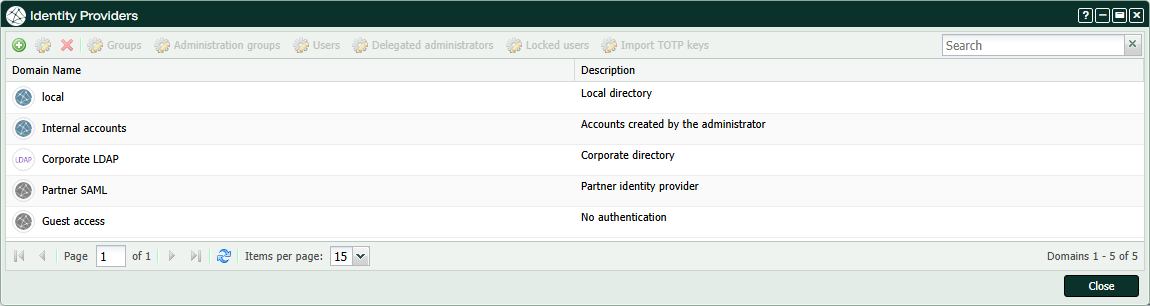
Creating a tenant already creates a local directory named local, which cannot
be deleted (the one holding the admin account), and a guest domain, hidden, which serves assistance requests. The
list is therefore never empty, and those two domains are not leftovers.
The details of each tab's fields (general information, authentication method, OTP token, LDAP settings, SAML access service) are described in the module reference.
The API endpoints that drive this object are described in the API reference.