LockSelf vault
In LockSelf mode, the secrets stay in a LockSelf instance. CyberElements connects to it as an API user to read the credentials of the categories shared with that user, and presents them to applications; it creates none, edits none and rotates none.
The screen is the one shared by the three external vaults: the synoptic opens it under the name Vault (LockSelf) as soon as this mode is selected in the general options. The consequences of the mode change on applications are described in Vault.
LockSelf prerequisites
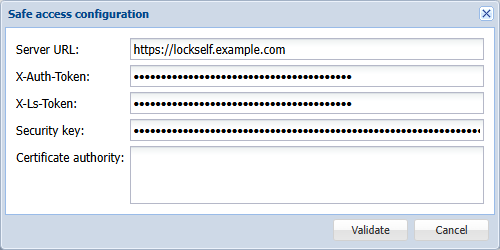
The platform reads LockSelf with the rights of one API user, and only through it:
- the address of the instance, in
https://; - the user's two tokens, X-Auth-Token and X-Ls-Token;
- the user's security key (its private key, 64 hexadecimal characters) without which the credentials, which LockSelf delivers encrypted, cannot be opened;
- if the instance certificate is not signed by an authority the system trusts, the
certificate of that authority, in Base64-encoded PEM format: the text between the
-----BEGIN CERTIFICATE-----and-----END CERTIFICATE-----lines, both lines included, pasted into the Certificate authority field. It is checked before any connection.
The creation of the API user, its keys and the sharing of categories on the LockSelf side are described in LockSelf integration.
Readable categories
The platform sees what is shared with the API user. Only the shared categories whose key the API user holds are readable. A category shared with others, but not with it, is not readable by the platform, whatever the rights of the administrator in the console.
Connection test
On saving, the console checks the form of each field (address, tokens, a key of exactly 64 hexadecimal characters), then queries the instance. The configuration is saved only if both steps succeed; otherwise the message gives the reason: token rejected, invalid key, unreachable instance or untrusted certificate, too many attempts.
Fields to enter again
When the Configuration window is reopened, only the address and the certificate authority are displayed again. The two tokens and the security key are never shown: any new save requires entering them again.
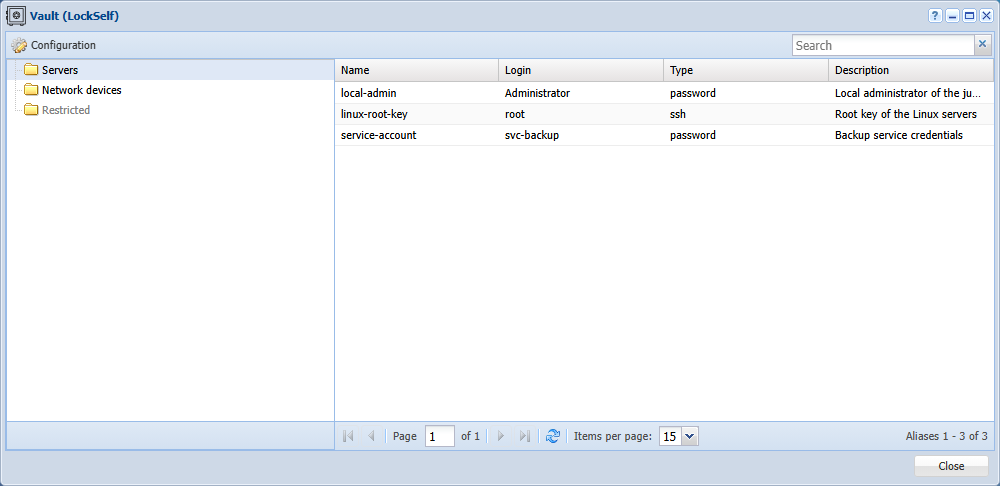
Navigation by category
The tree on the left shows the shared categories, loaded level by level as they are
unfolded. A category whose key the API user does not hold is greyed: selecting it displays a
warning and no credential. The list on the right shows, for the selected category, the name,
the login, the type (password or ssh, as LockSelf names them) and the description.
Tree caching
The platform keeps the categories it has already read for the aliases cache renewal period set in the general options. Opening the screen and the refresh button at the foot of the tree read them again.
Search limit
The search field filters the selected category only, and for that it reads all of it. Beyond 300 credentials, the search is refused: it has to be narrowed down by selecting a sub-category. Browsing page by page has no such limit, but the list is then sorted by name.
Credentials listed
Only LockSelf credentials of the password and SSH types are listed. For an SSH credential, the login is displayed without the host that LockSelf attaches to it.
The alias type follows from it: an SSH credential holding a private key (PEM or PuTTY format) becomes an SSH key alias; all the others become SSH password aliases.
Alias synchronisation
At each aliases cache renewal period, the platform reads again the credentials behind its aliases: name, login, description, type. The aliases therefore follow LockSelf with a delay.
Credential removed from a readable category
Its alias is deleted, and any application left with no alias at all reverts to Enabled SSO. A category that has become unreadable, on the other hand, does not cause its aliases to be deleted: they wait until it is readable again.
Limits
- The module is read-only: creating, editing or deleting a credential is done in LockSelf.
- No rotation is carried by the platform in this mode, hence no password policy and no history of exposure.
- The configuration holds one single LockSelf connection, with one API user.
- Credentials other than passwords and SSH credentials are invisible, with nothing to say so.
- Search is limited to categories of 300 credentials at most.
- What is displayed depends on the cache: a change made in LockSelf is not visible immediately.
The detail of the fields and the columns is in the module reference.