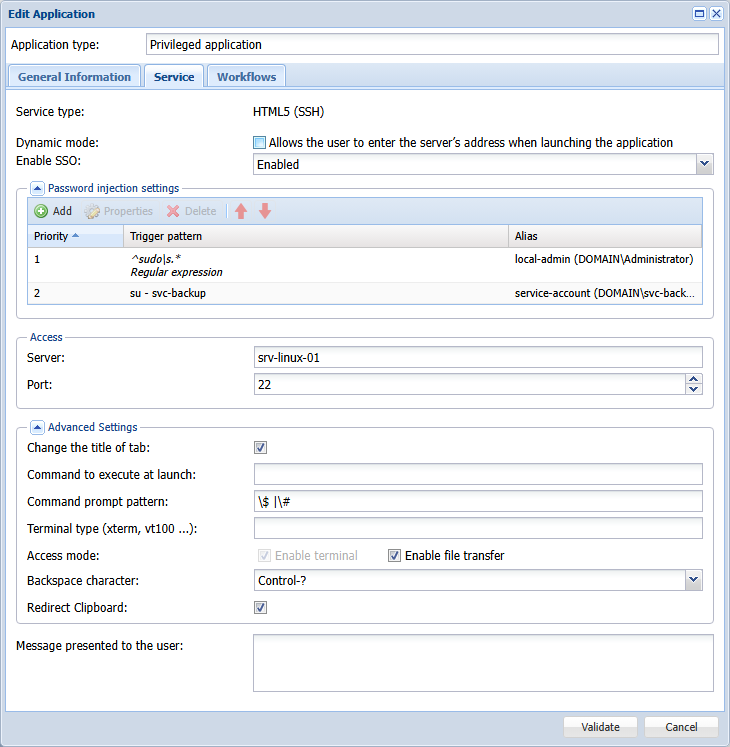
HTML5 (SSH)
Application fact sheet
| Video recording | Recording agent | CyberElements client | Desktop client | Direct access |
|---|---|---|---|---|
The HTML5 (SSH) type opens an SSH terminal in the browser, through the platform. No client on the workstation, no agent on the target: recording is performed by the gateway, which sees the terminal go through.
Permanent recording
The terminal is the recorded stream: this is a structural peculiarity of the type. There is therefore no video recording checkbox to untick, unlike every other privileged type.
A declared HTML5 (SSH) application is thus always traced: no configuration exempts it from recording.
Comparison with SSH
| Criterion | HTML5 (SSH) | SSH |
|---|---|---|
| Client on the workstation | none | required |
| HTML5 Gateway | mandatory | not needed |
| Assistance session sharing | available | unavailable |
| File transfer | from the session in the browser | over SFTP, depending on the access mode |
HTML5 (SSH) suits access from any workstation, or cases where assistance must be possible; SSH suits cases where the administrator prefers their native client.
Prerequisites
- An HTML5 Gateway running on the platform.
- An SSH target reachable from an Edge Gateway of the intended site.
Limits
- Without an HTML5 Gateway the type is not offered at creation: it only remains visible in edit mode, on the applications already using it.
- No recording agent: the notion is pointless here, traceability coming from the terminal itself. Whatever happens on the machine beyond the terminal is not seen.
- No direct access: access always goes through the user portal.
Passed credentials and SAML domains
Passing the user's credentials assumes the platform knows their password, which is not the case on a SAML domain, where it is entered at the identity provider. For those users, plan an SSO that takes the credentials elsewhere: entry at launch time, or an alias from the vault.
The details of the fields are in the module reference.
The API endpoints that drive this object are described in the API reference.