Password policies (CyberElements Access mode)
In CyberElements Access mode, a password policy is not a platform object: it is created, edited and deleted in the CyberElements Access directory, and the console only keeps a synchronised copy. It is the agents installed on the machines that apply it.
The policy describes what an agent must do on its machine: which accounts to take over, how often to change their password, and how far to go in restoring whatever relied on it.
Policy types
The choice is exclusive and it determines half the form.
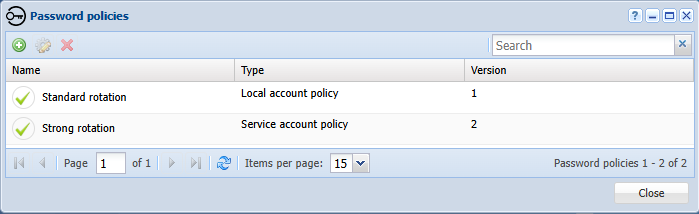
Local account policy: it targets accounts belonging to one machine. It alone gives access to:
- Enable accounts discovery, which lets the agent list the machine's local accounts by itself;
- the Advanced settings: Windows services management, scheduled tasks management, and auto-enabling of services for rotation.
Service account policy: it targets accounts shared between several machines. It alone gives access to the Inactivity period of computers, which drops from the policy the machines that have been silent for a given number of days.
Greyed-out fields
Switching from one type to the other disables the other type's fields instead of hiding them, without explanation. A greyed-out field is therefore not an unavailable field: it is a field belonging to the other policy type.
Advanced settings
Services management and Scheduled tasks management decide what the agent takes over besides the account itself: Windows services, scheduled tasks, both, or neither. That perimeter is what is transmitted to the CyberElements Access server along with the policy.
Auto enabling of services for password rotation depends on them: saving an existing policy wipes that setting if Services management is not ticked, without reporting it.
Account filters
Related accounts and Excluded accounts describe the policy's perimeter through patterns: a prefix, a suffix or a full name, separated by commas. Only one of the two fields is filled at a time: listing the related accounts amounts to an allow list, listing the excluded accounts amounts to a deny list over everything else.
Deletion of a policy
Deletion is refused for any policy an agent applies, and the message names the policies concerned. Those agents have to be reassigned or deleted first.
Removal order
Agents first, policy afterwards. A multiple deletion handles the free policies and only trips on those still in service: the list returned says which ones.
Version column
Every save of a policy increments its version, and the agents pick the policy up on their next pass. Comparing the displayed version with what a machine actually applies makes it possible to spot an agent that has not taken its instructions: an offline agent, for instance.
Default policies
On the shipped policies, Enable the policy, Enable accounts discovery and the choice of type are disabled, and deletion is refused. The mask, the period, the special characters and the filters remain editable.
Implementation order
- Access to the vault is configured: without it, no policy can be created or read.
- The policy is declared, its type settled first since it determines the rest.
- The perimeter is set through one of the two account filters.
- The policy is assigned to the agents concerned, from the agent, never from the policy.
Limits
- A policy's name is frozen at creation.
- An agent carries one policy only, and the selector opened from an agent offers local account policies alone: a service account policy cannot be assigned to a machine from that screen.
- The policy only acts through the agents: with no agent installed and enabled on the machine, it does nothing, and nothing reports it.
- Every operation requires the CyberElements Access server to answer. An unreachable server makes the list empty rather than faulty.
The detail of the fields (mask, filter syntax, creation and edition forms) is in the module reference.