MD5 condition
Availability of the condition
| Works without the client | Requires the client | Windows | macOS | Ubuntu |
|---|---|---|---|---|
The checksum utility offered by the console is Windows-only; the check itself works on all three systems.
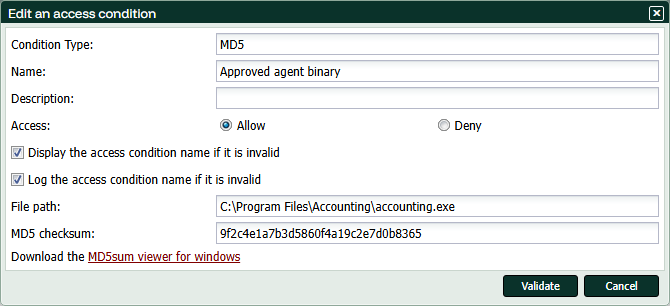
The MD5 condition checks that a file exists at a given path and that its MD5 checksum matches the expected one. It is a reinforced System condition: where its File mode observes presence, this one observes content as well.
Purpose of the checksum
A deployment marker dropped as a plain file is easily copied. Adding the checksum requires the content to be exactly the intended one, which fits a signed configuration file, a token distributed by the deployment, or a binary whose exact version matters.
Two fields are enough: the file's full path and its MD5 checksum, a 32-character hexadecimal number. The console offers a download of a Windows utility that computes it.
Precautions for use
Checksum and file version
The day the file changes (an update, a new configuration), the checksum no longer matches and the condition stops being valid. Set to Allow if valid, it closes access for the whole estate at once, with no message pointing at the cause. Apply it only to a file whose life cycle is controlled, and build the checksum update into the procedure that updates that file.
MD5 level of guarantee
MD5 is no longer a secure hash function: collisions can be manufactured. The condition serves here to observe that an expected file is in place, not to withstand an adversary forging a file with the same checksum; this nevertheless places the level of guarantee.
Limits
- Requires the client: without it the condition is not valid.
- One path / checksum pair per condition; covering several files takes several conditions and a metarule.
- The bundled checksum utility is Windows-only.
The details of the fields are in the module reference.