Operating system condition
Availability of the condition
| Works without the client | Requires the client | Windows | macOS | Ubuntu |
|---|---|---|---|---|
User-Agent mode works without the client; detection through the local agent, which is more reliable, requires it.
The Operating system condition checks the workstation OS: the Windows versions, Windows Server, Linux, macOS. It allows reserving access for a managed estate, or to keep out systems that are no longer supported.
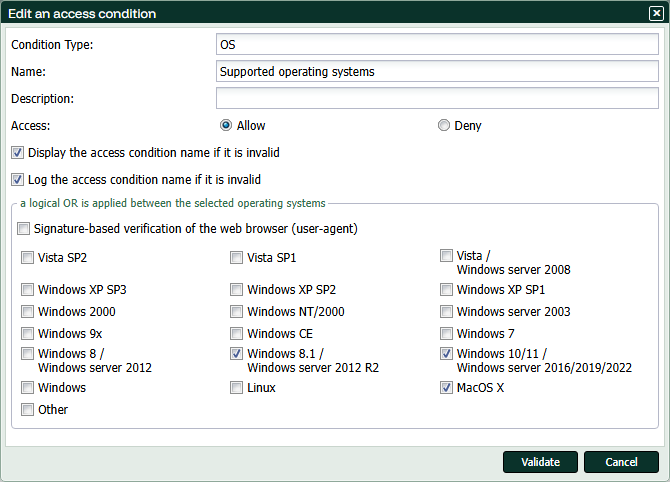
Detection modes
The detection mode is the structuring choice of this condition; the two modes offer very different guarantees:
- through the local agent (default): the CyberElements client reads the workstation's actual OS. Reliable, but requires the client to be installed.
- through the User-Agent: the OS is inferred from the header the browser sends. Works without a client, but rests on a declaration by the workstation, which is easily changed.
User-Agent mode and security
User-Agent mode is not a security measure: it informs, it proves nothing. It is to be kept for organisational cases: serving adapted content, keeping out an incompatible platform. Restricting access to a managed estate requires agent mode, or a System / Certificate condition, which observe something the workstation cannot merely assert.
List of systems
At least one box must be ticked, and the list is fixed: a missing OS goes in the Other field, where the name must match exactly.
List maintenance
The list does not update itself. A condition written some years ago and never revisited may not mention a system that has since entered the estate: set to Allow if valid, it closes access to it with no message explaining why.
Limits
- Outside User-Agent mode, the condition requires the client; without it the condition is not valid, which closes or opens access depending on its direction.
- Detection covers the OS family and version, not its patch level.
The details of the fields are in the module reference.