Firewall for Workplace
The firewall for Workplace filters network traffic inside extended Workplace desktops: it applies when the user opens his session, and determines what that desktop is allowed to send and receive. It does not filter CyberElements accesses themselves in any way.
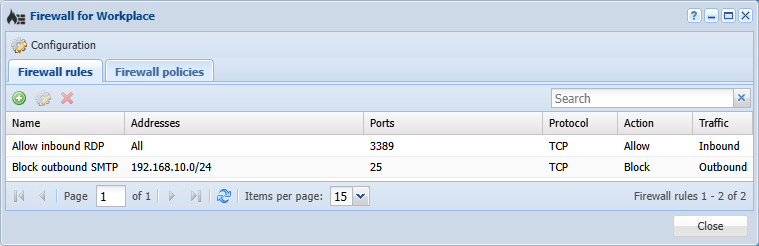
It relies on two objects: a rule states which traffic to allow or block, a policy applies a rule to a user group.
Configuration storage
Rules, policies, default behaviour and the list of offered groups are read from and written to Workplace, and nothing on screen indicates it. The CyberElements console only relays; it keeps no copy.
Unreachable Workplace server
An unreachable Workplace server makes the screen inoperative. Every action (displaying rules, creating one, changing the default behaviour) goes through the Workplace server, reached via the site declared in Workplace association. If that path is broken, the screen returns nothing usable, and the cause lies in the association, not in this screen.
Backup
A CyberElements backup does not back up these rules: they belong to the Workplace configuration, and the platform backup carries no trace of them.
Default behaviour
The default behaviour determines what happens to traffic matching no rule, independently for incoming and outgoing traffic. Both start on Block. It is set before the rules.
It gives the rules their meaning: on a blocking default, rules are allow rules; on an allowing default, block rules. Setting it afterwards changes the effect of everything already written.
Policy application failure
A box in the same window settles the case where the policy fails to apply to a workstation: either the session is disconnected, or it stays open with a firewall that is not the one intended. This is a security trade-off, to be made explicitly: the default value does not remove the need for this choice.
Policies
A policy is a plain group + rule pair. Selecting several groups and several rules does not create a single policy: the console creates one policy per combination, and each one is then independent.
A policy cannot be modified: there is no modify action, and changing a policy means deleting it and creating it again. Modifying the rule, on the other hand, propagates at once to every policy citing it.
Combining rules
When several rules apply to one user, they are merged: a user belonging to several groups receives the rules of all his groups. There is no priority between policies: adding a stricter policy to a user does not restrict him.
Order of implementation
- Check that console merging is in place: without it, the module does not appear.
- Set the default behaviour, in both directions.
- Write the rules: name, action, direction, then address scope and protocol or ports.
- Create the policies that apply them to the groups published in Workplace.
Limits
- The offered groups are those published in Workplace, not the CyberElements user groups.
- A rule name is unique, and a rule cited by a policy looks no different from an unused rule: the list does not show who uses it.
- A policy cannot be modified, only deleted and created again.
- Filtering bears on addresses, ports, a protocol and a direction: no process, no application, no named user.
- The screen reports no blocked traffic: there is no log, no counter and no test here.
Availability
The module only appears if the Workplace association is active and console merging is active too.
The tab-by-tab field detail is in module reference.