netBIOS
Application fact sheet
| Video recording | CyberElements client | Desktop client |
|---|---|---|
The netBIOS type mounts a file share as a network drive on the user's workstation, through the platform. The share then appears in the explorer, like a local drive, and the workstation's applications work in it directly.
Comparison with SMB
Both types publish a file share, in different places.
| Criterion | netBIOS | SMB |
|---|---|---|
| Where the share appears | network drive mounted on the workstation | web page of the portal |
| On the workstation | CyberElements client | nothing |
| Handling the files | local applications | browser |
netBIOS suits a user who has to work in the files with their usual tools; SMB suits fetching or dropping files, or when nothing can be installed on the workstation.
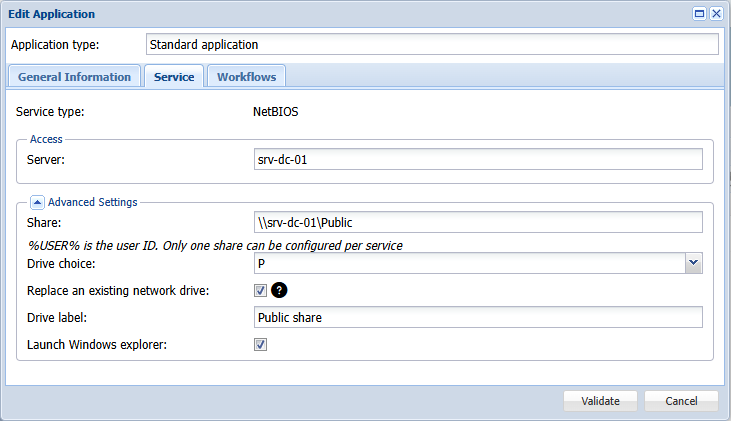
The netBIOS type can also open Windows Explorer as soon as the drive is mounted, and replace a drive already present on the same letter. When the chosen letter is already in use and its replacement is not enabled, the share takes the first free letter, starting from Z.
Prerequisites
- The CyberElements client on the workstation, Windows, macOS or Ubuntu: it mounts the share.
- The file server reachable from an Edge Gateway of the site.
- An Edge Gateway able to record, online in that site. The type records nothing, but without one the application is not offered to the user.
Limits
- SSO is implicitly enabled, with no setting: a vault alias cannot be used.
- No video recording, and nothing read or written is traced.
- Standard only, with no dynamic target.
- The drive letter and opening Windows Explorer assume a Windows workstation.
The details of the fields are in the module reference.
The API endpoints that drive this object are described in the API reference.