RDS
Application fact sheet
| Video recording | Recording agent | CyberElements client | Desktop client | Direct access |
|---|---|---|---|---|
| in agentless mode |
The RDS type opens a Windows Remote Desktop session in the workstation's native client, launched by the CyberElements client. It is the only type combining the recording agent, the native client and direct access.
Agent and agentless modes
This choice governs everything else; it is made through a checkbox of the form, not through a separate service type. With the agent deployed on the target server, recording sees what happens on the machine: clipboard, windows opened and closed, programs launched. The console can also deploy and remove the agent itself.
Effects of agentless mode
- Metadata is reduced to keystrokes: the video is still produced, but application-level traceability disappears.
- The available security modes are reduced to RDP and NLA.
- The RDS broker becomes unavailable: a farm addressed through its broker therefore requires the agent.
In return, this mode is the only one that opens direct access.
Recording agent without installation
The recording agent can provide its traces without being installed on the target server: it is launched in the session, when the session opens, and disappears when it closes. This mode suits a server on which the organisation cannot or does not want to install software.
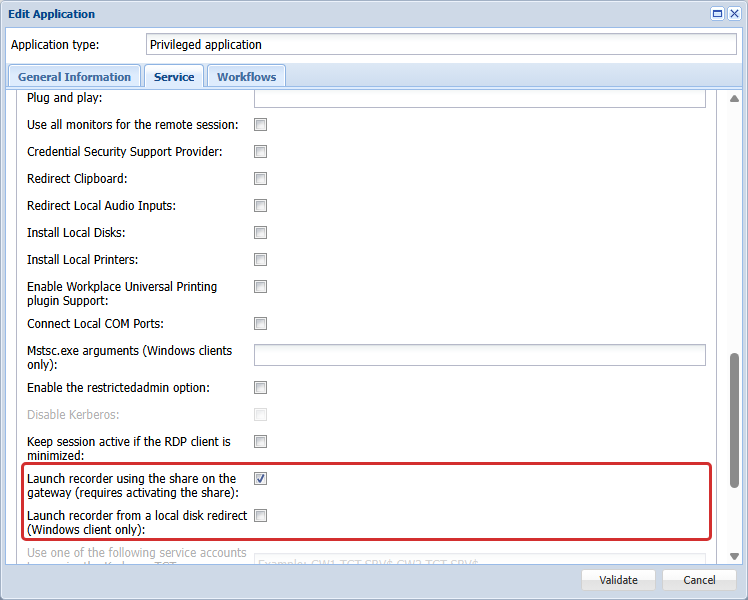
Two checkboxes of the Advanced Settings group of the Service tab set it. They are only offered when Without agent mode is not ticked, and they exclude each other.
-
Launch recorder using the share on the gateway (requires activating the share): the session starts the agent from a share on the Edge Gateway.
Prerequisites for launching from the share
The share is prepared once per Edge Gateway, and the target server must be able to use it:
- enable the share on the Edge Gateway, as root:
/usr/local/ipdiva/bin/enable_cleanroom_share.sh. The script installs Samba if it is missing and publishes theclrshare, read-only and without authentication, which contains the agent; - open the SMB flow (TCP 445) from the target server to the Edge Gateway: the server reads the share anonymously;
- allow the start program: the RDS server must accept that a session starts with a program other than the desktop, which is not always the case by default.
- enable the share on the Edge Gateway, as root:
-
Launch recorder from a local disk redirect (Windows client only): the CyberElements client places the agent on the user's workstation, and the session launches it from the redirected local disk. No share is needed.
Features unavailable without installation
Direct access and network filtering, which the agent installed on the server provides, are not available when the agent is launched in the session.
Comparison with HTML5 (RDP)
| Criterion | RDS | HTML5 (RDP) |
|---|---|---|
| Client on the workstation | required | none |
| HTML5 Gateway | not needed | mandatory |
| Assistance session sharing | unavailable | available |
| Direct access | in agentless mode | unavailable |
RDS suits a managed workstation and daily use; HTML5 (RDP) suits a workstation the organisation does not control.
RDS farm addressed through a broker
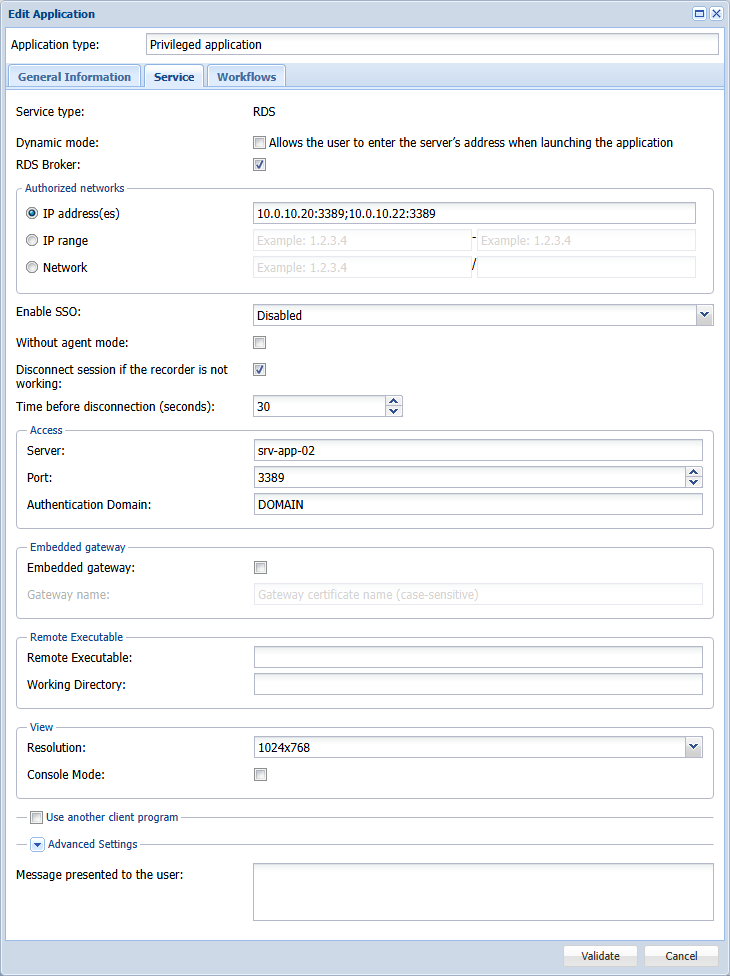
When the application targets an RDS farm through its broker (RDS broker option), the
session is redirected by the broker to one of the farm's servers. The application's
authorized networks must therefore contain the brokers and the RDS servers of the farm, each by
its IP address, with port 3389 (for example 10.0.10.20:3389): the field only
accepts IP addresses, not names. A redirection to a machine missing
from that list does not succeed.
Embedded Edge Gateway
The Embedded gateway frame makes it possible to reach a machine that accepts no remote connection, such as a privileged access workstation (PAW). A Windows Edge Gateway is installed on the target machine itself, and its name is entered in the application. The site's Edge Gateway, which records the session, then goes through this embedded Edge Gateway, which opens access to the machine locally: the machine's firewall can thus refuse any direct remote connection.
The full setup (local firewall, authentication) is described in Specific features of connecting to a PAW workstation.
Prerequisites
- The CyberElements client on the user's workstation.
- An RDS server reachable from an Edge Gateway of the intended site.
- The recording agent on the target, except in agentless mode or when it is launched without installation.
Limits
- The client is required: there is no browser access for this type.
- No session sharing: assistance covers only the three HTML5 types.
- The two modes offer neither the same traceability nor the same connection options.
Passed credentials and SAML domains
Passing the user's credentials assumes the platform knows their password, which is not the case on a SAML domain, where it is entered at the identity provider. For those users, plan an SSO that takes the credentials elsewhere: entry at launch time, or an alias from the vault.
The details of the fields are in the module reference.
The API endpoints that drive this object are described in the API reference.