Virtual machine snapshots
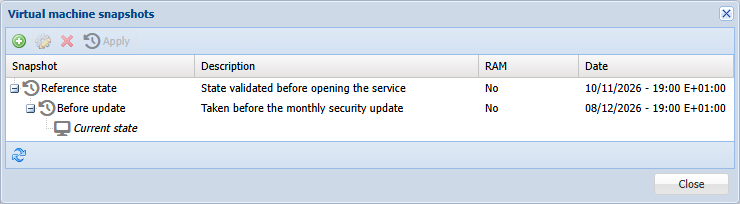
A snapshot freezes the state of a virtual machine at a given moment, so that it can be brought back to it later. The console offers the view and the commands from the virtual machines screen: select a machine, then open its snapshots.
Besides those the administrator takes, snapshots serve the virtual desktops: reference of linked clones and reset of clones. Those are flagged on this screen and protected.
Availability
Snapshots only exist on a Proxmox host. The button stays greyed out for a machine carried by a VMWare host, and the server refuses in the same way: tree, creation, edition, application and deletion are all conditioned on the Proxmox type.
The machine is driven normally in both cases: only snapshot management is absent.
Snapshot tree
Each snapshot appears under the one it was taken from. That hierarchy is the main information of the screen: it says which state each snapshot descends from, hence what going back would mean.
Current state line
The tree carries one particular line, in italics, marking the live state of the machine. It is not a snapshot: it is a name reserved by the hypervisor. It cannot be renamed, applied or deleted: the three commands stay inactive while it is selected.
Snapshot operations
Creating a snapshot is the only action that does not require a selection in the tree.
Including RAM
The option is only offered on creation, on a running or suspended machine, and on a Proxmox host. It adds the contents of the memory: reverting to that snapshot then gives the machine back exactly as it was running, open sessions included. Without it, the snapshot only carries the disks, and the machine will start from boot.
The RAM column of the tree tells, for each snapshot, whether the memory was included: Yes or No. It stays empty on the Current state line.
Applying a snapshot brings the machine back to that state; deleting one removes a return point from the tree. Both ask for confirmation, and both run on the hypervisor.
Serialised operations
Until a creation, an application or a deletion has finished and the tree has been read back, the window stays masked. This prevents acting on a stale tree: the host acknowledges the request before it has finished the work.
Linked clones of a virtual desktop
A Virtual desktop application whose clones are linked does not start from the reference machine as it stands: it starts from a snapshot of that machine, picked in the configuration of the application, where the choice is mandatory.
Protected snapshots
A snapshot that a virtual desktop depends on cannot be deleted: the delete button stays greyed out, a padlock follows the name of the snapshot and its tooltip names the application concerned. Two cases:
- the reference snapshot of the linked clones of an application;
- the reset snapshot of a clone (below).
Clone reset
After it is cloned, each clone receives a snapshot, described as the product's reference snapshot not to be deleted. When the clone closes at the end of a session, it goes back to that snapshot: the next user finds no trace of the previous one.
Reset snapshot deleted
If that snapshot has disappeared from the host (deleted outside the console), the clone can no longer return to its initial state: it fails, with the Error: reset snapshot deleted state in the clone management of the application, and is no longer assigned. The event is recorded in the log.
Limits
- Proxmox only, on the screen as on the server.
- The name cannot be changed after creation: editing only bears on the description.
- The name must start with a letter and then contain only letters, digits or the underscore (no space, no hyphen, no accented character) and be at least two characters long.
- Commands bear on one snapshot at a time.
- No scheduling: the only snapshot the console takes of its own accord is the reset snapshot of a clone, and it purges none.
- No quantity is displayed or capped by the console; it is the hypervisor that arbitrates the space consumed.
The field-by-field detail is in the module reference.
The API endpoints that drive this object are described in the API reference.