Virtual machines (Workplace)
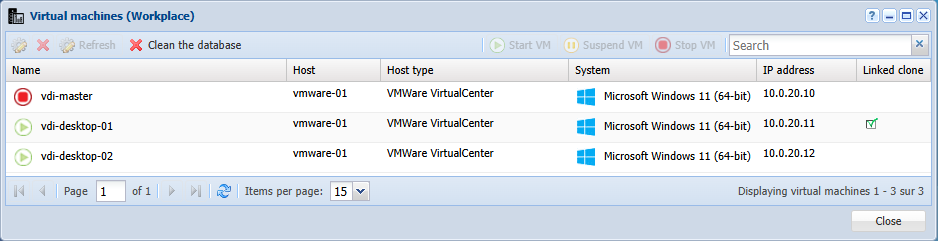
This screen is the inventory of the virtual machines known to the declared Workplace hosts: those serving as references to the VDI desktops, and the clones those desktops have produced.
Machines are never created here: they are discovered. The screen allows reading them, changing their power state, deleting one, and clearing the records of those that vanished on the hypervisor side.
Availability
The module only appears when the Workplace association is active and console merging is active too, both set in Workplace association. The machines listed are the same on both sides.
Screen of the same name without suffix
Virtual machines, in the main work panel, drives the machines of the CyberElements hypervisors and shows one host at a time. This one lists every Workplace host together and carries the (Workplace) suffix. They are two distinct screens, on two distinct inventories.
Origin of the listed machines
A machine enters this list through the referencing of a host (the background task the declaration of a Workplace host triggers) or through the cloning of an extended VDI desktop, which creates its machines as deployments go.
The Linked clone column tells the two families of clones apart: a linked clone shares its disks with the reference machine, a full clone is a standalone copy of it.
Synchronisation with the hypervisor
Two commands, with different effects, serve this synchronisation.
Refresh reads the properties of the selected machine back from the hypervisor and updates the row, without reloading the list.
Clean the database deletes the records of the machines identified as non-existent on the hypervisor side. It is an operation on the console database, not on the hypervisor: it destroys no machine.
Scope of the cleaning
Cleaning requires no selection. It bears on the whole inventory and stays offered at all times, including when no row is selected. A confirmation is asked before it runs.
Machine deletion
Unlike cleaning, deletion is a destruction on the host, and it is permanent.
Machine attached to a desktop clone
The console requires the machine to be stopped and the hypervisor to allow its destruction; the refusal message names the most frequent case, a machine still attached to a desktop clone.
The operation is then done from the VDI desktop itself (emptying or deleting it destroys its clones), not from this screen.
Deletion is followed in the background: the list reloads once the hypervisor is done.
Limits
- No creation and no modification: the properties record is read-only.
- Actions bear on one machine at a time.
- No hypervisor console from this screen, unlike its namesake in the main work panel.
- No snapshot management from this screen.
- No filter by host: only the text search narrows the list.
The field-by-field detail is in the module reference.