Access to Workplace contracts
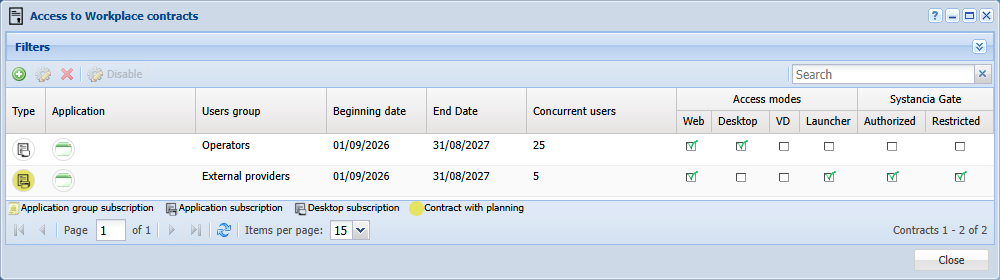
A Workplace contract publishes a Systancia Workplace resource to one or several user groups. It designates one target (an application, an application group or a VDI desktop), the groups entitled to it, a validity period, a maximum number of simultaneous instances, the authorised access modes and, where needed, time slots.
It is the only object that makes a Workplace resource visible: with no contract, the resource exists but is visible to nobody.
Availability
The module only appears when the Workplace association is active and console merging is active too, both set in Workplace association. Contracts are shared: a change made in CyberElements shows in Workplace, and the other way round.
Workplace contracts and access policies
Workplace contracts are not the CyberElements access policies. The access policies of the main work panel govern the applications of CyberElements. These govern the resources of Workplace, and the two never overlap: not the same objects, not the same screens, not the same rules.
Target type
The type of the contract (application group, application or desktop) is chosen on creation and can no longer be changed afterwards. A contract with the wrong type has to be created again.
The retained type governs the rest: which targets are offered, what the ceiling on simultaneous instances means, and whether the slots tab applies at all.
Target and user group
A contract needs a target and a user group. If either is missing the console says so explicitly, and the form offers no remedy: it is settled upstream, in Workplace for the target and in the user groups for the other.
Access modes
Besides who reaches what, a contract defines how.
The access modes (web portal, desktop, virtual desktop, launcher) are four boxes, all ticked by default: a contract created without touching them authorises everything. Restricting them is an explicit action.
Access from Systancia Gate obeys two boxes, unticked by default, and an order: until publication outside is authorised, the restriction to compliant clients stays inactive. The second only makes sense with the first.
Validity period
The validity bounds are a field like any other: a mandatory start, an optional end, a contract outside its period showing greyed out in the list.
Enabling and disabling
Enabling or disabling a contract moves its dates. The visible button (only one of the two at a time, the one matching the state of the contract) does not act on a separate flag: it rewrites the dates. Enabling brings the start back to today, disabling pushes the start to the day after the end.
One click on Disable therefore loses the defined period, and nothing restores it; the rest of the configuration is not changed.
Time slots
The slots tab adds a second grid of conditions, independent of the validity period: days of the week, dates, days of the month, months, with time ranges stacked up. One box, ticked by default, imposes the closing of the application when the slot limit is reached.
Two ranges cannot overlap (the console refuses the addition and says so), and the expected time format is strict.
Desktop-group contract
The tab does not apply to that target, and the general information tab recalls it.
Limits
- One target per contract: publishing two applications takes two contracts.
- The type of a contract can no longer be changed after creation.
- Actions (properties, deletion, enabling) bear on one contract at a time.
- The enable and disable buttons are never visible together, and neither is shown at all for a contract outside its period.
- Deleting a contract on an application group with recursion active on the Workplace side triggers an update task: the list only reloads when it ends.
The field-by-field detail is in the module reference.