Alerts
An alert is a rule evaluated during a recorded session: if what happens on screen or at the keyboard matches what it describes, it is raised, leaves a trace and may act on the session. It is the only mechanism in the product that reacts while an access is under way, whereas access policies decide beforehand and logs record afterwards.
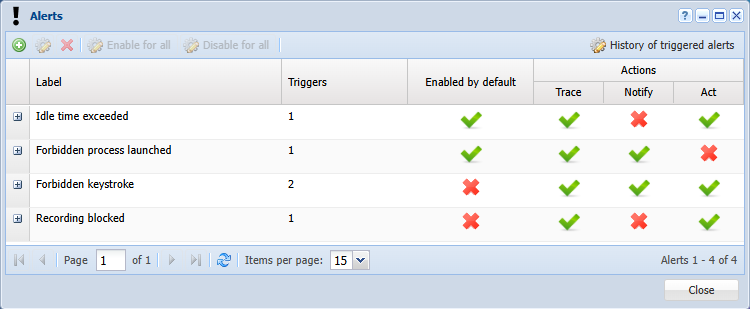
The content of an alert (its triggering conditions and its actions) is described in Alert definitions. What each raise produces is consulted in History of triggered alerts.
Alert evaluation
Sessions are not watched by the console but by the recording service hosted by the Edge Gateway. When a session opens, this service retrieves the alerts applicable to that access, then evaluates them itself against what it captures.
As a result:
- an alert can only be about what the recording captures; on an application that is not recorded, it does not exist;
- an alert is not raised retroactively: changing it only affects the sessions opened afterwards.
Alert attachment
A defined alert acts nowhere until it has been attached. Two objects assign it:
- an access policy, for application sessions;
- a direct recording configuration, for direct accesses to a machine.
The Enabled by default checkbox attaches nothing on its own: it describes the state that new contracts and configurations will take. To act on what already exists, the console offers, at the moment the box is switched, to force activation or deactivation on all contracts and all direct recording configurations; the Enable for all and Disable for all buttons have the same effect on a selection of alerts.
Declining the switch on existing objects
The confirmation that follows a change of the Enabled by default box is a question, not a mere warning: answering no does save the alert with its new value, but modifies no existing contract. The alert then appears enabled by default without firing on the accesses already in place, and nothing indicates it.
Effects of a raise
Every raised alert has four effects, in this order:
- it writes a raised alert event into the timeline of the session, visible in the Control center;
- it carries out the actions of the alert: shutdown, pause, process kill, account lock, messages;
- it sends an email if, and only if, a notification profile provides for it;
- it adds a row to the history of triggered alerts.
Email notification
No alert action produces an electronic message. Notification comes from a notification profile, which must meet three conditions at once: being an alert triggering profile of the right kind (applications or machines depending on the session), naming the application, category or machine concerned, and naming this alert. If one of the three is missing, the alert is raised without anyone being notified, and no screen indicates which one was missing.
The email that is sent carries the date, the user and their origin, the site, the alert label, the list of its triggers, the application, the gateway and the Mediation Controller. The label of an alert is therefore read outside the console.
Complementary mechanisms
- To be notified of a session opening or closing, with no condition on its content, a notification profile is enough: the alert detects, the profile transmits.
- To forbid an access rather than react during it, the tools are the access conditions and the contract.
- To feed a SIEM, the tool is the syslog of the general options.
Limits
- An alert only applies to recorded sessions.
- Direct SSH sessions are not covered: alerts are not transmitted to them.
- Attachment is done by contract or by direct recording configuration, never directly by user or by application.
The detail of the screens (grid, forms and purge) is described in the module reference.