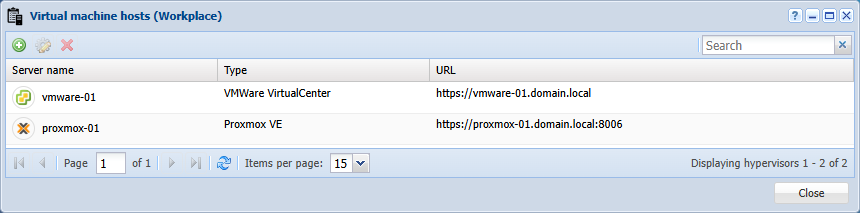
Virtual machine hosts (Workplace)
This screen declares the virtualisation platforms from which the VDI desktops of Systancia Workplace are provisioned. Declaring a host makes its machines appear in Virtual machines (Workplace), and then allows an extended VDI desktop to create its clones there.
Availability
The module only appears when the Workplace association is active and console merging is active too. Both are set in Workplace association, and enabling merging asks for a console reload before the modules show up.
The objects managed here are shared with Systancia Workplace: what is declared on one side shows on the other.
Hosts of the main work panel
The Container or virtualization hosts screen carries a very close name and does not serve the same product: it feeds the Virtual desktop and Isolate applications of CyberElements, never the VDI desktops of Workplace. The two host lists are independent, and a host declared in one does not appear in the other: the (Workplace) suffix is what tells them apart.
Host types
The host type offers five platforms, not the same as on the CyberElements side: VMware, Proxmox VE, Hyper-V, Nutanix and Azure. The last one is only offered when the associated Workplace instance allows it; the Azure-specific fields (subscription, tenant, resource group, storage account, region) only appear for it, and the common certificate fields then disappear.
Type frozen on creation
It becomes read-only as soon as the host exists. Changing platform means deleting the host and creating it again.
Implementation order
- Declare the host, with its address and an account holding the cloning rights.
- For a VMware host, run the host-type search: it queries the platform with the entered values and fills a read-only field. While that field stays empty, saving is refused.
- Let the referencing finish.
- Create the extended VDI desktop that will rely on a machine of that host.
Validate button
It is inactive when the form opens. On a VMware host it only activates once the search has come back; on the other types, once the form is complete.
Referencing
Adding a host triggers a background task that inventories its machines: that is what populates Virtual machines (Workplace). The console announces it and hands control back at once; the machine list is updated when the task ends.
Referencing in progress
Opening the form while a referencing run is under way disables the save button and explains why. No correction is needed: it is a wait, which lasts longer the more machines the host carries.
Host deletion
The confirmation asked for is not the same depending on what the host carries: when it carries application locations, the warning announces that those and the exclusion thresholds attached to them will go with it.
A failure on the platform side is reported as such: deletion is not silent.
Limits
- Referencing is automatic and global: there is no way to inventory a single machine from this screen.
- No button tests the connection of an already registered host; only the VMware host-type search really queries the platform, and only inside the form.
- One row at a time: neither editing nor deletion accepts a multiple selection.
- The password is shown masked when editing and is only rewritten if it is retyped.
The field-by-field detail is in the module reference.