Creating a site
A site, in the sense of the product, is a logical element that brings together various Edge Gateways and HTML5 Gateways.
This allows the product to manage load balancing and redirect traffic to an Edge Gateway that is still operational in the event of a malfunction of one of the site's Edge Gateways.
Access the web interface of the Mediation Controller server with the /console URI.
Examples
If access to the Mediation Controller on its web IP address is 10.0.10.10, then the administration console is reached at https://10.0.10.10/console.
If the Mediation Controller is reachable by a DNS name, for example cyberelements-bastion.domain.local, then the administration console is reached at https://cyberelements-bastion.domain.local/console.
-
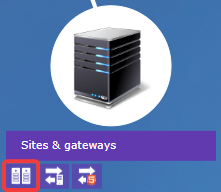
Open the site management module:
-
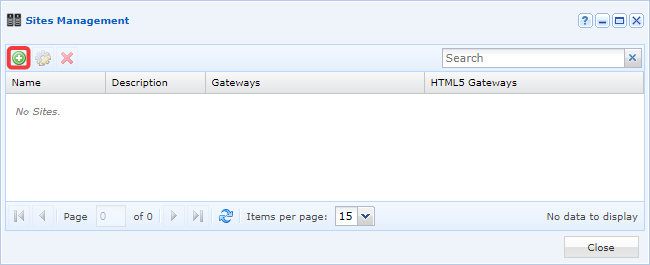
Create a new site by clicking on the + icon:
-
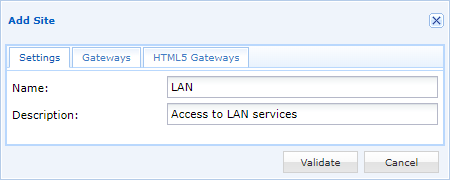
Give the new site a name and, if desired, a description:
-
Activate Edge Gateways:
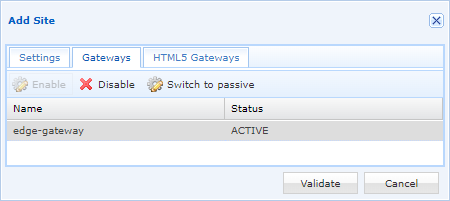
Three states can be defined:Active: an active Edge Gateway can be used if it is connected.Passive: A passive Edge Gateway can be used if it is connected and no active Edge Gateway is connected.Disabled: A disabled Edge Gateway will never be used to access site resources.
-
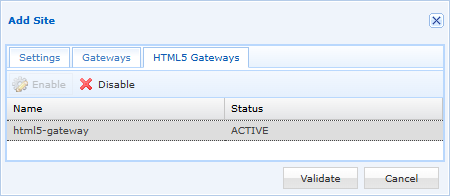
Enable HTML5 Gateways (the HTML5 Gateway does not need to be able to connect directly to site resources):
-
Finally, confirm the configurations you have made.