Languages
The Languages module determines in which language the administration console and the tenant's user portal are displayed. Two strategies are mutually exclusive: one language for everything, or one language per access type.
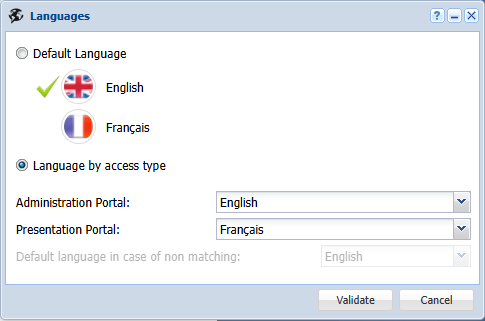
Languages available per interface
The two interfaces do not have the same languages, and this difference, which accounts for most of how this screen behaves, is stated nowhere:
- the administration console exists in English and French only;
- the user portal (called "Presentation Portal" in the screen) exists in German, English, Spanish, French and Swedish.
Fallback language
The fallback language offers only two values. It is used when a visitor's browser language matches none of the available languages. Since it must be applicable to the console as well, it is limited to English and French.
Browser language
The user portal follows the browser only for the languages it knows. A browser announcing German, Spanish or Swedish gets those languages on the user portal only. The administration console can never be displayed in German, Spanish or Swedish: it falls back to the fallback language.
Direct access sessions
Whatever language is chosen for the user portal, a direct access session is displayed in French or English; any other value falls back to the fallback language there.
Choice of strategy
Default language applies a single language everywhere (console and user portal alike). Two tiles carry it: English and French. It is the simplest mode, and the only one that guarantees an identical display for everyone.
Language by access type opens the detailed block: one language for the administration console, one for the user portal, and a fallback language.
Flag tiles
Clicking a flag tile switches back to Default language: the click does not merely change the global language, it re-selects the Default language option and disables the per-access-type block, with no confirmation and no message. An administrator who sets the three lists and then clicks a flag loses that entry on screen.
Fallback language activation
The fallback language only becomes active if at least one of the lists is set to Browser language settings: it is the only situation where a language may fail to match. Otherwise it is pointless, hence disabled. If a value is entered without any list being set to the browser, it is ignored on save, without a message.
Detailed setting retained
Switching back to global mode does not lose the detailed setting: the per-access-type values stay in the database and come back unchanged if the strategy is switched again.
After saving
The window closes, then the console offers to reload the page. Answering no does not cancel the change: it is already saved; only the display stays in the old language until the next navigation.
Reload offer
The reload is only offered when the console's language has changed. Changing only the user portal language, or only the fallback language, does not raise the question: nothing changed in the console. This behaviour is intended.
Scope of the setting
What this screen sets applies to the current tenant, not to the platform. Another tenant keeps its own languages.
Limits
- The administration console only exists in English and French: no setting can display it in another language.
- The Default language mode offers those two languages only.
- The fallback language is limited to English and French.
- Direct access sessions only render French and English.
- There is no per-user or per-domain language: the setting applies to the whole tenant, browser detection aside.
Field-by-field details are in the module reference.