SSH servers
An SSH server is an SSH target declared for direct access. The declaration carries the address at which the machine is reached, its recording retention policy, and two session options that can be set nowhere else.
It is the entry point of the SSH chain by machine: a server declared here becomes eligible for SSH direct recording configurations, and for nothing else.
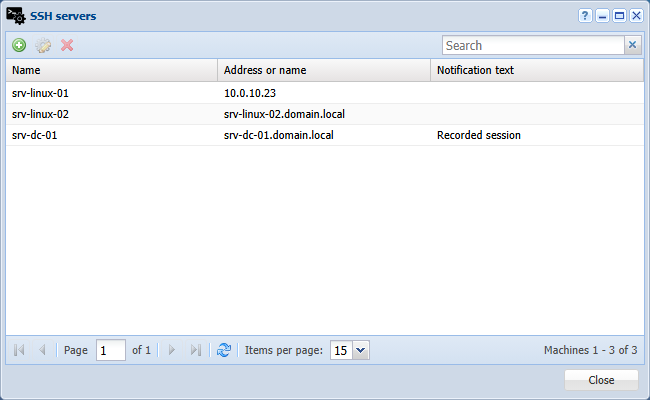
SSH servers and machines
The module is named SSH servers, while its windows, messages and confirmations say machine. It is the same object.
Machine identification
The user points their SSH client at an Edge Gateway and enters their session login, a colon, then the address or name declared here. That value, and that value alone, is what the platform compares to recognise the machine.
Examples of logon names
| Command typed on the user's workstation | Account passed to the server | Target server |
|---|---|---|
ssh 'root:srv-linux-02.domain.local'@gw-paris-01.domain.local -p <port> |
root |
the server srv-linux-02, declared under its name srv-linux-02.domain.local |
ssh 'root:10.0.10.23'@gw-paris-01.domain.local -p <port> |
root |
the server srv-linux-01, declared under its address 10.0.10.23 |
<port> is the port of the recording service instance deployed on the Edge Gateway (see
SSH direct record configurations). The password typed is that of
the account on the server: the Edge Gateway only accepts password authentication. Without a
colon, the connection is closed: no menu for choosing the server is offered.
The name only serves management purposes: it identifies the machine in SSH direct recording configurations, in notification profiles and in logs.
Unique name and address
Both fields are unique. The uniqueness of the address makes it impossible to declare the same machine twice to give it two recording policies, which is possible for an RDP machine. Adding and editing are refused with the message Machine exists, without saying which of the two fields is at fault.
An SSH server name stays editable after creation, unlike an RDP machine name, which is frozen.
Session options
These two fields have no equivalent in the configuration or in a contract: they belong to the machine, and therefore apply to every direct session opened on it, whoever the user is.
- The command to run at launch, played when the session opens.
- Enable file transfer, which allows SFTP during the session.
Chain by application
The same physical machine reached through an SSH record contract takes its launch command and its file transfer permission from the application, not from its declaration here. The two chains can therefore behave differently on the same target.
The notification text is the message shown to the user just after they authenticate.
Recording policy
As with RDP machines, recording retention is a target setting: whether manual deletion is allowed, whether an automatic purge runs after a number of days, and integrity checking at playback, the latter only affecting sessions recorded after it was enabled.
There is no equivalent here of the Record sessions as videos box of RDP machines: an SSH direct session is recorded as soon as a configuration covers it.
Server deletion
Deletion is refused in two cases, and the report tells them apart.
- A direct access session is open on the machine.
- The machine is listed by an SSH direct recording configuration or by a notification profile.
Deleting a selection is therefore partial by construction: the free machines are deleted, the others stay.
Limits
- No agent: traceability stops at what transits through the gateway, and there is nothing to deploy or remove on the target.
- No alerts and no network filtering on this chain.
- An address can belong to only one declaration.
- The listening port is not a field of this screen: it is part of the address.
- These servers have nothing to do with the catalogue's SSH applications: they are two separate inventories, and the same machine may appear in both.
The field and list detail is in the module reference.