Archives
The Archives section of the Control center gives access to the recordings of finished sessions: the video when there is one, and in every case the event timeline. It serves audit and after-the-fact investigation.
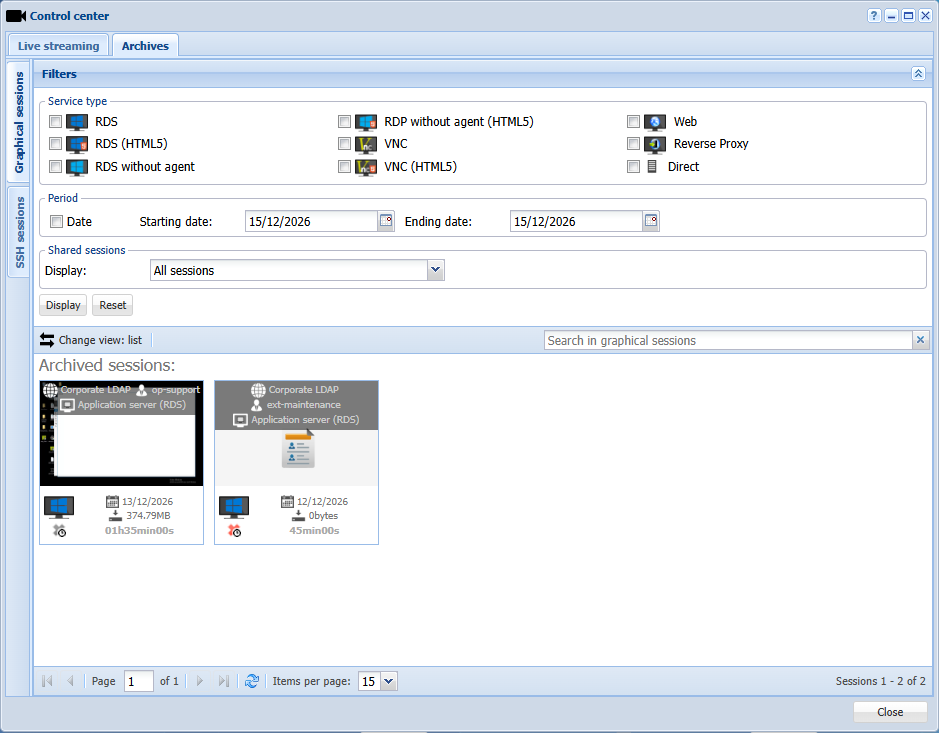
Recording families
Archives are held in two panes, which do not use the same player:
- graphical sessions (RDS, VNC, Web, Reverse proxy, together with their HTML5 and RDS without agent variants), played back as a video;
- SSH sessions, replayed as a terminal.
Direct recordings by machine are not a third pane: they appear in one or the other depending on their protocol, and are recognised by the Direct service type, which is a value of the type filter and not a tab.
Properties fixed when the session opens
Three properties of a recording are fixed when the session opens, from the configuration of the application, or of the machine for a direct recording. They cannot be changed from the archives:
- the video retention period, which determines its automatic deletion date;
- whether the recording is deletable or not;
- the integrity check, which fingerprints the video and its metadata.
Non-deletable recording
When the application forbids the deletion of its videos, the action is refused on any selection that contains one, including for an administrator. The decision is therefore taken on the application, before the session takes place, and a session already recorded cannot change status. The aim is to make the evidence independent of whoever administers the platform.
A recording whose integrity check fails is reported at playback. It is the Edge Gateway that recomputes the fingerprint, not the console.
Session search
The filter panel narrows the list by service type, by period and (on graphical sessions only) by activity index. Search, on the other hand, works on the content of sessions: it returns the sessions whose events match the text being looked for, and the result points at the matches in the timeline.
Activity index and agent
The activity index measures the share of the session during which the user actually did something. It is computed from the idle times reported by the recording agent: a session captured without an agent has none, and the filter therefore never keeps it. The filter itself only appears if the feature is enabled in the general options.
Recording annotation
Two distinct mechanisms allow a recording to be annotated:
- a custom event is placed at a precise moment of the session and takes its place in the timeline, among the captured events; it cannot be placed after the end of the session;
- a comment is about the whole session and is shown in a separate window.
Recording deletion
Deletion destroys the video on the Edge Gateway storage before removing the session from the database: it fails if the gateway cannot be reached, and is then only partial over a multiple selection. It is traced in the logs.
Automatic deletion, on the other hand, is not triggered here: it follows from the retention period carried by the session, and the tile shows the remaining delay.
Limits
- A session that is not recorded is never archived: it disappears when it closes.
- Retention period, deletability and integrity check cannot be changed afterwards.
- The activity index only exists for graphical sessions captured with an agent.
- Deletion depends on the Edge Gateway hosting the video being reachable.
The detail of the screen (columns, filters, player, search and export) is described in the module reference.