Léim go dtí an t-ábhar

Suiteáil an fhreastalaí Edge Gateway

Nóta

Mar mheabhrúchán, ní mór aistriú go root ar ríomhairí Debian a dhéanamh leis an ordú seo a leanas:

1
su -

An scáthán agus na huirlisí riachtanacha a íoslódáil

Is féidir scáthán CyberElements Cleanroom 4.6 agus eochair shínithe stór Systancia a íoslódáil ón nasc seo (ní mór cuntas custaiméara a chruthú): Systancia Marketplace

Chomh maith leis an scáthán agus leis an eochair, beidh uirlisí tríú páirtí ag teastáil don phróiseas uasghrádaithe:

  • Cliant SSH (ar Windows, is féidir leat PuTTY a úsáid)
  • Cliant SCP (ar Windows, is féidir na huirlisí WinSCP nó FileZilla a úsáid)

Úsáid an cliant SSH chun ceangal go cianda le d'fhreastalaí.

Úsáid an cliant SCP chun comhaid a aistriú chuig do chianríomhaire.

Ullmhú don tsuiteáil

Cumraíocht an líonra

Moltar go láidir seoladh líonra statach a shainiú don fhreastalaí Edge Gateway. Chun é seo a dhéanamh, ní mór duit ar dtús ainm chomhéadan líonra do ríomhaire agus a sheoladh MAC a fháil. Rith an t-ordú seo a leanas mar root:

1
ip -br link | grep -ve "^lo"

Taispeánann an t-ordú seo ainm an chomhéadain líonra, a stádas, a sheoladh MAC agus socruithe an chomhéadain.

Sampla

Nuair a ritheann an t-ordú, taispeántar an t-aschur seo a leanas:

1
ens192           UP             00:50:56:a1:56:9f <BROADCAST,MULTICAST,UP,LOWER_UP>

Is é ens192 ainm an chomhéadain líonra agus is é 00:50:56:a1:56:9f a sheoladh MAC.

Nuair a bheidh ainm an chomhéadain líonra agus an seoladh MAC faighte, is féidir cumraíocht líonra an ríomhaire a chur in eagar.
Cuir an comhad /etc/network/interfaces in eagar chun é a athrú de réir an teimpléid seo a leanas:

 1
 2
 3
 4
 5
 6
 7
 8
 9
10
11
12
13
14
15
16
17
18
19
20
21
22
# This file describes the network interfaces available on your system
# and how to activate them. For more information, see interfaces(5).

source /etc/network/interfaces.d/*

# The loopback network interface
auto lo
iface lo inet loopback

# The primary network interface
auto br0
iface br0 inet static
    bridge_ports INTERFACE_NAME
    bridge_stp off
    bridge_fd 0
    bridge_maxwait 2
    bridge_hw MAC_ADDRESS
    address IP_GW
    netmask NETMASK
    gateway NETWORK_GATEWAY
    dns-nameservers IP_DNS_1 IP_DNS_2
    dns-search DNS_SUFFIX

Sa chás seo:

  • Ní mór ainm an chomhéadain líonra a fuarthas roimhe seo a chur in ionad INTERFACE_NAME.
  • Ní mór an seoladh MAC a fuarthas roimhe seo a chur in ionad MAC_ADDRESS.
  • Ní mór seoladh IP an fhreastalaí a chur in ionad IP_GW.
  • Ní mór an masc líonra a bhaineann leis an seoladh IP a chur in ionad NETMASK.
  • Ní mór geata réamhshocraithe an líonra a chur in ionad NETWORK_GATEWAY.
  • Ní mór seoladh IP an fhreastalaí DNS a chur in ionad IP_DNS. Má tá roinnt freastalaithe le cumrú (3 ar a mhéad), scar iad le spás.
  • Ní mór an iarmhír DNS atá le húsáid a chur in ionad DNS_SUFFIX. Mura gá iarmhír a iontráil, scrios an líne.
Sampla
 1
 2
 3
 4
 5
 6
 7
 8
 9
10
11
12
13
14
15
16
17
18
19
20
21
22
# This file describes the network interfaces available on your system
# and how to activate them. For more information, see interfaces(5).

source /etc/network/interfaces.d/*

# The loopback network interface
auto lo
iface lo inet loopback

# The primary network interface
auto br0
iface br0 inet static
    bridge_ports ens192
    bridge_stp off
    bridge_fd 0
    bridge_maxwait 2
    bridge_hw 00:50:56:a1:56:9f
    address 172.16.10.10
    netmask 255.255.255.0
    gateway 172.16.10.254
    dns-nameservers 172.16.11.2 172.16.11.3
    dns-search domain.local

Sula gcuirtear an chumraíocht i bhfeidhm, tá trí chéim eile le críochnú.

Is í an chéad chéim ná na pacáistí resolvconf agus bridge-utils a shuiteáil ionas gur féidir an chumraíocht DNS a sonraíodh sa chomhad roimhe seo a chur i bhfeidhm agus an comhéadan br0 a úsáid:

1
apt install -y resolvconf bridge-utils

Is í an dara céim ná cumraíocht an chomhaid /etc/hosts a sheiceáil maidir le príomhsheoladh IP an ríomhaire (IP_GW).
Chun é seo a dhéanamh, cuir an comhad /etc/hosts in eagar agus seiceáil go bhfuil an dara líne san fhormáid seo a leanas:

2
IP_GW   FQDN    MACHINE_NAME
Sampla

Más é EDGE-GATEWAY ainm an ríomhaire, gan é a bheith i bhfearann, agus más é 172.16.10.10 a sheoladh IP IP_GW, chomhlánófaí an comhad mar seo a leanas:

2
172.16.10.10  EDGE-GATEWAY

Má tá an ríomhaire san fhearann DOMAIN.LOCAL, chomhlánófaí an comhad mar seo a leanas:

2
172.16.10.10  EDGE-GATEWAY.DOMAIN.LOCAL   EDGE-GATEWAY

Aire!

D'fhéadfadh cumraíocht mhícheart an chomhaid earráid a chruthú agus an pacáiste collectd á shuiteáil.

Níl fágtha ach an freastalaí a atosú:

1
reboot

An bainisteoir pacáistí APT a chumrú

Uaslódáil na comhaid a íoslódáladh ó Systancia Marketplace chuig an gcomhadlann /tmp/ ar an bhfreastalaí le cliant SCP:

  • systancia.gpg
  • cleanroom-4.6.1-build33.1096.D12-full.tgz

Logáil isteach ar an bhfreastalaí mar root, ansin rith na horduithe seo a leanas chun stór Systancia a dhízipeáil, a úsáid in APT a chumrú agus é a fhíordheimhniú.

1
2
3
4
5
mv /tmp/systancia.gpg /etc/apt/trusted.gpg.d/
mkdir -p /opt/systancia/repository/
tar xvzf /tmp/cleanroom-4.6*.tgz -C /opt/systancia/repository/
echo "deb file:///opt/systancia/repository/ bookworm ipdiva" > /etc/apt/sources.list.d/systancia.list
apt update

Molaimid go láidir suiteáil pacáistí neamhriachtanacha a dhíchumasú nuair a ritheann tú orduithe apt. Chun é sin a dhéanamh, rith an t-ordú seo a leanas:

1
echo -e 'APT::Install-Recommends false;\nAPT::Install-Suggests false;' > /etc/apt/apt.conf.d/99norecommends

Suiteáil an fhreastalaí Edge Gateway de chuid CyberElements Bastion

Suiteáil na mbunchomhpháirteanna

Tosaigh ag suiteáil na gcomhpháirteanna leis an ordú seo a leanas mar root:

1
apt install -y ipdiva-base

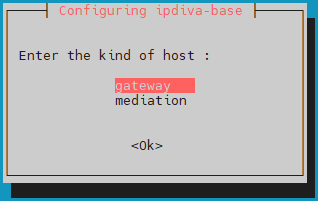
Tar éis na spleáchais go léir a íoslódáil, osclófar fuinneog ag iarraidh ort cineál an fhreastalaí a roghnú. Roghnaigh gateway:
Cad ba cheart dom a dhéanamh má tá earráid ann?

Má tá earráid san fhaisnéis a d'iontráil tú, lean ar aghaidh ag suiteáil an phacáiste ipdiva-base agus ansin úsáid an t-ordú seo a leanas chun an freastalaí a athchumrú:

1
dpkg-reconfigure ipdiva-base

Suiteáil na gcomhpháirteanna Edge Gateway

Ansin, tosaigh suiteáil na gcomhpháirteanna a bhaineann go sonrach leis an bhfreastalaí Edge Gateway leis an ordú seo a leanas:

1
apt install -y ipdiva-safe-gateway ipdiva-gateway-setup

Tá comhpháirteanna an fhreastalaí Edge Gateway suiteáilte anois. Níl fágtha ach an ríomhaire a atosú ionas gur féidir leis na comhpháirteanna nuashuiteáilte iad féin a thúsú:

1
reboot

Suiteáil na gcomhpháirteanna HTML5 Gateway

Úsáid an t-ordú seo a leanas chun tosú ag suiteáil comhpháirteanna HTML5 Gateway ar an bhfreastalaí Edge Gateway:

1
apt install -y ipdiva-html5gateway ipdiva-html5-webapp ipdiva-guacamole-server1

Úsáid na línte ordaithe seo a leanas chun na gnéithe aistrithe comhad agus printéara fhíorúil a chumasú agus a chumrú:

1
2
3
apt install -y ghostscript
echo -e "printer=cyberelements HTML5 Printer\nprinterDriver=MS Publisher Imagesetter" > /etc/guacamole/printer-config
mkdir /home/systanciahtml5share

Socruithe a bhaineann go sonrach le feidhmiú CyberElements Bastion

Nuair a bheidh na socruithe líonra curtha i bhfeidhm, ní mór duit fós na cásanna Edge Gateway agus HTML5 Gateway a cheangal leis na comhpháirteanna Mediation Controller.
Chuige sin, ceanglóidh na chéad chásanna Edge Gateway agus HTML5 Gateway leis an gcomhpháirt Mediation Controller MASTER, agus ceanglóidh na dara cásanna leis an gcomhpháirt Mediation Controller SLAVE.

Aire!

Mura bhfuil suiteáil an fhreastalaí Edge Gateway laistigh den LAN agus, dá bhrí sin, mura féidir teacht ar na seoltaí RIP_MED_SSL_MASTER agus RIP_MED_SSL_SLAVE (fiú le NAT).
Sa chás sin, ní bheidh ort ach an chéad chás Edge Gateway agus HTML5 Gateway a chumrú, a shocrófar chun ceangal le VIP_MED_SSL.

Sa chomhthéacs seo, is féidir an fearas fíorúil Standalone a úsáid. Tá an fearas fíorúil Cluster réamhchumraithe le dhá chás, agus tá a chomhghleacaí Standalone réamhchumraithe le cás amháin.

Sula leanann tú ar aghaidh leis na treoracha seo a leanas, cinntigh go bhfuil na míreanna seo a leanas agat:

  • Deimhniú do na cásanna Edge Gateway agus HTML5 Gateway atá le ceangal
  • Deimhniú don tseirbhís taifeadta
  • Cliant SSH (ar Windows, is féidir leat PuTTY a úsáid)
  • Cliant SCP (ar Windows, is féidir na huirlisí WinSCP nó FileZilla a úsáid)

Aistrigh na deimhnithe chuig comhadlann /tmp/ an ríomhaire.

Áscanna a chruthú chun ceangal leis an bhfreastalaí Mediation Controller SLAVE

Rith na horduithe seo a leanas mar root chun ásc nua de chuid Edge Gateway agus HTML5 Gateway a fhógairt, a úsáidfear chun ceangal leis an bhfreastalaí Mediation Controller SLAVE:

1
2
/usr/local/ipdiva/gateway/bin/gatewayCloner -slave
/usr/local/ipdiva/html5gateway/bin/gatewayCloner -slave

Comhpháirteanna Edge Gateway a cheangal

Cóipeáil comhad deimhnithe na comhpháirte Edge Gateway chuig na comhadlanna /etc/ipdiva/gateway/ssl/ agus /etc/ipdiva/gateway-slave/ssl/. Is féidir leat é seo a dhéanamh trí orduithe cosúil leis na horduithe seo a leanas a rith mar root (cuir ainm an deimhnithe don chomhpháirt Edge Gateway in ionad <CERT_NAME>):

1
2
cp /tmp/<CERT_NAME> /etc/ipdiva/gateway/ssl/
mv /tmp/<CERT_NAME> /etc/ipdiva/gateway-slave/ssl/

Cumraigh na cásanna Edge Gateway ionas gur féidir leo ceangal leis na comhpháirteanna Mediation Controller.
Bíonn na cumraíochtaí difriúil ag brath ar an gcomhpháirt Mediation Controller atá le teagmháil. Déan an dá shocrú:

Cuir an comhad /etc/ipdiva/gateway/gateway.xml in eagar agus líon isteach é leis an bhfaisnéis seo a leanas (fágadh roinnt codanna ar lár agus tá siad léirithe le […]):

 1
 2
 3
 4
 5
 6
 7
 8
 9
10
<gateway>
    <server>_FILL_ME_WITH_SERVER_ADDRESS_::ssl</server>
[…]
    <ssl>
        <cert>/etc/ipdiva/gateway/ssl/keyfile.pem</cert>
        <password>PASSWORD</password>
[…]
    </ssl>
[…]
</gateway>

Athchuir na heilimintí seo a leanas:

  • _FILL_ME_WITH_SERVER_ADDRESS_:: ní mór an seoladh RIP_MED_SSL_MASTER, an carachtar : agus port éisteachta na comhpháirte SSL Router, 443 de ghnáth, a chur ina ionad
  • keyfile.pem: ní mór ainm an chomhaid deimhnithe a chur ina ionad
  • PASSWORD: ní mór pasfhocal an deimhnithe a chur ina ionad
Sampla

Ag cur na faisnéise seo a leanas san áireamh:

  • Luach RIP_MED_SSL_MASTER: 10.0.10.11
  • Port éisteachta na comhpháirte SSL Router: 443
  • Ainm an chomhaid deimhnithe: edge-gateway.p12
  • Pasfhocal an deimhnithe: Str0ngP@ssw0rd

Chumrófaí an comhad /etc/ipdiva/gateway/gateway.xml mar seo a leanas:

 1
 2
 3
 4
 5
 6
 7
 8
 9
10
<gateway>
    <server>10.0.10.11:443:ssl</server>
[…]
    <ssl>
        <cert>/etc/ipdiva/gateway/ssl/edge-gateway.p12</cert>
        <password>Str0ngP@ssw0rd</password>
[…]
    </ssl>
[…]
</gateway>
Comhad iomlán
 1
 2
 3
 4
 5
 6
 7
 8
 9
10
11
12
13
14
15
16
17
18
19
20
21
22
23
24
25
26
27
28
29
30
31
32
33
34
35
36
37
38
39
40
41
42
43
44
45
46
47
48
49
50
51
52
53
54
55
56
57
58
59
60
61
62
63
64
65
66
67
68
69
70
71
72
73
74
75
76
77
78
79
80
81
<gateway>
        <server>10.0.10.11:443:ssl</server>
        <pipe>
                <ping-timeout>60000</ping-timeout>
                <rout-max-lock>20000</rout-max-lock>
        </pipe>
        <timeout>
                <reconnect>15000</reconnect>
        </timeout>
        <ticket><hmac></hmac></ticket>
        <proxy>
                <type>no</type>
                <address></address>
                <login></login>
                <password></password>
                <domain></domain>
        </proxy>
        <periodic-licence-check>false</periodic-licence-check>
        <session>
           <sslconf name="default">
              <ca-dir>/etc/ssl/certs</ca-dir>
              <verify-cert>true</verify-cert>
           </sslconf>
        </session>
        <ssl>
                <cert>/etc/ipdiva/gateway/ssl/edge-gateway.p12</cert>
                <password>Str0ngP@ssw0rd</password>
                <ca-dir>/etc/ipdiva/gateway/ssl/ca</ca-dir>
                <min-version>tls1.3</min-version>
                <max-version></max-version>
                <cipherlist>!ADH:!AECDH:!MD5:kEECDH+AES:kEDH+AES:AES256+RSA:3DES+RSA</cipherlist>
                <cipherlist-tls1.3>TLS_CHACHA20_POLY1305_SHA256:TLS_AES_256_GCM_SHA384:TLS_AES_128_GCM_SHA256</cipherlist-tls1.3>
                <verify-cert>true</verify-cert>
                <verify-certhostnamematch>true</verify-certhostnamematch>
        </ssl>
        <webaccess>
                <proxy></proxy>
                <useragent>true</useragent>
                <autoauth>true</autoauth>
                <forceauth>false</forceauth>
                <forcebasic>false</forcebasic>
                <persistentbasicauth>true</persistentbasicauth>
                <cache-date>Thu, 14 Dec 2006 09:28:00 GMT</cache-date>
                <reverse-proxy>
                        <headers>
                                <x-forwarded-for enabled='false'/>
                                <x-forwarded-host enabled='false'/>
                        </headers>
                </reverse-proxy>
                <davenport compatibilityMode="false">127.0.0.1:8070</davenport>
        </webaccess>
        <rpc-listen>127.0.0.1:9080</rpc-listen>
        <network-id></network-id>
        <services>/etc/ipdiva/gateway/services.xml</services>
        <compression>zlib</compression>
        <vlan>
                <prefixe></prefixe>
        </vlan>

        <openvpn>
                <ssl>
                        <cert>/usr/local/ipdiva/share/gw-controller-openvpnng/keys/allInOne.pem</cert>
                        <ca-file>/usr/local/ipdiva/share/gw-controller-openvpnng/keys/tmp-ca.crt</ca-file>
                        <version>tls1</version>
                </ssl>
                <client-ov>
                        <ip-type>V4</ip-type>
                        <dev-type>tun</dev-type>
                        <link-mtu>1507</link-mtu>
                        <tun-mtu>1500</tun-mtu>
                        <proto>TCPv4_CLIENT</proto>
                        <cipher>[null-cipher]</cipher>
                        <auth>[null-digest]</auth>
                        <keysize>0</keysize>
                        <key-method>2</key-method>
                        <tls-type>tls-client</tls-type>
                </client-ov>
        </openvpn>
    <useoldprotocol>false</useoldprotocol>
    <rate>0</rate>
</gateway>

Ar deireadh, tosaigh an cás Edge Gateway chun na socruithe nua a lódáil agus chun é a cheangal leis an gcomhpháirt Mediation Controller MASTER:

1
/usr/local/ipdiva/gateway/bin/start

Cuir an comhad /etc/ipdiva/gateway-slave/gateway.xml in eagar agus comhlánaigh é leis an bhfaisnéis seo a leanas (fágadh roinnt codanna ar lár agus tá siad léirithe le […]):

 1
 2
 3
 4
 5
 6
 7
 8
 9
10
11
12
<gateway>
    <server>@SERVER@:@SERVERPORT@:ssl</server>
[…]
    <ssl>
        <cert>/etc/ipdiva/gateway-slave/ssl/keyfile.pem</cert>
        <password>PASSWORD</password>
[…]
    </ssl>
[…]
    <rpc-listen>127.0.0.1:@RPC_PORT@</rpc-listen>
[…]
</gateway>

Athchuir na heilimintí seo a leanas:

  • @SERVER@: ní mór an seoladh RIP_MED_SSL_SLAVE a chur ina ionad
  • @SERVERPORT@: ní mór port éisteachta na comhpháirte SSL Router a chur ina ionad, 443 de ghnáth
  • keyfile.pem: ní mór ainm an chomhaid deimhnithe a chur ina ionad
  • PASSWORD: ní mór pasfhocal an deimhnithe a chur ina ionad
  • @RPC_PORT@: ní mór port TCP atá ar fáil ar an ríomhaire a chur ina ionad; úsáidtear an port 9081 go coitianta
Sampla

Ag cur na faisnéise seo a leanas san áireamh:

  • Luach RIP_MED_SSL_SLAVE: 10.0.10.13
  • Port éisteachta na comhpháirte SSL Router: 443
  • Ainm an chomhaid deimhnithe: edge-gateway.p12
  • Pasfhocal an deimhnithe: Str0ngP@ssw0rd
  • Port RPC atá ar fáil: 9081

Chumrófaí an comhad /etc/ipdiva/gateway-slave/gateway.xml mar seo a leanas:

 1
 2
 3
 4
 5
 6
 7
 8
 9
10
11
12
<gateway>
    <server>10.0.10.13:443:ssl</server>
[…]
    <ssl>
        <cert>/etc/ipdiva/gateway-slave/ssl/edge-gateway.p12</cert>
        <password>Str0ngP@ssw0rd</password>
[…]
    </ssl>
[…]
    <rpc-listen>127.0.0.1:9081</rpc-listen>
[…]
</gateway>
Comhad iomlán
 1
 2
 3
 4
 5
 6
 7
 8
 9
10
11
12
13
14
15
16
17
18
19
20
21
22
23
24
25
26
27
28
29
30
31
32
33
34
35
36
37
38
39
40
41
42
43
44
45
46
47
48
49
50
51
52
53
54
55
56
57
58
59
60
61
62
63
64
65
66
67
68
69
70
71
72
73
74
75
76
77
78
79
80
81
<gateway>
        <server>10.0.10.13:443:ssl</server>
        <pipe>
                <ping-timeout>60000</ping-timeout>
                <rout-max-lock>20000</rout-max-lock>
        </pipe>
        <timeout>
                <reconnect>15000</reconnect>
        </timeout>
        <ticket><hmac></hmac></ticket>
        <proxy>
                <type>no</type>
                <address></address>
                <login></login>
                <password></password>
                <domain></domain>
        </proxy>
        <periodic-licence-check>false</periodic-licence-check>
        <session>
           <sslconf name="default">
              <ca-dir>/etc/ssl/certs</ca-dir>
              <verify-cert>true</verify-cert>
           </sslconf>
        </session>
        <ssl>
                <cert>/etc/ipdiva/gateway-slave/ssl/edge-gateway.p12</cert>
                <password>Str0ngP@ssw0rd</password>
                <ca-dir>/etc/ipdiva/gateway-slave/ssl/ca</ca-dir>
                <min-version>tls1.3</min-version>
                <max-version></max-version>
                <cipherlist>!ADH:!AECDH:!MD5:kEECDH+AES:kEDH+AES:AES256+RSA:3DES+RSA</cipherlist>
                <cipherlist-tls1.3>TLS_CHACHA20_POLY1305_SHA256:TLS_AES_256_GCM_SHA384:TLS_AES_128_GCM_SHA256</cipherlist-tls1.3>
                <verify-cert>true</verify-cert>
                <verify-certhostnamematch>true</verify-certhostnamematch>
        </ssl>
        <webaccess>
                <proxy></proxy>
                <useragent>true</useragent>
                <autoauth>true</autoauth>
                <forceauth>false</forceauth>
                <forcebasic>false</forcebasic>
                <persistentbasicauth>true</persistentbasicauth>
                <cache-date>Thu, 14 Dec 2006 09:28:00 GMT</cache-date>
                <reverse-proxy>
                        <headers>
                                <x-forwarded-for enabled='false'/>
                                <x-forwarded-host enabled='false'/>
                        </headers>
                </reverse-proxy>
                <davenport compatibilityMode="false">127.0.0.1:8070</davenport>
        </webaccess>
        <rpc-listen>127.0.0.1:9081</rpc-listen>
        <network-id></network-id>
        <services>/etc/ipdiva/gateway-slave/services.xml</services>
        <compression>zlib</compression>
        <vlan>
                <prefixe></prefixe>
        </vlan>

        <openvpn>
                <ssl>
                        <cert>/usr/local/ipdiva/share/gw-controller-openvpnng/keys/allInOne.pem</cert>
                        <ca-file>/usr/local/ipdiva/share/gw-controller-openvpnng/keys/tmp-ca.crt</ca-file>
                        <version>tls1</version>
                </ssl>
                <client-ov>
                        <ip-type>V4</ip-type>
                        <dev-type>tun</dev-type>
                        <link-mtu>1507</link-mtu>
                        <tun-mtu>1500</tun-mtu>
                        <proto>TCPv4_CLIENT</proto>
                        <cipher>[null-cipher]</cipher>
                        <auth>[null-digest]</auth>
                        <keysize>0</keysize>
                        <key-method>2</key-method>
                        <tls-type>tls-client</tls-type>
                </client-ov>
        </openvpn>
    <useoldprotocol>false</useoldprotocol>
    <rate>0</rate>
</gateway>

Ar deireadh, tosaigh an cás Edge Gateway chun na socruithe nua a lódáil agus chun é a cheangal leis an gcomhpháirt Mediation Controller SLAVE:

1
/usr/local/ipdiva/gateway-slave/bin/start

Cumraíocht na seirbhíse taifeadta

Bog deimhniú na seirbhíse taifeadta chuig an gcomhadlann /etc/ipdiva/careserver/ le hordú cosúil leis an gceann seo (cuir ainm an deimhnithe atá beartaithe in ionad <CERT_NAME>):

1
mv /tmp/<CERT_NAME> /etc/ipdiva/careserver/

Ansin, cumraigh an tseirbhís tríd an gcomhad seo a leanas a athrú: /etc/ipdiva/careserver/careserver.xml. Ba cheart go mbeadh cumraíocht an chomhaid cosúil leis seo (fágtar go leor línte den chomhad ar lár sa sliocht seo a leanas, agus tá siad marcáilte le […]):

 1
 2
 3
 4
 5
 6
 7
 8
 9
10
11
12
13
14
15
<?xml version="1.0" ?><careserver>

    <listen>0.0.0.0:8443</listen>
[…]
    <ssl>
        <cert>/etc/ipdiva/careserver/recording_service.p12</cert>
        <password>PASSWORD</password>
[…]
    </ssl>
    <xmlrpc-connect>
        <element>http://127.0.0.1:9080</element>
        <element>http://127.0.0.1:9081</element>
    </xmlrpc-connect>
[…]
</careserver>

Déan na hathruithe seo a leanas:

  • Athraigh seoladh IP éisteachta na seirbhíse taifeadta go 0.0.0.0 (éisteann sí ar gach seoladh IP atá ar fáil)
  • Cuir ainm an deimhnithe don tseirbhís taifeadta in ionad recording_service.p12
  • Cuir pasfhocal an deimhnithe don tseirbhís taifeadta in ionad PASSWORD
  • Cuir an líne <element>http://127.0.0.1:9081</element> leis
Sampla

Ag cur na faisnéise seo a leanas san áireamh:

  • Ainm an chomhaid deimhnithe: fqdn.edge-gateway.local.p12
  • Pasfhocal an deimhnithe: Str0ngP@ssw0rd

Chumrófaí an comhad /etc/ipdiva/careserver/careserver.xml mar seo a leanas:

 1
 2
 3
 4
 5
 6
 7
 8
 9
10
11
12
13
14
15
<?xml version="1.0" ?><careserver>

    <listen>0.0.0.0:8443</listen>
[…]
    <ssl>
        <cert>/etc/ipdiva/careserver/fqdn.edge-gateway.local.p12</cert>
        <password>Str0ngP@ssw0rd</password>
[…]
    </ssl>
    <xmlrpc-connect>
        <element>http://127.0.0.1:9080</element>
        <element>http://127.0.0.1:9081</element>
    </xmlrpc-connect>
[…]
</careserver>
Comhad iomlán
 1
 2
 3
 4
 5
 6
 7
 8
 9
10
11
12
13
14
15
16
17
18
19
20
21
22
23
24
25
26
27
28
29
30
31
<?xml version="1.0" ?><careserver>

    <listen>0.0.0.0:8443</listen>


    <archivesdirectory>/var/lib/ipdiva/carerecord/archives</archivesdirectory>
    <recordingdirectory>/var/lib/ipdiva/carerecord/recording</recordingdirectory>
    <ssl>
        <cert>/etc/ipdiva/careserver/fqdn.edge-gateway.local.p12</cert>
        <password>Str0ngP@ssw0rd</password>
        <ca-dir>/etc/ipdiva/gateway/ssl/ca</ca-dir>
        <min-version>tls1.2</min-version>
        <max-version/>
        <cipherlist>!ADH:!AECDH:!MD5:kEECDH+AES:kEDH+AES:AES256+RSA:3DES+RSA</cipherlist>
        <cipherlist-tls1.3>TLS_CHACHA20_POLY1305_SHA256:TLS_AES_256_GCM_SHA384:TLS_AES_128_GCM_SHA256</cipherlist-tls1.3>
        <verify-cert>true</verify-cert>
        <no-fail-if-no-peer-cert>true</no-fail-if-no-peer-cert>
    </ssl>
    <gopsize>10</gopsize>
        <webgopsize>5</webgopsize>
    <webfakeframespersec>2</webfakeframespersec>
        <webhlslistsize>20</webhlslistsize>
    <webcaptureinterval>10000</webcaptureinterval>
    <webcapturetimeout>30000</webcapturetimeout>
    <captureinterval>250</captureinterval>
    <hlslistsize>20</hlslistsize>
    <xmlrpc-connect>
        <element>http://127.0.0.1:9080</element>
        <element>http://127.0.0.1:9081</element>
    </xmlrpc-connect>
</careserver>

Bailíochtaigh na socruithe nua tríd an tseirbhís taifeadta a atosú:

1
systemctl restart ipdivacarerecord

Áscanna HTML5 Gateway a cheangal

Más gá an t-ásc HTML5 Gateway a chumrú, rith an t-ordú seo a leanas ar an bhfreastalaí Edge Gateway mar root chun tosú uathoibríoch a chumasú don ásc:

1
chmod +x /etc/ipdiva/services/50html5gateway

Cóipeáil comhad deimhnithe na comhpháirte HTML5 Gateway chuig na comhadlanna /etc/ipdiva/html5gateway/ssl/ agus /etc/ipdiva/html5gateway-slave/ssl/. Is féidir leat é seo a dhéanamh trí orduithe cosúil leis na horduithe seo a leanas a rith mar root (cuir ainm an deimhnithe don chomhpháirt HTML5 Gateway in ionad <CERT_NAME>):

1
2
cp /tmp/<CERT_NAME> /etc/ipdiva/html5gateway/ssl/
mv /tmp/<CERT_NAME> /etc/ipdiva/html5gateway-slave/ssl/

Cumraigh na cásanna HTML5 Gateway ionas gur féidir leo ceangal leis na comhpháirteanna Mediation Controller.
Bíonn na cumraíochtaí difriúil ag brath ar an gcomhpháirt Mediation Controller atá le teagmháil. Déan an dá shocrú:

Cuir an comhad /etc/ipdiva/html5gateway/html5gateway.xml in eagar agus comhlánaigh é leis an bhfaisnéis seo a leanas (fágadh roinnt codanna ar lár agus tá siad léirithe le […]):

 1
 2
 3
 4
 5
 6
 7
 8
 9
10
<gateway>
    <server>_FILL_ME_WITH_SERVER_ADDRESS_::ssl</server>
[…]
    <ssl>
        <cert>/etc/ipdiva/html5gateway/ssl/keyfile.pem</cert>
        <password>PASSWORD</password>
[…]
    </ssl>
[…]
</gateway>

Athchuir na heilimintí seo a leanas:

  • _FILL_ME_WITH_SERVER_ADDRESS_:: ní mór an seoladh RIP_MED_SSL_MASTER, an carachtar : agus port éisteachta na comhpháirte SSL Router, 443 de ghnáth, a chur ina ionad
  • keyfile.pem: ní mór ainm an chomhaid deimhnithe a chur ina ionad
  • PASSWORD: ní mór pasfhocal an deimhnithe a chur ina ionad
Sampla

Ag cur na faisnéise seo a leanas san áireamh:

  • Luach RIP_MED_SSL_MASTER: 10.0.10.11
  • Port éisteachta na comhpháirte SSL Router: 443
  • Ainm an chomhaid deimhnithe: html5-gateway.p12
  • Pasfhocal an deimhnithe: Str0ngP@ssw0rd

Chumrófaí an comhad /etc/ipdiva/html5gateway/html5gateway.xml mar seo a leanas:

 1
 2
 3
 4
 5
 6
 7
 8
 9
10
<gateway>
    <server>10.0.10.11:443:ssl</server>
[…]
    <ssl>
        <cert>/etc/ipdiva/html5gateway/ssl/html5-gateway.p12</cert>
        <password>Str0ngP@ssw0rd</password>
[…]
    </ssl>
[…]
</gateway>
Comhad iomlán
 1
 2
 3
 4
 5
 6
 7
 8
 9
10
11
12
13
14
15
16
17
18
19
20
21
22
23
24
25
26
27
28
29
30
31
32
33
34
35
<gateway>
        <server>10.0.10.11:443:ssl</server>
        <pipe>
                <ping-timeout>60000</ping-timeout>
                <rout-max-lock>20000</rout-max-lock>
        </pipe>
        <timeout>
                <reconnect>15000</reconnect>
        </timeout>
        <ticket><hmac></hmac></ticket>
        <proxy>
                <type>no</type>
                <address></address>
                <login></login>
                <password></password>
                <domain></domain>
        </proxy>

        <ssl>
                <cert>/etc/ipdiva/html5gateway/ssl/html5-gateway.p12</cert>
                <password>Str0ngP@ssw0rd</password>
                <ca-dir>/etc/ipdiva/html5gateway/ssl/ca</ca-dir>
                <min-version>tls1.3</min-version>
                <max-version></max-version>
                <cipherlist>!ADH:!AECDH:!MD5:kEECDH+AES:kEDH+AES:AES256+RSA:3DES+RSA</cipherlist>
                <cipherlist-tls1.3>TLS_CHACHA20_POLY1305_SHA256:TLS_AES_256_GCM_SHA384:TLS_AES_128_GCM_SHA256</cipherlist-tls1.3>
                <verify-cert>true</verify-cert>
                <verify-certhostnamematch>true</verify-certhostnamematch>
        </ssl>

        <rpc-listen>127.0.0.1:9088</rpc-listen>
        <network-id></network-id>
        <compression>zlib</compression>

 </gateway>

Ar deireadh, atosaigh an cás HTML5 Gateway chun na socruithe nua a lódáil agus chun é a cheangal leis an gcomhpháirt Mediation Controller MASTER:

1
/usr/local/ipdiva/html5gateway/bin/start

Cuir an comhad /etc/ipdiva/html5gateway-slave/html5gateway.xml in eagar agus comhlánaigh é leis an bhfaisnéis seo a leanas (fágadh roinnt codanna ar lár agus tá siad léirithe le […]):

 1
 2
 3
 4
 5
 6
 7
 8
 9
10
11
12
<gateway>
    <server>@SERVER@:@SERVERPORT@:ssl</server>
[…]
    <ssl>
        <cert>/etc/ipdiva/html5gateway-slave/ssl/keyfile.pem</cert>
        <password>PASSWORD</password>
[…]
    </ssl>
[…]
    <rpc-listen>127.0.0.1:@RPC_PORT@</rpc-listen>
[…]
</gateway>

Athchuir na heilimintí seo a leanas:

  • @SERVER@: ní mór an seoladh RIP_MED_SSL_SLAVE a chur ina ionad
  • @SERVERPORT@: ní mór port éisteachta na comhpháirte SSL Router a chur ina ionad, 443 de ghnáth
  • keyfile.pem: ní mór ainm an chomhaid deimhnithe a chur ina ionad
  • PASSWORD: ní mór pasfhocal an deimhnithe a chur ina ionad
  • @RPC_PORT@: ní mór port TCP atá ar fáil ar an ríomhaire a chur ina ionad; úsáidtear an port 9089 go coitianta
Sampla

Ag cur na faisnéise seo a leanas san áireamh:

  • Luach RIP_MED_SSL_SLAVE: 10.0.10.13
  • Port éisteachta na comhpháirte SSL Router: 443
  • Ainm an chomhaid deimhnithe: html5-gateway.p12
  • Pasfhocal an deimhnithe: Str0ngP@ssw0rd
  • Port RPC atá ar fáil: 9089

Chumrófaí an comhad /etc/ipdiva/html5gateway-slave/html5gateway.xml mar seo a leanas:

 1
 2
 3
 4
 5
 6
 7
 8
 9
10
11
12
<gateway>
    <server>10.0.10.13:443:ssl</server>
[…]
    <ssl>
        <cert>/etc/ipdiva/html5gateway-slave/ssl/html5-gateway.p12</cert>
        <password>Str0ngP@ssw0rd</password>
[…]
    </ssl>
[…]
    <rpc-listen>127.0.0.1:9089</rpc-listen>
[…]
</gateway>
Comhad iomlán
 1
 2
 3
 4
 5
 6
 7
 8
 9
10
11
12
13
14
15
16
17
18
19
20
21
22
23
24
25
26
27
28
29
30
31
32
33
34
35
<gateway>
        <server>10.0.10.13:443:ssl</server>
        <pipe>
                <ping-timeout>60000</ping-timeout>
                <rout-max-lock>20000</rout-max-lock>
        </pipe>
        <timeout>
                <reconnect>15000</reconnect>
        </timeout>
        <ticket><hmac></hmac></ticket>
        <proxy>
                <type>no</type>
                <address></address>
                <login></login>
                <password></password>
                <domain></domain>
        </proxy>

        <ssl>
                <cert>/etc/ipdiva/html5gateway-slave/ssl/html5-gateway.p12</cert>
                <password>Str0ngP@ssw0rd</password>
                <ca-dir>/etc/ipdiva/html5gateway-slave/ssl/ca</ca-dir>
                <min-version>tls1.3</min-version>
                <max-version></max-version>
                <cipherlist>!ADH:!AECDH:!MD5:kEECDH+AES:kEDH+AES:AES256+RSA:3DES+RSA</cipherlist>
                <cipherlist-tls1.3>TLS_CHACHA20_POLY1305_SHA256:TLS_AES_256_GCM_SHA384:TLS_AES_128_GCM_SHA256</cipherlist-tls1.3>
                <verify-cert>true</verify-cert>
                <verify-certhostnamematch>true</verify-certhostnamematch>
        </ssl>

        <rpc-listen>127.0.0.1:9089</rpc-listen>
        <network-id></network-id>
        <compression>zlib</compression>

 </gateway>

Ar deireadh, atosaigh an cás HTML5 Gateway chun na socruithe nua a lódáil agus chun é a cheangal leis an gcomhpháirt Mediation Controller SLAVE:

1
/usr/local/ipdiva/html5gateway-slave/bin/start

Cumraíochtaí roimh chomhpháirteanna HTML5 Gateway a cheangal

Chun go n-oibreoidh feidhmchláir HTML5, ní mór socruithe breise a chumrú ar na freastalaithe Mediation Controller. Logáil isteach mar root ar na freastalaithe Mediation Controller MASTER agus SLAVE.

Cruthaigh nó cuir in eagar an comhad /etc/ipdiva/httpd/commonParameters.extra.conf chun cuid atá coibhéiseach leis an gcuid seo a leanas a chur leis don chomhpháirt HTML5 Gateway:

 1
 2
 3
 4
 5
 6
 7
 8
 9
10
11
12
13
14
15
16
17
18
19
20
21
<Location /URL_HTML5/>
        Order allow,deny
        Allow from all
        RequestHeader set X-Forwarded-Proto "https"
        RequestHeader set X-IPdiva-Gateway GW_NAME|
        RequestHeader set X-IPdiva-Orgname ORGANIZATION_NAME
        RequestHeader set X-IPdiva-Service 127.0.0.1:8080

        ProxyPass http://127.0.0.1:9016/systanciaHTML5-6.0/ flushpackets=on
</Location>

<Location /URL_HTML5/websocket-tunnel>
        Order allow,deny
        Allow from all
        RequestHeader set X-Forwarded-Proto "https"
        RequestHeader set X-IPdiva-Gateway GW_NAME|
        RequestHeader set X-IPdiva-Orgname ORGANIZATION_NAME
        RequestHeader set X-IPdiva-Service 127.0.0.1:8080

        ProxyPass ws://127.0.0.1:9016/systanciaHTML5-6.0/websocket-tunnel
</Location>

Sa chás seo:

  • Ní mór ábhar an réimse URL don chomhpháirt HTML5 Gateway a cumraíodh sa chonsól riaracháin le linn clárú na comhpháirte HTML5 Gateway a chur in ionad URL_HTML5 (i gcás braisle, HTML5-1 agus HTML5-2 a bhíonn ann de ghnáth).
  • Ní mór ainm comhpháirte Edge Gateway atá ar an bhfreastalaí céanna leis an gcomhpháirt HTML5 Gateway a chur in ionad GW_NAME. Maidir leis an gcarachtar | ag deireadh na líne, ní mór é a choinneáil.
  • Ní mór ainm na heagraíochta lena gceanglaíonn an chomhpháirt Edge Gateway roimhe seo a chur in ionad ORGANIZATION_NAME.
Sampla

I gcás ardáin a bhfuil na socruithe seo a leanas aige:

  • Ainm na heagraíochta: my-organization-name
  • Clárú na chéad chomhpháirte HTML5 Gateway sa chonsól riaracháin:
    • Name: html5-gateway-1
    • URL: HTML5-1
    • Protocol: WebSocket
  • Clárú na dara comhpháirte HTML5 Gateway sa chonsól riaracháin:
    • Name: html5-gateway-2
    • URL: HTML5-2
    • Protocol: WebSocket
  • Tá na nithe seo a leanas ag freastalaí Edge Gateway ar an gcéad chomhpháirt HTML5 Gateway:
    • Seirbhís Edge Gateway darb ainm edge-gateway-1
    • Seirbhís HTML5 Gateway darb ainm html5-gateway-1
  • Tá na nithe seo a leanas ag freastalaí Edge Gateway ar an dara comhpháirt HTML5 Gateway:
    • Seirbhís Edge Gateway darb ainm edge-gateway-2
    • Seirbhís HTML5 Gateway darb ainm html5-gateway-2

Socrófar an comhad cumraíochta /etc/ipdiva/httpd/commonParameters.extra.conf a cruthaíodh mar seo a leanas:

 1
 2
 3
 4
 5
 6
 7
 8
 9
10
11
12
13
14
15
16
17
18
19
20
21
22
23
24
25
26
27
28
29
30
31
32
33
34
35
36
37
38
39
40
41
42
43
<Location /HTML5-1/>
        Order allow,deny
        Allow from all
        RequestHeader set X-Forwarded-Proto "https"
        RequestHeader set X-IPdiva-Gateway edge-gateway-1|
        RequestHeader set X-IPdiva-Orgname my-organization-name
        RequestHeader set X-IPdiva-Service 127.0.0.1:8080

        ProxyPass http://127.0.0.1:9016/systanciaHTML5-6.0/ flushpackets=on
</Location>

<Location /HTML5-1/websocket-tunnel>
        Order allow,deny
        Allow from all
        RequestHeader set X-Forwarded-Proto "https"
        RequestHeader set X-IPdiva-Gateway edge-gateway-1|
        RequestHeader set X-IPdiva-Orgname my-organization-name
        RequestHeader set X-IPdiva-Service 127.0.0.1:8080

        ProxyPass ws://127.0.0.1:9016/systanciaHTML5-6.0/websocket-tunnel
</Location>

<Location /HTML5-2/>
        Order allow,deny
        Allow from all
        RequestHeader set X-Forwarded-Proto "https"
        RequestHeader set X-IPdiva-Gateway edge-gateway-2|
        RequestHeader set X-IPdiva-Orgname my-organization-name
        RequestHeader set X-IPdiva-Service 127.0.0.1:8080

        ProxyPass http://127.0.0.1:9016/systanciaHTML5-6.0/ flushpackets=on
</Location>

<Location /HTML5-2/websocket-tunnel>
        Order allow,deny
        Allow from all
        RequestHeader set X-Forwarded-Proto "https"
        RequestHeader set X-IPdiva-Gateway edge-gateway-2|
        RequestHeader set X-IPdiva-Orgname my-organization-name
        RequestHeader set X-IPdiva-Service 127.0.0.1:8080

        ProxyPass ws://127.0.0.1:9016/systanciaHTML5-6.0/websocket-tunnel
</Location>

Sula gcuireann tú na socruithe nua i bhfeidhm, ní mór duit a sheiceáil nach gcruthaíonn an chumraíocht nua aon earráid bhlocála don fhreastalaí gréasáin Apache2.
Chun é seo a dhéanamh, rith an t-ordú seo a leanas:

1
apache2ctl configtest

Más é Syntax OK an freagra, is féidir na hathruithe a chur i bhfeidhm leis an ordú thíos. Murab ea, seiceáil do chumraíocht sa chomhad /etc/ipdiva/httpd/commonParameters.extra.conf.

1
systemctl reload apache2

Freastalaí ama NTP a chumrú

Moltar freastalaí ama a shocrú chun clog an chórais a choinneáil cothrom le dáta. Tá cur síos ar na céimeanna riachtanacha ar an leathanach cumraíochta NTP.