Léim go dtí an t-ábhar

Suiteáil an fhreastalaí Edge Gateway

Socruithe tosaigh an chórais

Nuair a thosaítear an fearas Edge Gateway Cluster den chéad uair, taispeántar draoi cumraíochta tosaigh don ríomhaire. Ligeann an draoi seo duit cumraíocht shonrach an chórais a thúsú chomh maith leis an gcumraíocht a bhaineann go sonrach le húsáid CyberElements Bastion.

Socruithe córais

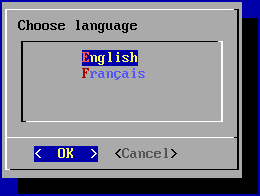
Iarrann an draoi ort teanga a roghnú ar dtús:
Faisnéis

Beidh tionchar ag an teanga a roghnaíonn tú ar theanga taispeána an chórais agus ar leagan amach an mhéarchláir araon. I mBéarla, beidh leagan amach QWERTY ar an méarchlár, agus i bhFraincis beidh sé AZERTY.

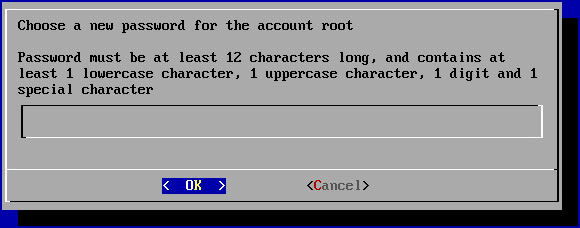
Iarrann an draoi ort ansin pasfhocal nua a chur leis don chuntas córais root (cinntigh go gcomhlíonann sé an chastacht riachtanach):
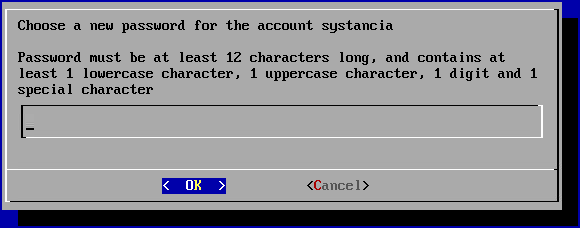
Ansin, ní mór duit pasfhocal an chuntais úsáideora córais systancia a athrú (cinntigh go gcomhlíonann sé an chastacht riachtanach):
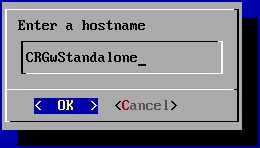
Ar deireadh, ní mór duit ainm an ríomhaire a iontráil:
Socruithe líonra

Nuair a bheidh socruithe an chórais curtha i bhfeidhm, aistríonn an draoi chuig socruithe líonra an ríomhaire.

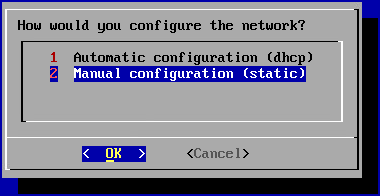
Iarrann an chéad phainéal ort rogha a dhéanamh idir cumraíocht statach agus cumraíocht dhinimiciúil trí DHCP:
Moladh

Moltar cumraíocht statach a úsáid do shocruithe líonra an ríomhaire, go háirithe don ghné rochtana dírí.
Is féidir DHCP a úsáid freisin má shocraítear an seoladh IP ar leibhéal an fhreastalaí DHCP.

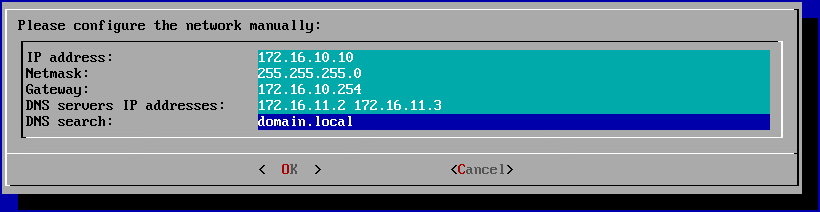
Má roghnaítear an chumraíocht statach, iarrfaidh an draoi na socruithe líonra seo a leanas:
Leid

Is féidir roinnt freastalaithe DNS a iontráil (3 ar a mhéad) trí spásanna a chur eatarthu. Ar an gcaoi chéanna, is féidir roinnt iarmhíreanna DNS a chur leis trí spás a chur eatarthu.

Na socruithe tosaigh a chríochnú

Iarrann roghchlár na cumraíochta tosaigh ort anois leanúint ar aghaidh le meicníocht péireála Edge Gateway.
Ní úsáidfear í sa doiciméadú seo, mar sin ní mór taispeáint an roghchláir seo ag logáil isteach a dhíchumasú, agus an ceangal uathoibríoch le root a dhíchumasú.

Chun é sin a dhéanamh, scoir ar dtús den roghchlár cumraíochta tosaigh, ag roghnú an chnaipe Cancel nó ag úsáid na teaglama eochracha Ctrl+C.
Ansin rith na horduithe seo a leanas:

1
2
3
4
sed -i '/gateway-setup/d' /root/.bashrc
sed -i 's/^NAutoVTs/#NAutoVTs/' /etc/systemd/logind.conf
rm -r /etc/systemd/system/getty@tty1.service.d/
systemctl daemon-reload

Socruithe a bhaineann go sonrach le feidhmiú CyberElements Bastion

Nuair a bheidh na socruithe líonra curtha i bhfeidhm, ní mór duit fós na cásanna Edge Gateway agus HTML5 Gateway a cheangal leis na comhpháirteanna Mediation Controller.
Chuige sin, ceanglóidh na chéad chásanna Edge Gateway agus HTML5 Gateway leis an gcomhpháirt Mediation Controller MASTER, agus ceanglóidh na dara cásanna leis an gcomhpháirt Mediation Controller SLAVE.

Aire!

Mura bhfuil suiteáil an fhreastalaí Edge Gateway laistigh den LAN agus, dá bhrí sin, mura féidir teacht ar na seoltaí RIP_MED_SSL_MASTER agus RIP_MED_SSL_SLAVE (fiú le NAT).
Sa chás sin, ní bheidh ort ach an chéad chás Edge Gateway agus HTML5 Gateway a chumrú, a shocrófar chun ceangal le VIP_MED_SSL.

Sa chomhthéacs seo, is féidir an fearas fíorúil Standalone a úsáid. Tá an fearas fíorúil Cluster réamhchumraithe le dhá chás, agus tá a chomhghleacaí Standalone réamhchumraithe le cás amháin.

Sula leanann tú ar aghaidh leis na treoracha seo a leanas, cinntigh go bhfuil na míreanna seo a leanas agat:

  • Deimhniú do na cásanna Edge Gateway agus HTML5 Gateway atá le ceangal
  • Deimhniú don tseirbhís taifeadta
  • Cliant SSH (ar Windows, is féidir leat PuTTY a úsáid)
  • Cliant SCP (ar Windows, is féidir na huirlisí WinSCP nó FileZilla a úsáid)

Aistrigh na deimhnithe chuig comhadlann /tmp/ an ríomhaire.

Comhpháirteanna Edge Gateway a cheangal

Cóipeáil comhad deimhnithe na comhpháirte Edge Gateway chuig na comhadlanna /etc/ipdiva/gateway/ssl/ agus /etc/ipdiva/gateway-slave/ssl/. Is féidir leat é seo a dhéanamh trí orduithe cosúil leis na horduithe seo a leanas a rith mar root (cuir ainm an deimhnithe don chomhpháirt Edge Gateway in ionad <CERT_NAME>):

1
2
cp /tmp/<CERT_NAME> /etc/ipdiva/gateway/ssl/
mv /tmp/<CERT_NAME> /etc/ipdiva/gateway-slave/ssl/

Cumraigh na cásanna Edge Gateway ionas gur féidir leo ceangal leis na comhpháirteanna Mediation Controller.
Bíonn na cumraíochtaí difriúil ag brath ar an gcomhpháirt Mediation Controller atá le teagmháil. Déan an dá shocrú:

Cuir an comhad /etc/ipdiva/gateway/gateway.xml in eagar agus líon isteach é leis an bhfaisnéis seo a leanas (fágadh roinnt codanna ar lár agus tá siad léirithe le […]):

 1
 2
 3
 4
 5
 6
 7
 8
 9
10
<gateway>
    <server>_FILL_ME_WITH_SERVER_ADDRESS_::ssl</server>
[…]
    <ssl>
        <cert>/etc/ipdiva/gateway/ssl/keyfile.pem</cert>
        <password>PASSWORD</password>
[…]
    </ssl>
[…]
</gateway>

Athchuir na heilimintí seo a leanas:

  • _FILL_ME_WITH_SERVER_ADDRESS_:: ní mór an seoladh RIP_MED_SSL_MASTER, an carachtar : agus port éisteachta na comhpháirte SSL Router, 443 de ghnáth, a chur ina ionad
  • keyfile.pem: ní mór ainm an chomhaid deimhnithe a chur ina ionad
  • PASSWORD: ní mór pasfhocal an deimhnithe a chur ina ionad
Sampla

Ag cur na faisnéise seo a leanas san áireamh:

  • Luach RIP_MED_SSL_MASTER: 10.0.10.11
  • Port éisteachta na comhpháirte SSL Router: 443
  • Ainm an chomhaid deimhnithe: edge-gateway.p12
  • Pasfhocal an deimhnithe: Str0ngP@ssw0rd

Chumrófaí an comhad /etc/ipdiva/gateway/gateway.xml mar seo a leanas:

 1
 2
 3
 4
 5
 6
 7
 8
 9
10
<gateway>
    <server>10.0.10.11:443:ssl</server>
[…]
    <ssl>
        <cert>/etc/ipdiva/gateway/ssl/edge-gateway.p12</cert>
        <password>Str0ngP@ssw0rd</password>
[…]
    </ssl>
[…]
</gateway>
Comhad iomlán
 1
 2
 3
 4
 5
 6
 7
 8
 9
10
11
12
13
14
15
16
17
18
19
20
21
22
23
24
25
26
27
28
29
30
31
32
33
34
35
36
37
38
39
40
41
42
43
44
45
46
47
48
49
50
51
52
53
54
55
56
57
58
59
60
61
62
63
64
65
66
67
68
69
70
71
72
73
74
75
76
77
78
79
80
81
<gateway>
        <server>10.0.10.11:443:ssl</server>
        <pipe>
                <ping-timeout>60000</ping-timeout>
                <rout-max-lock>20000</rout-max-lock>
        </pipe>
        <timeout>
                <reconnect>15000</reconnect>
        </timeout>
        <ticket><hmac></hmac></ticket>
        <proxy>
                <type>no</type>
                <address></address>
                <login></login>
                <password></password>
                <domain></domain>
        </proxy>
        <periodic-licence-check>false</periodic-licence-check>
        <session>
           <sslconf name="default">
              <ca-dir>/etc/ssl/certs</ca-dir>
              <verify-cert>true</verify-cert>
           </sslconf>
        </session>
        <ssl>
                <cert>/etc/ipdiva/gateway/ssl/edge-gateway.p12</cert>
                <password>Str0ngP@ssw0rd</password>
                <ca-dir>/etc/ipdiva/gateway/ssl/ca</ca-dir>
                <min-version>tls1.3</min-version>
                <max-version></max-version>
                <cipherlist>!ADH:!AECDH:!MD5:kEECDH+AES:kEDH+AES:AES256+RSA:3DES+RSA</cipherlist>
                <cipherlist-tls1.3>TLS_CHACHA20_POLY1305_SHA256:TLS_AES_256_GCM_SHA384:TLS_AES_128_GCM_SHA256</cipherlist-tls1.3>
                <verify-cert>true</verify-cert>
                <verify-certhostnamematch>true</verify-certhostnamematch>
        </ssl>
        <webaccess>
                <proxy></proxy>
                <useragent>true</useragent>
                <autoauth>true</autoauth>
                <forceauth>false</forceauth>
                <forcebasic>false</forcebasic>
                <persistentbasicauth>true</persistentbasicauth>
                <cache-date>Thu, 14 Dec 2006 09:28:00 GMT</cache-date>
                <reverse-proxy>
                        <headers>
                                <x-forwarded-for enabled='false'/>
                                <x-forwarded-host enabled='false'/>
                        </headers>
                </reverse-proxy>
                <davenport compatibilityMode="false">127.0.0.1:8070</davenport>
        </webaccess>
        <rpc-listen>127.0.0.1:9080</rpc-listen>
        <network-id></network-id>
        <services>/etc/ipdiva/gateway/services.xml</services>
        <compression>zlib</compression>
        <vlan>
                <prefixe></prefixe>
        </vlan>

        <openvpn>
                <ssl>
                        <cert>/usr/local/ipdiva/share/gw-controller-openvpnng/keys/allInOne.pem</cert>
                        <ca-file>/usr/local/ipdiva/share/gw-controller-openvpnng/keys/tmp-ca.crt</ca-file>
                        <version>tls1</version>
                </ssl>
                <client-ov>
                        <ip-type>V4</ip-type>
                        <dev-type>tun</dev-type>
                        <link-mtu>1507</link-mtu>
                        <tun-mtu>1500</tun-mtu>
                        <proto>TCPv4_CLIENT</proto>
                        <cipher>[null-cipher]</cipher>
                        <auth>[null-digest]</auth>
                        <keysize>0</keysize>
                        <key-method>2</key-method>
                        <tls-type>tls-client</tls-type>
                </client-ov>
        </openvpn>
    <useoldprotocol>false</useoldprotocol>
    <rate>0</rate>
</gateway>

Ar deireadh, tosaigh an cás Edge Gateway chun na socruithe nua a lódáil agus chun é a cheangal leis an gcomhpháirt Mediation Controller MASTER:

1
/usr/local/ipdiva/gateway/bin/start

Cuir an comhad /etc/ipdiva/gateway-slave/gateway.xml in eagar agus comhlánaigh é leis an bhfaisnéis seo a leanas (fágadh roinnt codanna ar lár agus tá siad léirithe le […]):

 1
 2
 3
 4
 5
 6
 7
 8
 9
10
11
12
<gateway>
    <server>@SERVER@:@SERVERPORT@:ssl</server>
[…]
    <ssl>
        <cert>/etc/ipdiva/gateway-slave/ssl/keyfile.pem</cert>
        <password>PASSWORD</password>
[…]
    </ssl>
[…]
    <rpc-listen>127.0.0.1:@RPC_PORT@</rpc-listen>
[…]
</gateway>

Athchuir na heilimintí seo a leanas:

  • @SERVER@: ní mór an seoladh RIP_MED_SSL_SLAVE a chur ina ionad
  • @SERVERPORT@: ní mór port éisteachta na comhpháirte SSL Router a chur ina ionad, 443 de ghnáth
  • keyfile.pem: ní mór ainm an chomhaid deimhnithe a chur ina ionad
  • PASSWORD: ní mór pasfhocal an deimhnithe a chur ina ionad
  • @RPC_PORT@: ní mór port TCP atá ar fáil ar an ríomhaire a chur ina ionad; úsáidtear an port 9081 go coitianta
Sampla

Ag cur na faisnéise seo a leanas san áireamh:

  • Luach RIP_MED_SSL_SLAVE: 10.0.10.13
  • Port éisteachta na comhpháirte SSL Router: 443
  • Ainm an chomhaid deimhnithe: edge-gateway.p12
  • Pasfhocal an deimhnithe: Str0ngP@ssw0rd
  • Port RPC atá ar fáil: 9081

Chumrófaí an comhad /etc/ipdiva/gateway-slave/gateway.xml mar seo a leanas:

 1
 2
 3
 4
 5
 6
 7
 8
 9
10
11
12
<gateway>
    <server>10.0.10.13:443:ssl</server>
[…]
    <ssl>
        <cert>/etc/ipdiva/gateway-slave/ssl/edge-gateway.p12</cert>
        <password>Str0ngP@ssw0rd</password>
[…]
    </ssl>
[…]
    <rpc-listen>127.0.0.1:9081</rpc-listen>
[…]
</gateway>
Comhad iomlán
 1
 2
 3
 4
 5
 6
 7
 8
 9
10
11
12
13
14
15
16
17
18
19
20
21
22
23
24
25
26
27
28
29
30
31
32
33
34
35
36
37
38
39
40
41
42
43
44
45
46
47
48
49
50
51
52
53
54
55
56
57
58
59
60
61
62
63
64
65
66
67
68
69
70
71
72
73
74
75
76
77
78
79
80
81
<gateway>
        <server>10.0.10.13:443:ssl</server>
        <pipe>
                <ping-timeout>60000</ping-timeout>
                <rout-max-lock>20000</rout-max-lock>
        </pipe>
        <timeout>
                <reconnect>15000</reconnect>
        </timeout>
        <ticket><hmac></hmac></ticket>
        <proxy>
                <type>no</type>
                <address></address>
                <login></login>
                <password></password>
                <domain></domain>
        </proxy>
        <periodic-licence-check>false</periodic-licence-check>
        <session>
           <sslconf name="default">
              <ca-dir>/etc/ssl/certs</ca-dir>
              <verify-cert>true</verify-cert>
           </sslconf>
        </session>
        <ssl>
                <cert>/etc/ipdiva/gateway-slave/ssl/edge-gateway.p12</cert>
                <password>Str0ngP@ssw0rd</password>
                <ca-dir>/etc/ipdiva/gateway-slave/ssl/ca</ca-dir>
                <min-version>tls1.3</min-version>
                <max-version></max-version>
                <cipherlist>!ADH:!AECDH:!MD5:kEECDH+AES:kEDH+AES:AES256+RSA:3DES+RSA</cipherlist>
                <cipherlist-tls1.3>TLS_CHACHA20_POLY1305_SHA256:TLS_AES_256_GCM_SHA384:TLS_AES_128_GCM_SHA256</cipherlist-tls1.3>
                <verify-cert>true</verify-cert>
                <verify-certhostnamematch>true</verify-certhostnamematch>
        </ssl>
        <webaccess>
                <proxy></proxy>
                <useragent>true</useragent>
                <autoauth>true</autoauth>
                <forceauth>false</forceauth>
                <forcebasic>false</forcebasic>
                <persistentbasicauth>true</persistentbasicauth>
                <cache-date>Thu, 14 Dec 2006 09:28:00 GMT</cache-date>
                <reverse-proxy>
                        <headers>
                                <x-forwarded-for enabled='false'/>
                                <x-forwarded-host enabled='false'/>
                        </headers>
                </reverse-proxy>
                <davenport compatibilityMode="false">127.0.0.1:8070</davenport>
        </webaccess>
        <rpc-listen>127.0.0.1:9081</rpc-listen>
        <network-id></network-id>
        <services>/etc/ipdiva/gateway-slave/services.xml</services>
        <compression>zlib</compression>
        <vlan>
                <prefixe></prefixe>
        </vlan>

        <openvpn>
                <ssl>
                        <cert>/usr/local/ipdiva/share/gw-controller-openvpnng/keys/allInOne.pem</cert>
                        <ca-file>/usr/local/ipdiva/share/gw-controller-openvpnng/keys/tmp-ca.crt</ca-file>
                        <version>tls1</version>
                </ssl>
                <client-ov>
                        <ip-type>V4</ip-type>
                        <dev-type>tun</dev-type>
                        <link-mtu>1507</link-mtu>
                        <tun-mtu>1500</tun-mtu>
                        <proto>TCPv4_CLIENT</proto>
                        <cipher>[null-cipher]</cipher>
                        <auth>[null-digest]</auth>
                        <keysize>0</keysize>
                        <key-method>2</key-method>
                        <tls-type>tls-client</tls-type>
                </client-ov>
        </openvpn>
    <useoldprotocol>false</useoldprotocol>
    <rate>0</rate>
</gateway>

Ar deireadh, tosaigh an cás Edge Gateway chun na socruithe nua a lódáil agus chun é a cheangal leis an gcomhpháirt Mediation Controller SLAVE:

1
/usr/local/ipdiva/gateway-slave/bin/start

Cumraíocht na seirbhíse taifeadta

Bog deimhniú na seirbhíse taifeadta chuig an gcomhadlann /etc/ipdiva/careserver/ le hordú cosúil leis an gceann seo (cuir ainm an deimhnithe atá beartaithe in ionad <CERT_NAME>):

1
mv /tmp/<CERT_NAME> /etc/ipdiva/careserver/

Ansin, cumraigh an tseirbhís tríd an gcomhad seo a leanas a athrú: /etc/ipdiva/careserver/careserver.xml. Ba cheart go mbeadh cumraíocht an chomhaid cosúil leis seo (fágtar go leor línte den chomhad ar lár sa sliocht seo a leanas, agus tá siad marcáilte le […]):

 1
 2
 3
 4
 5
 6
 7
 8
 9
10
11
12
13
14
15
<?xml version="1.0" ?><careserver>

    <listen>0.0.0.0:8443</listen>
[…]
    <ssl>
        <cert>/etc/ipdiva/careserver/recording_service.p12</cert>
        <password>PASSWORD</password>
[…]
    </ssl>
    <xmlrpc-connect>
        <element>http://127.0.0.1:9080</element>
        <element>http://127.0.0.1:9081</element>
    </xmlrpc-connect>
[…]
</careserver>

Déan na hathruithe seo a leanas:

  • Athraigh seoladh IP éisteachta na seirbhíse taifeadta go 0.0.0.0 (éisteann sí ar gach seoladh IP atá ar fáil)
  • Cuir ainm an deimhnithe don tseirbhís taifeadta in ionad recording_service.p12
  • Cuir pasfhocal an deimhnithe don tseirbhís taifeadta in ionad PASSWORD
  • Cuir an líne <element>http://127.0.0.1:9081</element> leis
Sampla

Ag cur na faisnéise seo a leanas san áireamh:

  • Ainm an chomhaid deimhnithe: fqdn.edge-gateway.local.p12
  • Pasfhocal an deimhnithe: Str0ngP@ssw0rd

Chumrófaí an comhad /etc/ipdiva/careserver/careserver.xml mar seo a leanas:

 1
 2
 3
 4
 5
 6
 7
 8
 9
10
11
12
13
14
15
<?xml version="1.0" ?><careserver>

    <listen>0.0.0.0:8443</listen>
[…]
    <ssl>
        <cert>/etc/ipdiva/careserver/fqdn.edge-gateway.local.p12</cert>
        <password>Str0ngP@ssw0rd</password>
[…]
    </ssl>
    <xmlrpc-connect>
        <element>http://127.0.0.1:9080</element>
        <element>http://127.0.0.1:9081</element>
    </xmlrpc-connect>
[…]
</careserver>
Comhad iomlán
 1
 2
 3
 4
 5
 6
 7
 8
 9
10
11
12
13
14
15
16
17
18
19
20
21
22
23
24
25
26
27
28
29
30
31
<?xml version="1.0" ?><careserver>

    <listen>0.0.0.0:8443</listen>


    <archivesdirectory>/var/lib/ipdiva/carerecord/archives</archivesdirectory>
    <recordingdirectory>/var/lib/ipdiva/carerecord/recording</recordingdirectory>
    <ssl>
        <cert>/etc/ipdiva/careserver/fqdn.edge-gateway.local.p12</cert>
        <password>Str0ngP@ssw0rd</password>
        <ca-dir>/etc/ipdiva/gateway/ssl/ca</ca-dir>
        <min-version>tls1.2</min-version>
        <max-version/>
        <cipherlist>!ADH:!AECDH:!MD5:kEECDH+AES:kEDH+AES:AES256+RSA:3DES+RSA</cipherlist>
        <cipherlist-tls1.3>TLS_CHACHA20_POLY1305_SHA256:TLS_AES_256_GCM_SHA384:TLS_AES_128_GCM_SHA256</cipherlist-tls1.3>
        <verify-cert>true</verify-cert>
        <no-fail-if-no-peer-cert>true</no-fail-if-no-peer-cert>
    </ssl>
    <gopsize>10</gopsize>
        <webgopsize>5</webgopsize>
    <webfakeframespersec>2</webfakeframespersec>
        <webhlslistsize>20</webhlslistsize>
    <webcaptureinterval>10000</webcaptureinterval>
    <webcapturetimeout>30000</webcapturetimeout>
    <captureinterval>250</captureinterval>
    <hlslistsize>20</hlslistsize>
    <xmlrpc-connect>
        <element>http://127.0.0.1:9080</element>
        <element>http://127.0.0.1:9081</element>
    </xmlrpc-connect>
</careserver>

Bailíochtaigh na socruithe nua tríd an tseirbhís taifeadta a atosú:

1
systemctl restart ipdivacarerecord

Áscanna HTML5 Gateway a cheangal

Más gá an t-ásc HTML5 Gateway a chumrú, rith an t-ordú seo a leanas ar an bhfreastalaí Edge Gateway mar root chun tosú uathoibríoch a chumasú don ásc:

1
chmod +x /etc/ipdiva/services/50html5gateway*

Cóipeáil comhad deimhnithe na comhpháirte HTML5 Gateway chuig na comhadlanna /etc/ipdiva/html5gateway/ssl/ agus /etc/ipdiva/html5gateway-slave/ssl/. Is féidir leat é seo a dhéanamh trí orduithe cosúil leis na horduithe seo a leanas a rith mar root (cuir ainm an deimhnithe don chomhpháirt HTML5 Gateway in ionad <CERT_NAME>):

1
2
cp /tmp/<CERT_NAME> /etc/ipdiva/html5gateway/ssl/
mv /tmp/<CERT_NAME> /etc/ipdiva/html5gateway-slave/ssl/

Cumraigh na cásanna HTML5 Gateway ionas gur féidir leo ceangal leis na comhpháirteanna Mediation Controller.
Bíonn na cumraíochtaí difriúil ag brath ar an gcomhpháirt Mediation Controller atá le teagmháil. Déan an dá shocrú:

Cuir an comhad /etc/ipdiva/html5gateway/html5gateway.xml in eagar agus comhlánaigh é leis an bhfaisnéis seo a leanas (fágadh roinnt codanna ar lár agus tá siad léirithe le […]):

 1
 2
 3
 4
 5
 6
 7
 8
 9
10
<gateway>
    <server>_FILL_ME_WITH_SERVER_ADDRESS_::ssl</server>
[…]
    <ssl>
        <cert>/etc/ipdiva/html5gateway/ssl/keyfile.pem</cert>
        <password>PASSWORD</password>
[…]
    </ssl>
[…]
</gateway>

Athchuir na heilimintí seo a leanas:

  • _FILL_ME_WITH_SERVER_ADDRESS_:: ní mór an seoladh RIP_MED_SSL_MASTER, an carachtar : agus port éisteachta na comhpháirte SSL Router, 443 de ghnáth, a chur ina ionad
  • keyfile.pem: ní mór ainm an chomhaid deimhnithe a chur ina ionad
  • PASSWORD: ní mór pasfhocal an deimhnithe a chur ina ionad
Sampla

Ag cur na faisnéise seo a leanas san áireamh:

  • Luach RIP_MED_SSL_MASTER: 10.0.10.11
  • Port éisteachta na comhpháirte SSL Router: 443
  • Ainm an chomhaid deimhnithe: html5-gateway.p12
  • Pasfhocal an deimhnithe: Str0ngP@ssw0rd

Chumrófaí an comhad /etc/ipdiva/html5gateway/html5gateway.xml mar seo a leanas:

 1
 2
 3
 4
 5
 6
 7
 8
 9
10
<gateway>
    <server>10.0.10.11:443:ssl</server>
[…]
    <ssl>
        <cert>/etc/ipdiva/html5gateway/ssl/html5-gateway.p12</cert>
        <password>Str0ngP@ssw0rd</password>
[…]
    </ssl>
[…]
</gateway>
Comhad iomlán
 1
 2
 3
 4
 5
 6
 7
 8
 9
10
11
12
13
14
15
16
17
18
19
20
21
22
23
24
25
26
27
28
29
30
31
32
33
34
35
<gateway>
        <server>10.0.10.11:443:ssl</server>
        <pipe>
                <ping-timeout>60000</ping-timeout>
                <rout-max-lock>20000</rout-max-lock>
        </pipe>
        <timeout>
                <reconnect>15000</reconnect>
        </timeout>
        <ticket><hmac></hmac></ticket>
        <proxy>
                <type>no</type>
                <address></address>
                <login></login>
                <password></password>
                <domain></domain>
        </proxy>

        <ssl>
                <cert>/etc/ipdiva/html5gateway/ssl/html5-gateway.p12</cert>
                <password>Str0ngP@ssw0rd</password>
                <ca-dir>/etc/ipdiva/html5gateway/ssl/ca</ca-dir>
                <min-version>tls1.3</min-version>
                <max-version></max-version>
                <cipherlist>!ADH:!AECDH:!MD5:kEECDH+AES:kEDH+AES:AES256+RSA:3DES+RSA</cipherlist>
                <cipherlist-tls1.3>TLS_CHACHA20_POLY1305_SHA256:TLS_AES_256_GCM_SHA384:TLS_AES_128_GCM_SHA256</cipherlist-tls1.3>
                <verify-cert>true</verify-cert>
                <verify-certhostnamematch>true</verify-certhostnamematch>
        </ssl>

        <rpc-listen>127.0.0.1:9088</rpc-listen>
        <network-id></network-id>
        <compression>zlib</compression>

 </gateway>

Ar deireadh, atosaigh an cás HTML5 Gateway chun na socruithe nua a lódáil agus chun é a cheangal leis an gcomhpháirt Mediation Controller MASTER:

1
/usr/local/ipdiva/html5gateway/bin/start

Cuir an comhad /etc/ipdiva/html5gateway-slave/html5gateway.xml in eagar agus comhlánaigh é leis an bhfaisnéis seo a leanas (fágadh roinnt codanna ar lár agus tá siad léirithe le […]):

 1
 2
 3
 4
 5
 6
 7
 8
 9
10
11
12
<gateway>
    <server>@SERVER@:@SERVERPORT@:ssl</server>
[…]
    <ssl>
        <cert>/etc/ipdiva/html5gateway-slave/ssl/keyfile.pem</cert>
        <password>PASSWORD</password>
[…]
    </ssl>
[…]
    <rpc-listen>127.0.0.1:@RPC_PORT@</rpc-listen>
[…]
</gateway>

Athchuir na heilimintí seo a leanas:

  • @SERVER@: ní mór an seoladh RIP_MED_SSL_SLAVE a chur ina ionad
  • @SERVERPORT@: ní mór port éisteachta na comhpháirte SSL Router a chur ina ionad, 443 de ghnáth
  • keyfile.pem: ní mór ainm an chomhaid deimhnithe a chur ina ionad
  • PASSWORD: ní mór pasfhocal an deimhnithe a chur ina ionad
  • @RPC_PORT@: ní mór port TCP atá ar fáil ar an ríomhaire a chur ina ionad; úsáidtear an port 9089 go coitianta
Sampla

Ag cur na faisnéise seo a leanas san áireamh:

  • Luach RIP_MED_SSL_SLAVE: 10.0.10.13
  • Port éisteachta na comhpháirte SSL Router: 443
  • Ainm an chomhaid deimhnithe: html5-gateway.p12
  • Pasfhocal an deimhnithe: Str0ngP@ssw0rd
  • Port RPC atá ar fáil: 9089

Chumrófaí an comhad /etc/ipdiva/html5gateway-slave/html5gateway.xml mar seo a leanas:

 1
 2
 3
 4
 5
 6
 7
 8
 9
10
11
12
<gateway>
    <server>10.0.10.13:443:ssl</server>
[…]
    <ssl>
        <cert>/etc/ipdiva/html5gateway-slave/ssl/html5-gateway.p12</cert>
        <password>Str0ngP@ssw0rd</password>
[…]
    </ssl>
[…]
    <rpc-listen>127.0.0.1:9089</rpc-listen>
[…]
</gateway>
Comhad iomlán
 1
 2
 3
 4
 5
 6
 7
 8
 9
10
11
12
13
14
15
16
17
18
19
20
21
22
23
24
25
26
27
28
29
30
31
32
33
34
35
<gateway>
        <server>10.0.10.13:443:ssl</server>
        <pipe>
                <ping-timeout>60000</ping-timeout>
                <rout-max-lock>20000</rout-max-lock>
        </pipe>
        <timeout>
                <reconnect>15000</reconnect>
        </timeout>
        <ticket><hmac></hmac></ticket>
        <proxy>
                <type>no</type>
                <address></address>
                <login></login>
                <password></password>
                <domain></domain>
        </proxy>

        <ssl>
                <cert>/etc/ipdiva/html5gateway-slave/ssl/html5-gateway.p12</cert>
                <password>Str0ngP@ssw0rd</password>
                <ca-dir>/etc/ipdiva/html5gateway-slave/ssl/ca</ca-dir>
                <min-version>tls1.3</min-version>
                <max-version></max-version>
                <cipherlist>!ADH:!AECDH:!MD5:kEECDH+AES:kEDH+AES:AES256+RSA:3DES+RSA</cipherlist>
                <cipherlist-tls1.3>TLS_CHACHA20_POLY1305_SHA256:TLS_AES_256_GCM_SHA384:TLS_AES_128_GCM_SHA256</cipherlist-tls1.3>
                <verify-cert>true</verify-cert>
                <verify-certhostnamematch>true</verify-certhostnamematch>
        </ssl>

        <rpc-listen>127.0.0.1:9089</rpc-listen>
        <network-id></network-id>
        <compression>zlib</compression>

 </gateway>

Ar deireadh, atosaigh an cás HTML5 Gateway chun na socruithe nua a lódáil agus chun é a cheangal leis an gcomhpháirt Mediation Controller SLAVE:

1
/usr/local/ipdiva/html5gateway-slave/bin/start

Cumraíochtaí roimh chomhpháirteanna HTML5 Gateway a cheangal

Chun go n-oibreoidh feidhmchláir HTML5, ní mór socruithe breise a chumrú ar na freastalaithe Mediation Controller. Logáil isteach mar root ar na freastalaithe Mediation Controller MASTER agus SLAVE.

Cruthaigh nó cuir in eagar an comhad /etc/ipdiva/httpd/commonParameters.extra.conf chun cuid atá coibhéiseach leis an gcuid seo a leanas a chur leis don chomhpháirt HTML5 Gateway:

 1
 2
 3
 4
 5
 6
 7
 8
 9
10
11
12
13
14
15
16
17
18
19
20
21
<Location /URL_HTML5/>
        Order allow,deny
        Allow from all
        RequestHeader set X-Forwarded-Proto "https"
        RequestHeader set X-IPdiva-Gateway GW_NAME|
        RequestHeader set X-IPdiva-Orgname ORGANIZATION_NAME
        RequestHeader set X-IPdiva-Service 127.0.0.1:8080

        ProxyPass http://127.0.0.1:9016/systanciaHTML5-6.0/ flushpackets=on
</Location>

<Location /URL_HTML5/websocket-tunnel>
        Order allow,deny
        Allow from all
        RequestHeader set X-Forwarded-Proto "https"
        RequestHeader set X-IPdiva-Gateway GW_NAME|
        RequestHeader set X-IPdiva-Orgname ORGANIZATION_NAME
        RequestHeader set X-IPdiva-Service 127.0.0.1:8080

        ProxyPass ws://127.0.0.1:9016/systanciaHTML5-6.0/websocket-tunnel
</Location>

Sa chás seo:

  • Ní mór ábhar an réimse URL don chomhpháirt HTML5 Gateway a cumraíodh sa chonsól riaracháin le linn clárú na comhpháirte HTML5 Gateway a chur in ionad URL_HTML5 (i gcás braisle, HTML5-1 agus HTML5-2 a bhíonn ann de ghnáth).
  • Ní mór ainm comhpháirte Edge Gateway atá ar an bhfreastalaí céanna leis an gcomhpháirt HTML5 Gateway a chur in ionad GW_NAME. Maidir leis an gcarachtar | ag deireadh na líne, ní mór é a choinneáil.
  • Ní mór ainm na heagraíochta lena gceanglaíonn an chomhpháirt Edge Gateway roimhe seo a chur in ionad ORGANIZATION_NAME.
Sampla

I gcás ardáin a bhfuil na socruithe seo a leanas aige:

  • Ainm na heagraíochta: my-organization-name
  • Clárú na chéad chomhpháirte HTML5 Gateway sa chonsól riaracháin:
    • Name: html5-gateway-1
    • URL: HTML5-1
    • Protocol: WebSocket
  • Clárú na dara comhpháirte HTML5 Gateway sa chonsól riaracháin:
    • Name: html5-gateway-2
    • URL: HTML5-2
    • Protocol: WebSocket
  • Tá na nithe seo a leanas ag freastalaí Edge Gateway ar an gcéad chomhpháirt HTML5 Gateway:
    • Seirbhís Edge Gateway darb ainm edge-gateway-1
    • Seirbhís HTML5 Gateway darb ainm html5-gateway-1
  • Tá na nithe seo a leanas ag freastalaí Edge Gateway ar an dara comhpháirt HTML5 Gateway:
    • Seirbhís Edge Gateway darb ainm edge-gateway-2
    • Seirbhís HTML5 Gateway darb ainm html5-gateway-2

Socrófar an comhad cumraíochta /etc/ipdiva/httpd/commonParameters.extra.conf a cruthaíodh mar seo a leanas:

 1
 2
 3
 4
 5
 6
 7
 8
 9
10
11
12
13
14
15
16
17
18
19
20
21
22
23
24
25
26
27
28
29
30
31
32
33
34
35
36
37
38
39
40
41
42
43
<Location /HTML5-1/>
        Order allow,deny
        Allow from all
        RequestHeader set X-Forwarded-Proto "https"
        RequestHeader set X-IPdiva-Gateway edge-gateway-1|
        RequestHeader set X-IPdiva-Orgname my-organization-name
        RequestHeader set X-IPdiva-Service 127.0.0.1:8080

        ProxyPass http://127.0.0.1:9016/systanciaHTML5-6.0/ flushpackets=on
</Location>

<Location /HTML5-1/websocket-tunnel>
        Order allow,deny
        Allow from all
        RequestHeader set X-Forwarded-Proto "https"
        RequestHeader set X-IPdiva-Gateway edge-gateway-1|
        RequestHeader set X-IPdiva-Orgname my-organization-name
        RequestHeader set X-IPdiva-Service 127.0.0.1:8080

        ProxyPass ws://127.0.0.1:9016/systanciaHTML5-6.0/websocket-tunnel
</Location>

<Location /HTML5-2/>
        Order allow,deny
        Allow from all
        RequestHeader set X-Forwarded-Proto "https"
        RequestHeader set X-IPdiva-Gateway edge-gateway-2|
        RequestHeader set X-IPdiva-Orgname my-organization-name
        RequestHeader set X-IPdiva-Service 127.0.0.1:8080

        ProxyPass http://127.0.0.1:9016/systanciaHTML5-6.0/ flushpackets=on
</Location>

<Location /HTML5-2/websocket-tunnel>
        Order allow,deny
        Allow from all
        RequestHeader set X-Forwarded-Proto "https"
        RequestHeader set X-IPdiva-Gateway edge-gateway-2|
        RequestHeader set X-IPdiva-Orgname my-organization-name
        RequestHeader set X-IPdiva-Service 127.0.0.1:8080

        ProxyPass ws://127.0.0.1:9016/systanciaHTML5-6.0/websocket-tunnel
</Location>

Sula gcuireann tú na socruithe nua i bhfeidhm, ní mór duit a sheiceáil nach gcruthaíonn an chumraíocht nua aon earráid bhlocála don fhreastalaí gréasáin Apache2.
Chun é seo a dhéanamh, rith an t-ordú seo a leanas:

1
apache2ctl configtest

Más é Syntax OK an freagra, is féidir na hathruithe a chur i bhfeidhm leis an ordú thíos. Murab ea, seiceáil do chumraíocht sa chomhad /etc/ipdiva/httpd/commonParameters.extra.conf.

1
systemctl reload apache2

Freastalaí ama NTP a chumrú

Moltar freastalaí ama a shocrú chun clog an chórais a choinneáil cothrom le dáta. Tá cur síos ar na céimeanna riachtanacha ar an leathanach cumraíochta NTP.