Filter and display of events
An event filter assigns an icon to a family of events, and determines whether those events are shown or hidden. It changes nothing to what is recorded: every event is collected, in all cases.
It is the only setting that visually ranks what the Control center displays: without a filter, all events look alike.
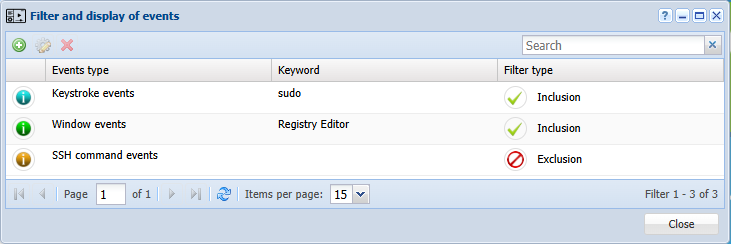
Filter composition
A filter is made up of three elements:
- The events type. Twelve families are offered: URL, raised alert, program, keystroke, clipboard, window, file, SSH command, SSH display, custom event, SFTP transfer, helpdesk event.
- The filter type: Inclusion or Exclusion.
- The keyword: a substring looked for in the event content. Left empty, it targets the whole family.
Event covered by no filter
An event covered by no filter is not hidden: it is displayed with the default icon. Declaring a filter therefore never serves to make an event appear, only to distinguish it or to set it aside.
Display and export
The rule applied differs between display and export, and nothing on screen indicates it.
In the Control center feed, a filter sets events aside only if it is an Exclusion and has no keyword. An Exclusion carrying a keyword sets nothing aside: it behaves like an inclusion, and marks with its icon the events containing that word.
In a session export, events matching an Exclusion keyword are removed, then those matching an Inclusion keyword are put back.
Inclusion without exclusion
An inclusion alone changes nothing to the export. As long as no Exclusion filter exists for a family, the export already contains all of its events: the Inclusion filters of that family are then not applied. Inclusion only makes sense as an exception to an exclusion.
Hiding a whole family
An Exclusion filter on that type, with an empty keyword, is the only form that removes the family from the feed entirely. This form is used to stop displaying keystrokes or the clipboard when nobody analyses them.
Icon order
The ten icons offered are ordered, and that order acts as a level: the Control center walks the filters from the highest level down and groups events by icon. Choosing an icon is therefore choosing a rank, not a colour.
Keystroke obfuscation
When the matching option is active in the general options, keystrokes are scrambled in the database, and filter keywords are scrambled the same way before comparison. A filter written in clear text therefore keeps finding what it looks for.
Limits
- A filter bears on a family, not on an application, a user or a site.
- Several filters may target the same family; the console then warns that a single event matching several of them may be displayed several times.
- The keyword is a plain substring, with no regular expression and no configurable case sensitivity.
- The system event family exists in the data but is not offered here: it can be neither marked nor hidden.
- The setting is global to the tenant: there is no per-administrator filtered view.
The field-by-field detail and the complete list of families are in module reference.