Configuring log outsourcing to the Sekoia solution
Warning!
The procedure for setting up log outsourcing to Sekoia.io differs depending on whether you are in a CyberElements context.
Specific instructions for the product used will be provided.
Enable log redirection
Access the web interface of your CyberElements tenant with the /console URI.
Examples
For a tenant named my-tenant, the platform is reached at https://my-tenant.cyberelements.io.
The administration console login form can also be reached directly at https://my-tenant.cyberelements.io/console.
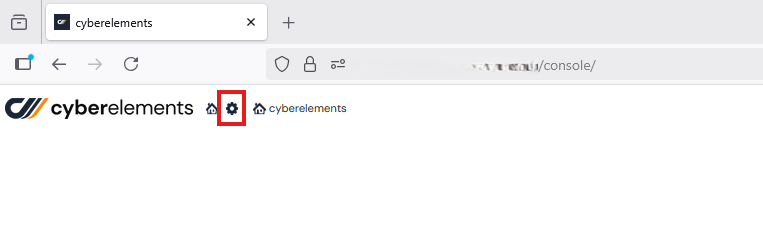
Access the Configuration work plan by clicking on the icon below:
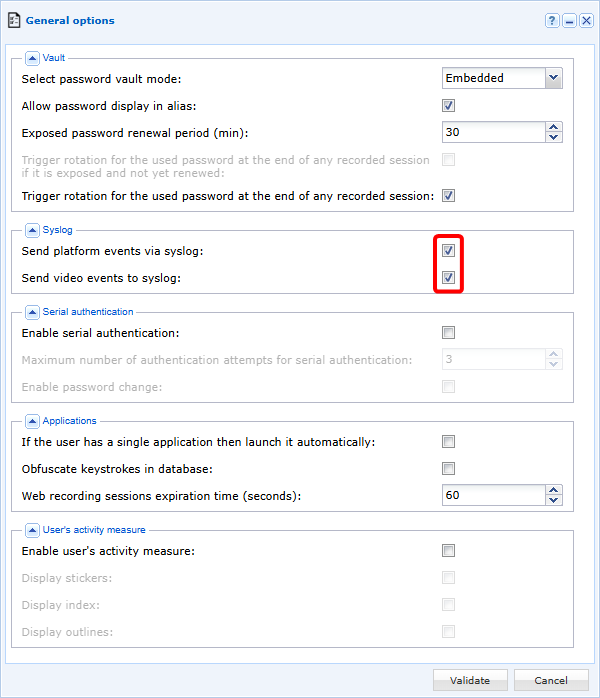
Then click on the General Options tile:

Check the boxes Send platform events via syslog and Send video events to syslog:
Configure log redirection
Warning!
In order to set up the appropriate system configuration for the Sekoia log concentrator, you must contact CyberElements.
Configure Sekoia to interpret logs
It is possible to customize log processing on the Sekoia side as indicated in the following documentation: Sekoia Docs