Client computer
When using the CyberElements agent, logs are accessible on the user's workstation:
CyberElements client log:
- Location:
%USERPROFILE%\IPdiva\<ORG_NAME>\Logs - Information about the client's connection to the Mediation Controller server and the launch of resources.
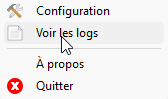
You can access the client logs directly by right-clicking on the client icon in the system tray and selecting “View logs” from the menu:
VPN client log CyberElements:
- Location:
C:\\Windows\\Temp\\IPdiva\\AdminDaemon\\VPN - Information about the client's connection to the Mediation Controller server and the launch of the VPN resource.