ACM
ACM (Application Credential Manager) allows an application installed on a remote machine to obtain the password it needs to work, without a person logging in to provide it, a case the user portal does not cover. Instead of being written into a configuration file, the password is requested by the application from a local agent, which queries the platform; the platform checks that an ACM contract allows it, then returns the secret from the vault.
The work panel gathers the five objects of that mechanism: the agents deployed on machines, the system accounts on whose behalf a request is issued, the authorised executables, the contracts that tie it all together, and the log of processed requests.
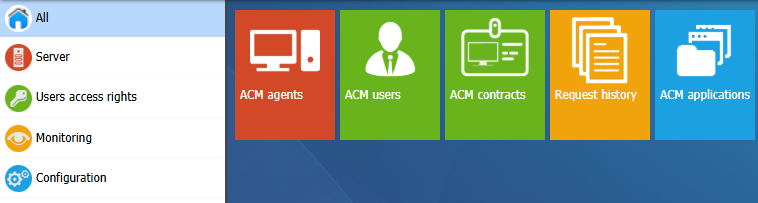
Operating principle
ACM is the only part of the product where the platform answers a machine rather than a person. The chain has four actors:
- the application on the remote machine asks the local agent for a credential;
- the ACM agent relays the request to the ACM service published by an Edge Gateway;
- the platform looks for a contract covering the invoked account, the issuing agent, the requested alias and the calling executable all at once, then checks its period restrictions;
- if everything matches, the secret is read from the vault and returned.
Agent authentication
The agent identifies itself with a certificate, not a password. A request only succeeds if the connection presents a client certificate issued by the platform authority, whose name carries the agent and the tenant. That certificate is produced by the configuration archive downloaded from ACM agents; the agent's identity is therefore never something the remote machine can choose for itself.
Cumulative dimensions
A contract must name the user, the agent and the alias of the request, and cover the executable. A request matching three elements out of four is refused with the No contract status, and nothing on screen indicates which one was missing: the request history gives the full context, to be compared with the contracts manually.
Implementation order
Objects must exist before being named: the contract creates nothing, apart from what an import brings to it.
- Check the availability of ACM (see below): without it the work panel does not appear.
- Declare in the vault the aliases the remote applications will use.
- Declare the ACM agents, then deploy the service on the machines, or fetch their configuration archive for a manual installation.
- Declare the ACM users: the operating system accounts on whose behalf requests will be issued.
- Declare the ACM applications, to confine the mechanism to a closed list of executables. This step is optional: a contract may accept every executable.
- Create the ACM contract, which ties agents, users, aliases, applications and sites together, with its optional restrictions.
- Check the outcome in the request history.
Role of the site
A contract names one or more sites, and it is from their Edge Gateways that the agent obtains the address of the ACM service. An agent that appears in no contract therefore has no gateway to reach: it cannot work, however correctly it was installed.
Dependencies
The contract is the only object that references the others, which explains every deletion refusal in the work panel:
- an agent, a user or an application named by a contract cannot be deleted while it appears in it;
- deleting a contract, conversely, touches nothing: the objects it named remain and become deletable again if no other contract references them;
- aliases and sites belong to other modules, where they are managed.
Limits
- The mechanism only serves Windows machines: the agent is a Windows service, deployed and removed remotely from the console.
- The returned secret is read from the embedded vault. An alias whose secret is held elsewhere cannot be served: the request ends in a vault error.
- A contract restricts neither the frequency of requests nor their number: its restrictions bear on the period: dates, times, months, days of the week.
- The request history is a log, not supervision: it reports after the fact, it does not alert.
Availability
The ACM work panel and its five modules only appear when two conditions are met:
- the platform licence covers ACM;
- the tenant carries the Allow ACM usage option, set by CyberElements.
If either is missing, the screen is hidden and ACM operations are refused.
The detail of each screen's fields is in the reference: ACM agents · ACM users · ACM applications · ACM contracts · Request history.