Active connections
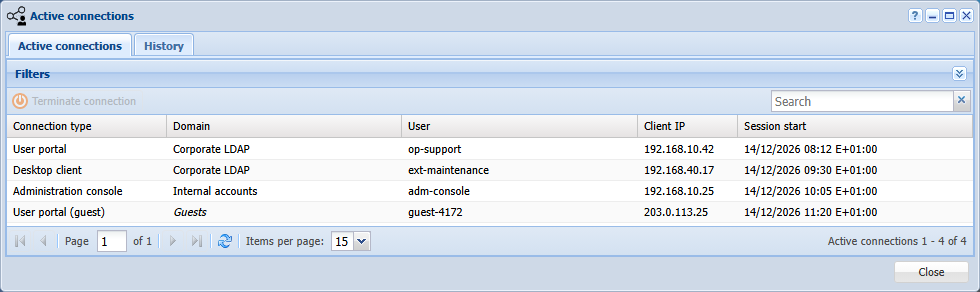
Active connections lists the connections open on the platform, whatever their entry point, and allows them to be terminated. It is the counterpart of the Control center: that screen shows user activity on applications, this one shows which users are connected.
Entry points
Every connection carries a connection type, which indicates the user's entry point. The seven types do not all have the same effects:
- the user portal;
- the user portal (guest), for a third party invited to a shared session;
- the Desktop client;
- the administration console;
- the REST API;
- direct recordings, that is direct accesses to a machine, which open no portal session but are tracked here so that they can be interrupted;
- Unknown, when the entry point was not qualified.
Licence consumption
Only connections from the user portal, the user portal (guest) and the Desktop client count towards the maximum number of concurrent sessions. Administration console sessions and REST API sessions consume nothing. That is what the Counting towards the maximum number of sessions filter expresses, and it is the key to reading the chart of the History tab: a platform may show many connections and few licences consumed.
Terminating a connection
Terminating a connection disconnects the user from the entry point concerned. The action is traced in the logs. The button stays inactive as soon as the selection contains a connection that cannot be closed, which covers four cases:
- the administrator's own console session: the refusal is applied both by the screen and by the server;
- a guest connection of the user portal;
- for a delegated administrator only, an administration console connection;
- for a delegated administrator only, a REST API connection.
Terminating a direct recording
A direct recordings row does not correspond to a portal session: closing it amounts to asking the Edge Gateway to stop the recording session running on the machine. The effect is that of an End session in the Control center, not that of a portal disconnection.
History tab
The second tab does not replay connections one by one: it carries, day by day, the maximum number of concurrent connections observed during that day, over two series: counted connections and direct recordings. A table gives their average and maximum over the period.
This screen therefore makes it possible to check whether the number of licences is sufficient, whereas Licenses usage shows who consumed them.
Missing days are computed when they are requested: an interval never consulted is filled in on first opening, hence a slight delay.
Availability
The module is always present in the administration console, without condition: one of the few that depend neither on a platform option nor on a subscription state.
Limits
- A closed connection disappears from the list: the screen keeps no per-user history, only daily counters.
- There is no bulk action beyond the current selection, and the selection is refused as a whole as soon as it contains a protected connection.
- The History tab distinguishes neither domains nor entry points: it only knows its two series.
The detail of the screen (columns, filters and chart) is described in the module reference.