Alert definitions
An alert definition consists of a label, one or more triggers and zero, one or several actions. Triggers specify what has to be detected in a session; actions, what has to be done when it is. The general notion and the path a raise follows are described in Alerts.
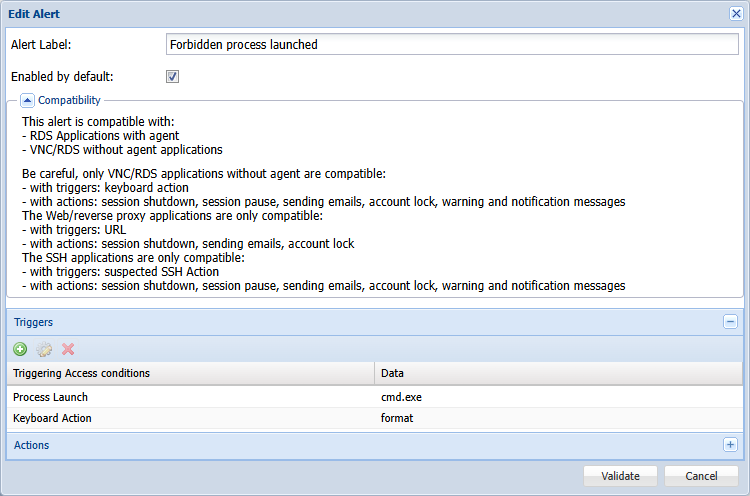
Triggers
Nine triggers exist, and they do not observe the same thing:
- Idle Time: the only condition about the absence of activity; it is also the only one that asks for a unit, minutes or hours;
- Process Launch and Kill process: an executable name; the closing one only reports the name, never a full path;
- Window Opening: a window title;
- File Copy: a file path;
- Keyboard Action: a keystroke to detect;
- Recording Blocked: the only condition with no parameter (it is raised by the fact that the recording could not take place);
- URL access (web applications): a URL or a pattern, such as
/jobs/*or*.exe; - Suspected SSH Action: a suspicious command in an SSH session.
Except for URL access and Suspected SSH Action, these conditions are about what happens on the target machine, not about the stream. This distinction explains the compatibility described below.
Compatibility by application type
The trigger type determines the applications on which the alert can be used. The form shows it in a Compatibility box that fills up as triggers are added. The triggers that watch the target machine are reported by the recording agent: without it, only keystrokes are known.
| Trigger | RDS with agent | RDS and VNC without agent | SSH | Web and Reverse proxy |
|---|---|---|---|---|
| Idle Time | ||||
| Process Launch | ||||
| Kill process (end of process) | ||||
| Window Opening | ||||
| File Copy | ||||
| Recording Blocked | ||||
| Keyboard Action | ||||
| URL access (web applications) | ||||
| Suspected SSH Action |
In SSH, Keyboard Action is never evaluated: the SSH recording service only passes the terminal line confirmed with Enter to the alert engine, not the individual keystrokes. Suspected SSH Action plays that role: it looks for its text in that line, ignoring case.
Alert mixing several families
Nothing prevents putting a Keyboard Action and a URL access in the same alert: the box then announces both families, and the alert is indeed attached to both. But on a web session, only the URL trigger is evaluated: the others never are. An alert is therefore built per application family, rather than by accumulating conditions some of which will not apply.
Raising an alert
The triggers of an alert combine with OR: the alert is raised as soon as one of its triggers is met, without waiting for the others. Each trigger is evaluated independently of the others.
The console offers no AND relation between triggers: an alert cannot require several conditions to be met.
Actions and exclusions
Six actions are offered:
- Session Shutdown and Session Pause act on the running session;
- Notification Message and Warning Message carry a text to be typed;
- Kill process asks for the name of the executable to kill;
- Lock account closes all the user's connections to the portal and locks their account in its domain: the user then appears in Blocked users.
Not every action runs on every application: the Compatibility box of the form lists them per family.
| Action | RDS with agent | RDS and VNC without agent | SSH | Web and Reverse proxy |
|---|---|---|---|---|
| Session Shutdown | ||||
| Session Pause | ||||
| Notification Message | ||||
| Warning Message | ||||
| Kill process | ||||
| Lock account |
Two exclusions are enforced when the action is saved, with a message:
- a single action acting on the session (Shutdown or Pause), never both;
- a single message (notification or warning), never both.
No email-sending action
Sending an electronic message is not an alert action: it belongs to a notification profile. The three columns of the list read accordingly: Trace is ticked as soon as an action exists, since all of them record the raise; Notify only concerns the two message actions; Act covers the four others.
Required fields
- The label is mandatory and unique: two alerts cannot bear the same name.
- At least one trigger is mandatory.
- No action is mandatory to save the alert. But apart from URL access, a trigger is only evaluated for an associated action: an alert with no action is then neither raised nor traced.
Rewrite on save
Saving an alert rewrites all its triggers and all its actions: editing does not update the existing rows, it deletes them and recreates them from the content of the form. Concurrent editing by two administrators therefore does not merge: the last save prevails, with no conflict reported.
Limits
- A referenced alert cannot be deleted: the console refuses the deletion as long as it is named by an access policy or by a notification profile; the refusal message names the alerts concerned, without indicating what cites them.
- The triggers of a single alert always combine with OR (see Raising an alert): no AND relation is possible.
- Since the label of an alert is reused in notification emails and in the history, renaming it changes what the next recipients will read, never what has already been written.
The detail of the fields, the forms and the refusal messages is described in the module reference.