HTML5 (VNC)
Application fact sheet
| Video recording | CyberElements client | Desktop client |
|---|---|---|
The HTML5 (VNC) type renders a VNC session in the browser. It serves machines that only expose that protocol (Linux workstations, appliance consoles, virtual machines seen through their hypervisor) without installing anything on the user's workstation.
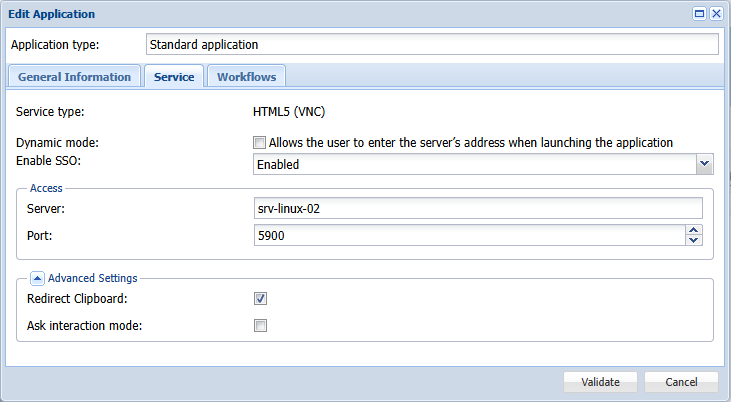
Comparison with VNC
| Criterion | HTML5 (VNC) | VNC |
|---|---|---|
| On the workstation | nothing | CyberElements client |
| In the site | HTML5 Gateway online | Edge Gateway only |
| Transport tuning | absent | encoding, compression, JPEG quality |
| Smartphone and tablet | available | absent |
HTML5 (VNC) suits occasional access. The VNC type becomes preferable when the link is narrow or distant, because it allows tuning of what travels over the network.
Prerequisites
- The HTML5 feature enabled on the tenant, failing which the type is not offered at creation time.
- An HTML5 Gateway online in the target site.
- The VNC server reachable from an Edge Gateway of that site.
Limits
- No video recording: traceability belongs to the privileged variant.
- No assistance session sharing: assistance profiles only keep privileged HTML5 applications.
- No embedded gateway: that setting is reserved for the privileged variant.
- No encoding or compression setting: what the HTML5 Gateway produces is not tuned here.
Passed credentials and SAML domains
Passing the user's credentials assumes the platform knows their password, which is not the case on a SAML domain, where it is entered at the identity provider. For those users, plan an SSO that takes the credentials elsewhere: entry at launch time, or an alias from the vault.
The details of the fields are in the module reference.
The API endpoints that drive this object are described in the API reference.